

For many small businesses, a starting Google Ads budget at a moderate daily level provides enough data to learn what works without burning through cash on guesswork. That range isn’t arbitrary — it reflects the spend needed to collect meaningful conversion data across a few weeks. Here are three actions to take before you touch anything else:
- Set a daily budget in your campaign settings based on your monthly comfort level divided by 30.4.
- Turn on conversion tracking so Google can optimize toward real results, not just clicks.
- Run the Google Ads cost estimator to get industry-specific CPC benchmarks for your location and vertical before committing to a number.
Table of Contents
- How does a Google Ads budget actually work?
- Bids vs. budgets: what controls what?
- How to pick a starting budget for your specific situation
- What to expect with budget pacing and overdelivery
- How to monitor your budget and know when to act
- Common budgeting mistakes that waste money fast
- Key Takeaways
- The case for a managed approach when budgets are tight
- Ready to stop guessing at your ad spend?
- Useful sources and official Google Ads resources
How does a Google Ads budget actually work?
Google Ads runs on an average daily budget, not a hard daily cap. You tell Google what you’re comfortable spending per day on average, and it uses that number to calculate two spending limits that protect your account.
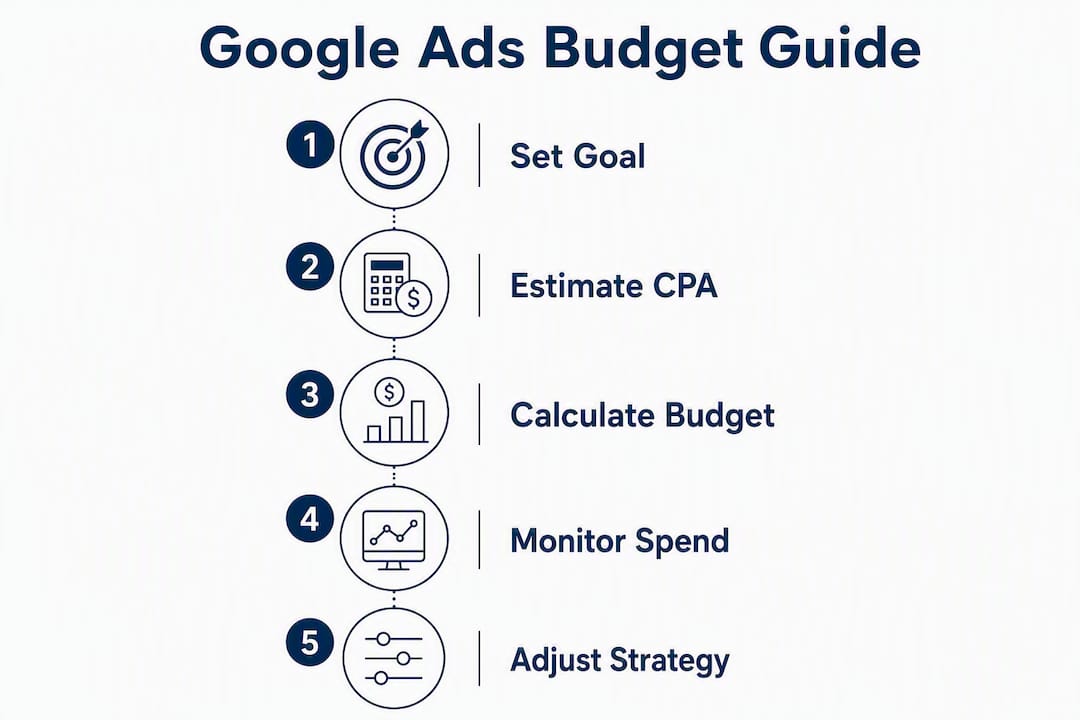
The daily spending limit is up to twice your average daily budget on a high-traffic day. So a $20/day budget can spend up to $40 on a busy Monday. The monthly spending limit is your average daily budget multiplied by 30.4, which is the average number of days in a month. Google will never charge you more than that monthly cap, even if daily overdelivery occurs.
| Budget type | Calculation | Example ($10/day) |
|---|---|---|
| Average daily budget | Set by you | $10 |
| Daily spending limit | Daily budget × 2 | twice your daily budget |
| Monthly spending limit | Daily budget × average days per month | your daily budget times the average number of days in a month |
One more distinction worth knowing: served cost is the total cost of all clicks and impressions your campaign received. Billed cost is what actually hits your account. Served cost can exceed spending limits in rare cases, but Google covers the difference. The only number that affects your bank account is billed cost. You can compare both figures in the Billed cost report inside Google Ads reporting templates.
If you adjust your daily budget mid-month, Google recalculates pacing using the calendar days remaining. That matters when you’re planning a promotional push — a mid-month budget increase spreads across fewer days, so the per-day impact is higher than you might expect.
Bids vs. budgets: what controls what?
These two settings get confused constantly, and mixing them up leads to wasted spend.
Your budget is a pacing lever. It controls the total scale of your campaign — how much Google can spend on your behalf in a given period. It does not tell Google which searches to enter or how aggressively to bid.
Your bid is what directs auction behavior. It tells Google how much you’re willing to pay per click (manual CPC) or instructs Google’s AI to optimize toward a goal (automated bidding).
- Manual CPC bidding gives you direct control over max cost-per-click. Useful when you know which keywords convert and want to allocate spend precisely. The tradeoff is that it requires active management.
- Maximize Clicks is the simplest automated strategy. Set a daily budget, and Google’s AI manages bids to get the most clicks within that budget. Good for early-stage campaigns where you’re still learning which terms convert.
- Maximize Conversions / Target CPA tells Google to optimize for actual conversions at a target cost per action. This is where most small businesses should land once conversion tracking is running and they have some data.
A low bid on a competitive keyword means your ads rarely show, no matter how generous your budget is. A generous budget with no conversion tracking means Google optimizes for clicks, not customers. Both settings need to work together.
How to pick a starting budget for your specific situation
The most reliable method: start with your goal, work backward from your target cost per acquisition (CPA) or average order value (AOV), and budget for enough conversions to generate a meaningful test sample. Thirty conversions over a campaign’s learning phase is a common benchmark for getting statistically useful data.

Here’s how that math plays out across three common small-business scenarios:
Local lead generation (plumber, HVAC, landscaper)
Average CPC in competitive local service categories often runs $5–$15. If your target CPA is $40 and your landing page converts at 10%, you need roughly 10 clicks per lead. At $10 CPC, that’s $100 per lead. To generate 10 leads for a meaningful test: $1,000/month, or about $33/day. That’s a reasonable starting point for most local service businesses.
Low-cost e-commerce (gifts, apparel, accessories)
Lower AOV means tighter margins. If your AOV is $45 and you need a 3:1 return on ad spend, your target CPA is $15. At a 2% conversion rate, you need 50 clicks per sale. At $0.80–$2.00 CPC, a $500–$800/month budget gets you enough volume to test product-level performance.
High-ticket services (consulting, legal, financial)
Higher CPA is expected and acceptable. A $500 CPA on a $5,000 service is a strong return. At a 5% conversion rate and $20 CPC, you need 20 clicks per conversion. Budget $400–$600/month to generate a handful of qualified leads and judge campaign viability.
The Google Ads cost estimator and Performance Planner can refine these estimates with real CPC data for your industry and location. Performance Planner is particularly useful once you have campaign history — it models different budget allocations and shows expected conversions and cost across scenarios, which beats rule-of-thumb math for businesses with measurable conversion values.
Pro Tip: Budget for at least four to six weeks before making final judgments on a campaign. Google’s learning phase needs conversion data to optimize bidding, and cutting a campaign short after one week is one of the most common reasons small businesses conclude Google Ads “doesn’t work.” Any significant budget change resets the learning phase, so avoid frequent adjustments in the first month.
What to expect with budget pacing and overdelivery
Google doesn’t spend your budget in a perfectly flat line. On days when search volume is high — say, a Tuesday in a competitive service category — your campaign may spend up to twice your daily budget. On slower days, it may spend less. The monthly cap keeps the total in check.

This is called overdelivery, and it’s actually a feature, not a bug. Experienced account managers look at billed cost, not served cost, and treat small overdelivery as a de facto discount: Google delivered more traffic than your daily budget technically allowed, but you’re only billed up to your monthly limit.
A few practical things to watch for:
- If your campaign consistently hits its daily budget before the day ends, you’re leaving impressions on the table.
- If billed cost is consistently well below your monthly limit, your bids may be too low to compete or your targeting is too narrow.
- Check the Billed cost report to compare served vs. billed cost at the campaign level. A large gap between the two is worth investigating.
When you change your daily budget mid-month, Google recalculates pacing across the remaining calendar days. A mid-month budget increase means the remaining days are paced at the new daily budget, which can increase per-day spend more than you might initially expect.
How to monitor your budget and know when to act
Monitoring a Google Ads budget isn’t about checking it daily and panicking over fluctuations. It’s about watching a short list of signals and knowing what each one means.
- Check the “limited by budget” flag. This appears in your Campaigns view when your daily budget runs out before the day ends. It’s a direct signal that you’re missing potential conversions. The Budget Report projects end-of-month spend and shows how past budget changes affected performance, making it the right starting point for any budget review.
- Review impression share lost to budget. Find this in the Campaigns columns. If you’re losing more than 20% of eligible impressions to budget constraints on a campaign with strong conversion rates, that’s a case for increasing spend, not optimizing further.
- Track CPA trends weekly. A rising CPA with a flat budget usually means increased competition or a landing page issue, not a budget problem. A falling CPA with a constrained budget is the clearest signal to raise spend.
- Compare served vs. billed cost monthly. Large discrepancies can indicate unusual traffic spikes or targeting issues worth reviewing.
- Run Performance Planner experiments before raising budgets. It models the expected impact of a budget increase before you commit, which removes the guesswork from scaling decisions.
When CPA is strong and impression share lost to budget is high, raise the budget. When CPA is weak and you’re spending your full budget, fix the campaign before adding money. More spend on a broken campaign just loses money faster.
Common budgeting mistakes that waste money fast
Small businesses make the same Google Ads budget mistakes repeatedly. Most are fixable in under 10 minutes.
- Underfunding the learning phase. Setting a $5/day budget on a $15 CPC keyword means the campaign can’t generate enough clicks to learn. Fix: budget at least 10–20 clicks per day to give the algorithm something to work with.
- Skipping conversion tracking. Without it, Google optimizes for clicks, not customers. Fix: set up Google Ads conversion tracking before the campaign goes live, not after.
- Setting bids so low ads never compete. A $0.50 max CPC in a $10 CPC market means your ads rarely show. Fix: use the Google Ads Keyword Planner to check realistic CPC ranges before setting bids.
- Ignoring dayparting and geotargeting. Running ads 24/7 nationally when your customers are local and only call during business hours burns budget on irrelevant traffic. Fix: add location targeting and an ad schedule that matches your actual business hours.
- Making frequent budget changes. Every significant change can trigger a new learning phase, resetting the optimization progress Google has built. Fix: make one change at a time and give it at least a week before evaluating results.
- Using shared budgets incorrectly. Shared budgets work well when multiple campaigns share a single goal. Using them across campaigns with different objectives lets one campaign drain the budget before others get a chance to spend.
The Google Ads “money pit” trap almost always traces back to one of these mistakes, not to Google Ads itself being ineffective.
Key Takeaways
Setting the right Google Ads budget requires knowing your target CPA, using Google’s cost estimator for realistic benchmarks, and giving campaigns at least four to six weeks to exit the learning phase before judging results.
| Point | Details |
|---|---|
| Starting daily budget | Divide your monthly comfort level by the average number of days in a month; many small businesses start at a moderate daily budget level. |
| Monthly spending limit | Google caps monthly charges at your daily budget multiplied by the average number of days in a typical month, so your total spend will not exceed that limit. |
| Bids and budgets work together | Budget controls scale; bids direct auction behavior. Both must be set correctly for results. |
| Watch the “limited by budget” flag | This signal means you’re missing conversions — check the Budget Report and consider raising spend if CPA is strong. |
| Tradewindsunitedmedia | Offers managed Google Ads campaigns with conversion tracking setup, Performance Planner usage, and clear performance reporting for small businesses. |
The case for a managed approach when budgets are tight
The DIY path works fine if you have the time to learn the platform, monitor signals weekly, and make disciplined adjustments. Google’s own tools — the cost estimator, Performance Planner, and Budget Report — are genuinely useful, and this guide gives you the framework to use them.
Where it breaks down is when a small business owner is also running the business. Missed “limited by budget” flags, skipped conversion tracking, and bids that haven’t been touched in three months are the norm, not the exception. That’s not a criticism — it’s a time problem. A managed approach pays for itself when the alternative is a campaign quietly burning $600/month on untracked clicks with no conversion data to show for it.
Tradewindsunitedmedia handles the full setup: conversion tracking, bid strategy selection, Performance Planner modeling, and monthly reporting that shows exactly what the spend produced. For small businesses weighing whether Google Ads fits their marketing mix, that kind of transparency makes the decision much clearer.
Ready to stop guessing at your ad spend?
Tradewindsunitedmedia gives small business owners a concrete alternative to managing Google Ads alone: a fully managed campaign where budget decisions are backed by real conversion data, not gut feel. The difference between a campaign that breaks even and one that generates consistent leads is usually in the setup details — conversion tracking, bid strategy, and knowing when to raise or reallocate spend.

Services include Google Ads campaign setup and management, conversion tracking configuration, Performance Planner budget modeling, and monthly performance reports that show exactly how your ad spend converts into leads or sales. If your current campaign is flagged “limited by budget” but you’re not sure whether to raise spend or fix the campaign first, that’s exactly the kind of question a Google Ads audit answers. Reach out to Tradewindsunitedmedia for a free budget review and find out what your current spend should actually be producing.
Useful sources and official Google Ads resources
- Budgets overview — Google Ads Help: official rules for average daily budgets, monthly spending limits, and how mid-month changes affect pacing.
- About spending limits — Google Ads Help: explains the daily spending limit (2x multiplier) and monthly cap.
- About overdelivery and your average daily budget — Google Ads Help: defines served cost vs. billed cost and how overdelivery credits work.
- About average daily budgets — Google Ads Help: covers Performance Planner and how to set budgets based on advertising goals.
- Choose your bid and budget — Google Ads Help: explains bidding options, max CPC, and how bids interact with budgets.
- Google Ads cost estimator — Google Ads: run industry and location-specific CPC benchmarks before setting your first budget.
- Using Google Ads for online marketing — Tradewindsunitedmedia: Tradewindsunitedmedia’s overview of Google Ads strategy, conversion tracking, and campaign management for small businesses.




