A website maintenance plan is a recurring schedule of security checks, backups, software updates, performance tuning, and content upkeep that keeps a site from breaking, getting hacked, or quietly losing rankings. If you have not audited your site in the last 90 days, that is your first move: check uptime history, confirm your last successful backup, test your contact forms, and see what plugins or themes are overdue for an update. Once you know where things stand, pick a tier that matches your risk and traffic.
- Essential (a monthly price typical for basic plans): backups, updates, basic security scans
- Professional (a monthly price typical for mid-level plans): adds performance tuning, monthly reporting, faster response times
- Premium (roughly $750–$2,000+/month): full-service management, content and SEO support, priority incident response
Vendors and agencies often anchor cadence recommendations to Elementor’s maintenance guidance and accessibility work to W3C’s WCAG standards. Tradewindsunitedmedia builds and manages plans across all three tiers for small business clients who want this handled without hiring in-house.
Key Takeaways
A website maintenance plan works because it replaces expensive emergency repairs with cheap, scheduled prevention across security, backups, updates, and performance.
| Point | Details |
|---|---|
| Start with an audit | Check uptime, last backup, and form functionality before choosing a tier. |
| Match tier to risk | Essential ($100–$249/mo) suits low-risk sites; Professional ($250–$749/mo) fits revenue-dependent sites. |
| Follow the cadence | Daily monitoring, weekly updates and scans, monthly audits, quarterly performance reviews. |
| Test your backups | A backup that has never been restored in a drill is not a working safety net. |
| Get it in writing | Insist on SLA response times, reporting cadence, and itemized scope before signing. |
Table of Contents
- What Does a Website Maintenance Plan Actually Cover?
- Why Does Regular Maintenance Matter for Small Businesses?
- What Tasks Belong on a Website Maintenance Checklist?
- How Much Does a Website Maintenance Plan Cost?
- Should You Handle Maintenance In-House or Hire a Professional?
- What Do Sample Website Maintenance Plans Look Like?
- What Do Security Standards Say About Maintenance Priorities?
- What Should Small Businesses Do First?
- Where to Read More on Website Security and Maintenance Standards
- Frequently Asked Questions
- Sources
What Does a Website Maintenance Plan Actually Cover?
A website maintenance plan is the ongoing work that keeps a live site functional, secure, and fast after launch. Who owns it varies. Some businesses handle it in-house with a marketing coordinator or IT generalist; others hand it to a vendor under a signed support contract.
The standard scope includes:
- Security and monitoring: malware scans, firewall rules, uptime alerts
- Backups and restore testing: not just taking backups, but confirming they actually restore
- CMS, theme, and plugin updates: patching known vulnerabilities per OWASP’s Top Ten
- Performance tuning: image compression, caching, page speed fixes
- Content updates and SEO housekeeping: fixing broken links, refreshing outdated copy
- Analytics and tracking: verifying tags fire correctly
- Accessibility and compliance: periodic WCAG review
- Hosting, SSL, and license renewals
- Emergency response when something breaks
What maintenance does not cover: major redesigns, new feature builds, or a full rebrand. Those are projects, priced and scoped separately from the recurring plan.
Why Does Regular Maintenance Matter for Small Businesses?
Skipping maintenance does not save money. It defers a cost and usually inflates it. A hacked site, a broken checkout, or a security warning in Google Chrome can cost more in one bad week than a year of Essential-tier upkeep.
The business case breaks down cleanly:
- Fewer outages mean fewer lost sales during peak hours
- Emergency fixes cost more per hour than scheduled maintenance
- Search rankings hold steady when sites stay fast and error-free
- Conversion rates improve when forms and checkout flows actually work
- Legal and compliance exposure drops with regular accessibility review
Elementor’s research points to proactive management catching small issues, like a plugin conflict or a stray broken link, before they snowball into an outage. Mobile traffic now makes up roughly half of all site visits, according to Statista, so a maintenance plan that ignores mobile testing and accessibility checks ignores half your audience and invites legal risk under WCAG standards.
What Tasks Belong on a Website Maintenance Checklist?
Cadence is where most maintenance plans fall apart. Businesses either do everything reactively (bad) or try to do everything daily (unnecessary and expensive). The right frequency depends on the task and how much damage a delay could cause.
| Frequency | Tasks | Time Commitment |
|---|---|---|
| Daily | Uptime monitoring, security alert review, backup verification | 5–15 minutes (mostly automated) |
| Weekly | Plugin/theme/CMS updates, security scans, contact form and checkout tests | 30–90 minutes |
| Monthly | Broken-link checks, content audits, plugin license review | 1–2 hours |
| Quarterly | Performance audit, SEO review, staging environment test updates | 2–4 hours |
| Yearly | Hosting contract review, SSL renewal check, full strategy review | 3–6 hours |
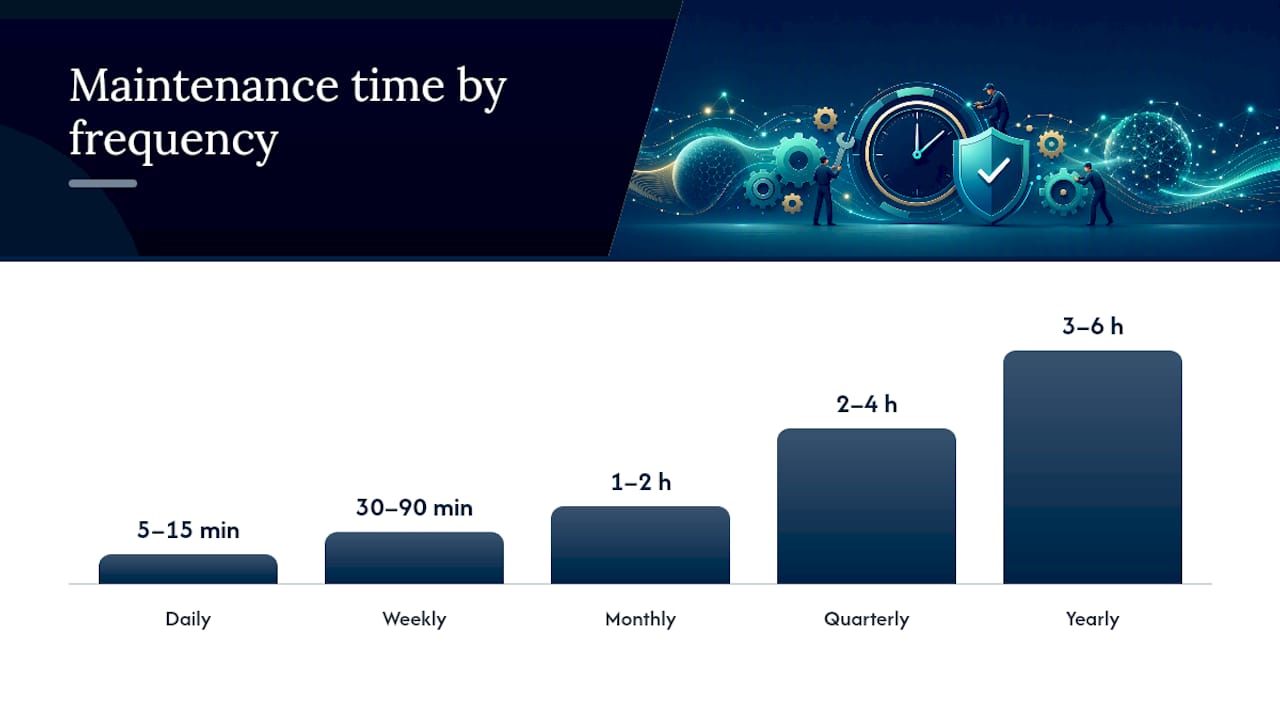
HubSpot’s maintenance guidance recommends checking uptime as often as every 5 minutes for sites where downtime directly costs revenue, like ecommerce stores or lead-gen sites running paid traffic. A 2026 maintenance checklist from Codevibe backs the same structure: weekly backups and scans, monthly updates, quarterly performance and SEO audits, yearly strategy resets.
Here is why the cadence matters at each level. Daily checks catch a site going down before customers notice and complain on social media. Weekly updates close security holes fast, since OWASP’s Top Ten shows most breaches exploit known, unpatched vulnerabilities, not novel attacks. Monthly content audits stop your site from quietly accumulating dead links that tank user trust and search rankings. Quarterly performance reviews catch the slow creep of bloat, like uncompressed images or outdated plugins, that gradually kills page speed. Yearly reviews force a step back to ask whether your hosting plan, SSL setup, and overall strategy still fit a business that has probably grown since last year.
Automate what you can. Uptime monitors, automated backup tools, and vulnerability scanners exist precisely so daily and weekly tasks do not eat a full workday. Staging environments let you test updates before pushing them live, which avoids the classic disaster of a plugin update breaking your checkout page on a Friday afternoon.
Pro Tip: Do not just take backups. Schedule a quarterly restore drill where you actually recover the site from backup to a test environment. A backup nobody has tested is a false sense of security, not a safety net.
How Much Does a Website Maintenance Plan Cost?
Pricing follows three common structures, each with real tradeoffs.
- Fixed monthly tiers: predictable billing, easiest to budget, but you may pay for capacity you don’t use in a quiet month
- Retainer hours: you buy a block of hours (say, 10 per month) and anything unused often rolls over or expires, depending on the contract
- Pay-as-you-go: no monthly commitment, but response times are usually slower and emergency work costs a premium
Market pricing generally lines up with the tiers mentioned earlier. Basic plans often start around $100 to $249 a month and cover backups, updates, and light security work. Mid-level plans land between $250 and $749, adding performance monitoring and monthly reporting. Full-service premium plans run $750 to $2,000 or more, with faster SLA response times and dedicated support hours.
Watch for costs that show up outside the base fee:
- Emergency patching after hours, often billed at a rush rate
- Third-party plugin or theme licenses that renew separately
- Hosting migrations if your current host can’t support new requirements
- Extra development time for anything beyond the agreed scope
Before signing anything, insist on written SLA response times, a set reporting cadence, and an itemized scope. A vague one-line description of “monthly maintenance” in a contract is how scope creep and surprise invoices happen.
Should You Handle Maintenance In-House or Hire a Professional?
Run through this checklist before deciding:
- How complex is the site? A five-page brochure site needs less than an ecommerce store with a live checkout.
- How much revenue depends on uptime? If downtime costs sales every hour, professional monitoring pays for itself fast.
- Does anyone in-house actually have the skills? “Someone who knows WordPress” is not the same as someone who can diagnose a security breach.
- Do you have compliance obligations that require documented accessibility or security reviews?
- How much downtime can you tolerate before it damages the business?
If you outsource, interview vendors with direct questions:
- What are your SLA response times for critical issues versus minor ones?
- How long do you retain backups, and when did you last run a restore test?
- Can you share your incident response history, without naming other clients?
- How often do you report, and what’s actually in that report?
- What security tools do you run, and how often are scans scheduled?
Red flags to walk away from: no written SLA, no evidence of backup testing, vague pricing, no references, or a “we’ll just push updates live” attitude with no staging process. CISA’s guidance on handling web vulnerabilities is a reasonable baseline to hold any vendor to.
Pro Tip: A hybrid model works well for many small businesses: keep basic content updates in-house, but retain a vendor for security monitoring, backups, and quarterly audits. You get control over the small stuff without carrying the security burden alone.

What Do Sample Website Maintenance Plans Look Like?
Here’s how the three tiers typically break down in practice:
- Essential: weekly backups, weekly security scans, monthly updates, basic uptime monitoring, quarterly reporting, roughly 2 to 4 hours of support monthly
- Professional: daily backups, uptime monitoring every 5 minutes, weekly updates, monthly performance and broken-link checks, monthly reporting, 6 to 10 support hours
- Premium: daily backups with off-site storage, continuous monitoring, weekly security scans, quarterly full audits, dedicated account contact, 15+ support hours, priority incident response
A sample SLA clause might read:
Critical issues (site down, checkout broken, security breach) receive a response within 2 hours during business hours. Non-critical requests receive a response within 1 business day. Backups are retained for 30 days on a rolling basis, verified monthly through a restore test, and reported to the client quarterly.
Add-ons like A/B testing, deeper SEO consulting through a dedicated SEO service, or ongoing content production shift the hours and price up. These are worth negotiating separately rather than bundling blindly into a base tier.
What Do Security Standards Say About Maintenance Priorities?
Cross-referencing security and maintenance guidance points to a clear priority order. Backups with tested restores come first, since a backup you can’t recover from is worthless in a crisis. Weekly updates come second, closing the known vulnerabilities that OWASP tracks as the most commonly exploited. Uptime monitoring every 5 minutes matters most for revenue-generating sites, per HubSpot’s task breakdown.
Automate these four things first: off-site backup storage, uptime alerts, scheduled vulnerability scans, and a staging-first workflow for any update before it touches your live site.
Pro Tip: Run a restore drill at least quarterly and log the result, including how long recovery took. If you don’t know your recovery time, you don’t actually have a backup plan.
What Should Small Businesses Do First?
For most small businesses, the Professional tier is the right starting point. Essential is thin coverage for anything with a checkout or lead form. My recommendation: block 30 to 60 minutes this week. Check uptime history, confirm your last backup, test your contact form, and check for overdue plugin updates. That audit tells you exactly which tier fits.
Where to Read More on Website Security and Maintenance Standards
- OWASP Top Ten: the standard reference for web security risks
- WCAG guidelines: accessibility compliance standard
- CISA vulnerability tips: incident response guidance
- HubSpot’s maintenance task list: practical cadence reference
If your audit reveals gaps you don’t have time to close yourself, consider checking a comprehensive local business directory to find the right professionals who can help manage your website maintenance plan efficiently.
Frequently Asked Questions
Do I need a monthly website maintenance plan, or can I do maintenance occasionally?
Occasional maintenance leaves security gaps between checks, since most breaches exploit vulnerabilities that sat unpatched for weeks. Monthly plans are not mandatory for every site, but any business with a checkout, lead form, or steady traffic benefits from at least weekly monitoring, which realistically means a standing plan rather than ad hoc fixes.
What’s the difference between website maintenance and a website redesign?
Maintenance keeps an existing site secure, updated, and functional. A redesign changes the structure, design, or core features. If you’re asking whether maintenance includes a new homepage layout, it doesn’t. That’s a separate project, and a good small business website design guide covers how to scope one.
How much should a small business budget for website maintenance?
Most small business sites fall into the $250 to $749 monthly range for a Professional tier, covering updates, backups, monitoring, and reporting. Simple brochure sites can run on Essential tier pricing closer to $100 to $249 a month, while ecommerce or high-traffic sites often justify Premium pricing above $750.
Can I maintain my website myself instead of hiring someone?
Yes, if you have someone with real technical skill, not just familiarity with your CMS, and your site’s downtime tolerance is high. Sites tied directly to revenue, or businesses without in-house technical staff, tend to do better with a vendor retainer or a hybrid setup that mixes in-house content work with outsourced security and backups.
How do I know if my current maintenance plan is actually working?
Check three things: whether your last backup restore was ever tested, whether your response time for a critical issue matches what’s in your contract, and whether you’re getting reports you can actually read. If any answer is “I don’t know,” that’s the gap to fix first.
Sources
- What is a website maintenance plan? — Elementor
- What Is Website Maintenance? 11 Tasks to Keep Your Site in Tip-Top Shape — HubSpot
- OWASP Top Ten
- CISA tips for handling web vulnerabilities