Call tracking attribution ties every incoming phone call back to the exact marketing source that caused it — the campaign, keyword, ad, or landing page — so you can measure phone-driven ROI the same way you measure clicks. Without it, vendors estimate that marketers miss attributing half or more of their conversions. Three things change immediately when you add it:
- Offline conversions become measurable. Calls from Google Ads, organic search, or a local listing show up as real conversion events in Google Analytics (GA4) and Google Ads.
- Ad spend gets sharper. You can see which keywords and campaigns actually produce calls, not just clicks, and shift budget accordingly.
- Lead quality improves. Pairing call data with a CRM like Salesforce lets you connect call outcomes to pipeline stages, so you know which sources produce buyers, not just browsers.
Key takeaways
Call tracking attribution works when DNI is deployed sitewide, call conversions feed Google Ads and GA4, and call outcomes map to CRM stages so every phone lead has a measurable source.
| Point | Details |
|---|---|
| Deploy DNI on every page | A missing snippet on any page breaks session continuity and creates attribution gaps. |
| Integrate calls into Ads, GA4, and CRM | Call conversions must feed Smart Bidding and pipeline reporting to influence budget decisions. |
| Use conversation analytics for lead quality | Intent tags and call scores let you shift budget based on lead quality, not just call volume. |
| Run compliance checks before recording | State two-party consent laws and TCPA rules apply before you store any call audio. |
| Tradewindsunitedmedia | Provides end-to-end call attribution setup including DNI deployment, Google Ads linking, and monthly reporting. |
Table of Contents
- How call tracking attribution actually works
- What attribution levels tell you about your callers
- Which call metrics to capture and how to use them
- Why marketing teams adopt call attribution and where it pays off
- How to implement call tracking attribution step by step
- What conversation analytics adds beyond call volume
- U.S. privacy and legal checklist for call recording
- An agency perspective on deploying call attribution for small businesses
- Tradewindsunitedmedia can set up your call attribution from the ground up
- Sources
How call tracking attribution actually works
Dynamic number insertion (DNI) combined with session capture is the core mechanism. Here is the flow in plain terms:
- A visitor lands on your site from a Google Ads click. The browser captures the
gclidparameter, UTM tags, referrer, and landing page URL. - A small JavaScript snippet on the page swaps the phone number displayed to a unique tracking number from your pool, assigned to that visitor’s session.
- The visitor calls. The tracking number routes the call to your real business line without any disruption to the caller.
- The platform maps that tracking number back to the session, campaign, keyword, and landing page stored in step one.
- The attributed call record syncs to your Google Ads account, GA4, and CRM automatically.
Nimbata’s documentation describes how placing the DNI script on every page is critical to preserving session continuity. A visitor who lands on your homepage, browses to a service page, and then calls from there will only be attributed correctly if the script is present on that service page too.
Number pools work by holding a set of unique tracking numbers in reserve. Each active session gets one assigned temporarily. The pool size depends on your average concurrent visitor count — too small a pool and two visitors share a number, which corrupts attribution.

Pro Tip: Deploy the DNI snippet via Google Tag Manager rather than hardcoding it. GTM lets you push the script to every page in one step, version-control changes, and quickly fix any page where the tag fires incorrectly. The most common attribution gap is a checkout or thank-you page that was excluded from the GTM container.
What attribution levels tell you about your callers
Not every business needs the same attribution depth. CallRail’s platform supports both source tracking and visitor tracking, and the distinction matters depending on your sales cycle.
- Session-level attribution ties a call to the single browsing session in which it occurred. Best for short sales cycles — a plumber, a dentist, or any business where visitors typically call on the first visit. Simple to implement and interpret.
- Visitor-level attribution links calls to a tracked visitor across multiple sessions. A prospect who visits three times before calling gets all three sessions credited, giving you a fuller picture of the path. Useful for home remodelers, law firms, or any business with a longer consideration phase.
- Campaign-level / source tracking assigns calls to a campaign or traffic source without requiring session-level granularity. Works well for offline promotions (radio, direct mail) where you assign a dedicated number to each channel and measure call volume by source.
- Multi-touch attribution for calls lets call records participate in models like U-shaped, W-shaped, or full-path. Marketo Measure handles exactly this — combining online clicks, offline calls, and sales activities into a single revenue model. A B2B team running a six-month sales cycle can see whether the call that happened in week two or the demo in week eight actually moved the deal.
The right level is usually the simplest one that answers your actual question. Start with session-level, add visitor-level when you notice callers returning before converting, and layer multi-touch only when you have enough call volume and CRM data to make the model meaningful.
Which call metrics to capture and how to use them
Raw call metadata is the foundation. Call tracking software typically records time, duration, caller ID, device type, referrer, and keyword alongside the call itself.
| Metric | What it shows | Reporting use |
|---|---|---|
| Tracking number / source | Which campaign, keyword, or channel drove the call | Campaign-level ROAS and CPA |
| Call duration | Proxy for call quality (short calls often indicate wrong number or poor fit) | Filter out low-quality calls from conversion counts |
| Caller ID / location | Geographic demand patterns | Geo-targeting and bid adjustments |
| Device type | Mobile vs. desktop call behavior | Landing page optimization |
| UTM / gclid | Exact ad group, keyword, and match type | Keyword-level bid decisions in Google Ads |
| Call outcome tag | Lead, appointment, sale, no answer | Pipeline stage mapping in CRM |
| Transcription / intent tag | What the caller actually asked about | Content gaps, sales coaching, routing rules |
| Lead quality score | AI-derived signal of conversion likelihood | Automated bid adjustments and routing |
Mapping call outcome tags to CRM opportunity stages is where call data stops being a vanity metric and starts influencing revenue. When a “qualified lead” tag in your call platform automatically creates a contact in Salesforce and stamps the source campaign on that record, your sales team sees attribution without any manual entry.
Why marketing teams adopt call attribution and where it pays off
The core problem call attribution solves is the gap between digital clicks and actual business outcomes. Understanding which channels drive phone leads changes every budget conversation.
Local service businesses benefit most immediately. A dental practice, HVAC company, or law firm running Google Ads can see exactly which ad groups produce appointment calls versus hang-ups. Appointment-driven businesses often find that one or two keywords drive the majority of qualified calls, while several others generate clicks with no call activity at all.
B2B teams with high-value leads use visitor-level attribution to track the full journey. A prospect who downloads a whitepaper, visits the pricing page twice, and then calls sales gets all those touchpoints captured. That data feeds directly into the multi-touch models that tools like Marketo Measure use to show which content actually accelerates pipeline.
Paid-search advertisers can feed call conversion data back into Google Ads Smart Bidding. When the algorithm knows that a specific keyword produces calls that convert to sales at three times the rate of other keywords, it bids accordingly. The result is a lower effective CPA without reducing budget.
A practical example: a home services company running two campaigns discovers that one campaign’s calls convert to booked jobs at three times the rate of the other.
How to implement call tracking attribution step by step
A clean implementation follows this sequence:
- Select tracking number types and pool size. Choose local numbers for geo-targeted campaigns and toll-free for national. Estimate your peak concurrent visitors and size the pool accordingly.
- Deploy the DNI snippet sitewide. Use Google Tag Manager to fire the script on every page, including checkout, confirmation, and thank-you pages. Confirm the tag fires in GTM’s preview mode before publishing.
- Configure session timeout and sticky behavior. Set session timeout to match your analytics platform (typically 30 minutes). Enable sticky number assignment so a returning visitor within the session window sees the same number.
- Map URL parameters to number assignments. Configure your platform to capture
utm_source,utm_medium,utm_campaign,utm_content,utm_term, andgclidon every session. These fields are what make keyword-level attribution possible. - Set up call forwarding. Route tracking numbers to your real business line. Test that caller ID passes through correctly and that hold music or IVR prompts do not break the experience.
Integration checklist:
- Google Ads: Import call conversions using the
gclidparameter. Set a minimum call duration threshold to filter out misdials before counting a call as a conversion. - GA4: Send call events as custom events with source, medium, campaign, and duration as event parameters. This lets you build call-conversion goals and include them in GA4’s attribution reports.
- CRM (Salesforce or equivalent): Push call records via API or native connector. Map source campaign, keyword, call outcome, and duration to lead/contact fields. Proper Google Ads conversion tracking setup is the prerequisite before calls can feed Smart Bidding.
Testing checklist:
- Open an incognito window, arrive via a UTM-tagged URL, and confirm the displayed number changes.
- Navigate from the landing page to an interior page and confirm the number persists.
- Make a test call and verify the session record in your tracking dashboard shows the correct source and UTM values.
- Check the CRM to confirm a lead record was created with attribution fields populated.
Pro Tip: After go-live, run a two-week parallel period where you compare attributed call volume against your phone system’s raw call log. Any gap between the two numbers points to pages missing the DNI script or sessions where the snippet failed to fire.
What conversation analytics adds beyond call volume
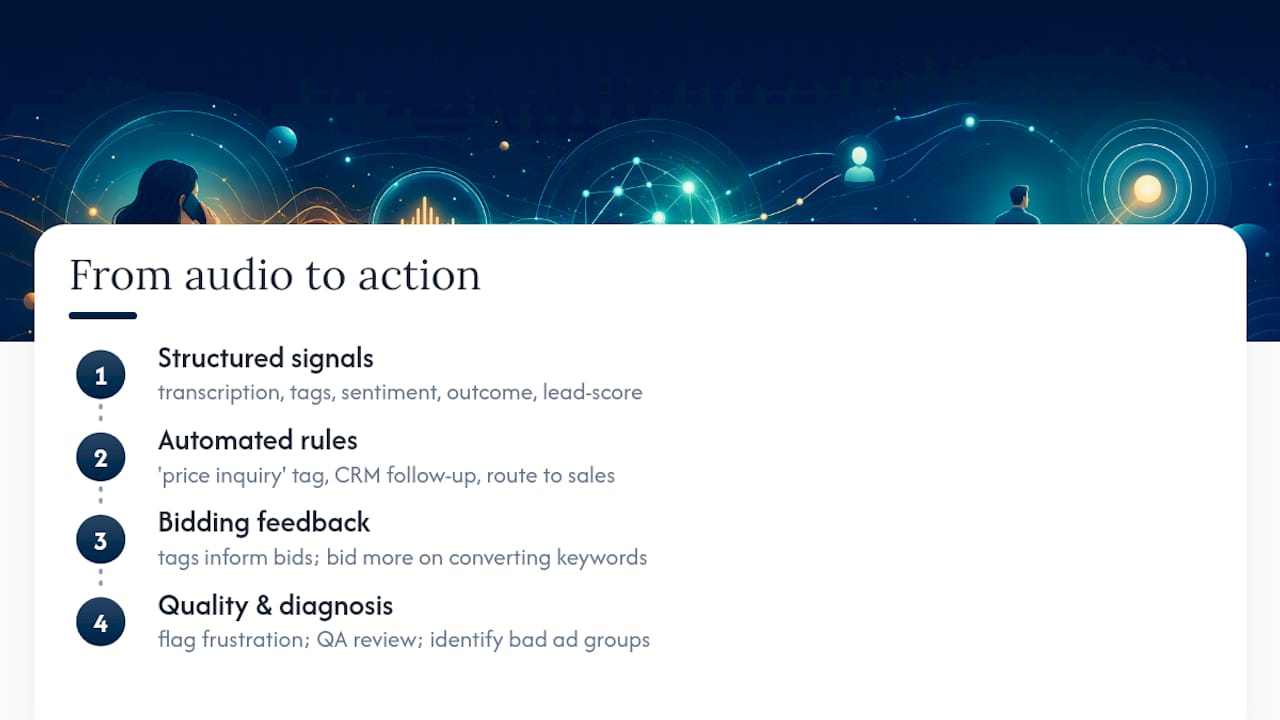
AI-enabled call tracking converts raw audio into structured signals: transcription, keyword and intent tags, sentiment scores, call outcome labels, and AI-derived lead quality scores. The shift from counting calls to understanding them is significant.
Practically, this means you can build tagging rules that fire automatically. A rule that detects the phrase “how much does it cost” or “what’s your price” can tag the call as “price inquiry,” trigger a priority follow-up task in the CRM, and flag the lead for a sales rep rather than a scheduler. That same tag can feed back into your bidding strategy: if price-inquiry calls from one keyword convert at a higher rate, the algorithm learns to bid more aggressively on it.
Sentiment scoring adds another layer. Calls where the caller expresses frustration or confusion can be flagged for quality review, helping you identify whether a specific ad’s messaging is creating mismatched expectations before callers even reach your team.
AI-driven conversation analytics also helps diagnose lead quality problems at the campaign level. If one ad group consistently produces calls tagged as “not a fit” or “wrong service,” that is a creative or targeting problem, not a sales problem.
U.S. privacy and legal checklist for call recording
You must confirm recording consent and TCPA compliance before capturing or storing call audio. The legal framework varies by state, and the penalties for non-compliance are significant.
- One-party vs. two-party consent: Federal law and most states require only one-party consent for recording. California, Florida, Illinois, Maryland, Massachusetts, Michigan, Montana, Nevada, New Hampshire, Oregon, Pennsylvania, and Washington require all-party consent. If you serve callers in any of these states, your IVR prompt must disclose recording before the call begins.
- IVR disclosure language: A standard disclosure sounds like: “This call may be recorded for quality and training purposes.” Play it before the caller reaches a live agent.
- Website privacy policy: Update your policy to disclose that calls may be recorded, what data is collected, how long it is retained, and how callers can request deletion.
- Opt-out handling: Give callers a clear way to opt out of recording. Some platforms let callers press a key to disable recording for that session.
- TCPA considerations: If your platform uses automated outbound dialing or SMS follow-up triggered by a call, TCPA consent requirements apply. Inbound call recording is generally lower risk, but outbound automation requires express written consent.
- Vendor due diligence: Confirm your vendor’s data residency (U.S.-based storage preferred for U.S. businesses), their ability to disable recording on demand, their data retention and deletion policies, and their SOC 2 or equivalent security certification.
This section is general information, not legal advice. Consult qualified counsel for TCPA compliance and state-specific recording law questions.
An agency perspective on deploying call attribution for small businesses
Most small businesses that come to an agency for call attribution help have the same starting point: Google Ads running, no call tracking, and a vague sense that the phone is ringing but no idea which campaigns are responsible. The instrumentation scope is usually the same across clients: deploy DNI via GTM, link call conversions to Google Ads using gclid, send call events to GA4, and map call outcome fields to the CRM.
One pattern that shows up consistently: after attribution is live for 60–90 days, the data almost always reveals that one or two campaigns are producing the majority of qualified calls, while one or two others are generating clicks and zero call activity. Reallocating budget based on that finding typically improves cost per qualified lead without increasing total spend. The improvement is not from spending more — it is from stopping the spend that was producing nothing measurable.
Tradewindsunitedmedia’s work in local SEO, Google Ads management, and performance reporting gives this kind of attribution analysis a natural home. Call data does not live in isolation — it connects to organic rankings, Google Business Profile visibility, and paid campaigns simultaneously, and the reporting needs to reflect all of it.
Tradewindsunitedmedia can set up your call attribution from the ground up
If you have been running Google Ads or SEO without call tracking, you are making budget decisions on incomplete data. Tradewindsunitedmedia handles the full implementation: website design that places the DNI snippet correctly on every page, Google Ads conversion linking, GA4 event configuration, and CRM field mapping — all connected to monthly performance reports that show exactly which campaigns are driving phone leads.

The starting point is a call-attribution audit: a review of your current tracking setup, your Google Ads account, and your site’s DNI coverage. You will leave the discovery call knowing exactly what is missing and what it would take to fix it. If you are ready to stop guessing which campaigns are working, contact Tradewindsunitedmedia to schedule your audit.
Sources
The following resources expand on the implementation steps, vendor capabilities, and technical documentation covered in this guide.
- Call Attribution
- Attribution | Call Tracking and Analytics | CallRail
- Marketo Measure
- AI call tracking software for complete marketing attribution
- Call tracking software that shows which ads drive phone leads