

Branded keywords contain your company or product name; non-branded keywords describe the problem, category, or need without naming you. Branded traffic converts at higher rates because intent is already decided, while non-branded traffic builds the audience that eventually searches your name. The tactical move: stop blending them in one report, split your budget and your dashboards, and measure each on its own terms.
TL;DR:
- Separating branded and non-branded campaigns allows accurate measurement of each segment’s performance and avoids misleading averages that mask declining trends.
- Google Search Console’s native branded query filter helps identify branded organic search terms effortlessly, but paid campaigns require manual tagging and separate reporting.
- For paid search, building dedicated branded campaigns with strict exclusions and different budget priorities is essential to defend your name and attract new customers effectively.
- Smaller or growing brands should allocate 10-15% of their budget to branded search, while established brands need at least half to protect high-value, high-intent traffic.
- Consistently reviewing search terms and maintaining separate dashboards for each segment improves measurement hygiene and ensures campaigns target the right audience at the right stage of the funnel.
Table of Contents
- Branded vs Non Branded Search: Definitions and Quick Differences
- How Branded and Non-Branded Fit the Marketing Funnel
- Measurement and Reporting: Keep the Two Segments Separate
- Paid vs Organic: Different Rules for Each Channel
- Benchmarks and Budget Allocation by Brand Maturity
- Your Action Checklist for This Week
- How Tradewinds United Media Applies This Playbook
- Lessons From the Data: Measurement Hygiene Comes First
- Get Your Branded and Non-Branded Search Working Together
- Sources
- FAQ
Branded vs Non Branded Search: Definitions and Quick Differences
A branded query includes your business name, product line, or a close variant: “Tradewinds United Media reviews,” “Nike Air Max sale,” or a misspelling like “Amozon returns.” A non-branded query describes the problem or category with no company name attached: “best running shoes for flat feet,” “affordable SEO agency near me,” “how to fix a leaking faucet.” That second category is where the branded vs non branded search distinction actually gets messy, because a few terms sit right on the border.
- Retailer vs. product brand: “Target Dyson vacuum” is branded for Dyson but arguably non-branded for Target, depending on which company owns the report.
- Product-line names: “iPhone 17 case” functions as a branded query even without the word “Apple,” since the product line itself carries brand equity.
- Misspellings and abbreviations: these still count as branded and should live on your brand-terms list, not get lost in the non-branded bucket.
Build a living brand-terms list covering your name, taglines, product lines, founder names, and common misspellings, then review it quarterly as your catalog changes.
How Branded and Non-Branded Fit the Marketing Funnel
Branded queries sit at the bottom of the funnel. Someone typing your name already knows who you are and is often ready to buy, renew, or find your phone number. Non-branded queries sit higher up, in awareness and consideration, where a shopper is still comparing options and hasn’t picked a winner.
Google’s own Brand-Category-Affinity framework treats this as three concentric layers, not two: branded terms for people who already know you, category terms for topical relevance (“emergency plumber”), and affinity terms for audiences who share your values or interests but haven’t searched your category yet. That third layer is where a lot of non-branded search budget quietly leaks or quietly pays off.
- Branded campaign goals: protect market share, maximize conversion rate, defend against competitor bidding.
- Non-branded campaign goals: grow reach, test new audiences, build the brand authority that eventually turns into branded search next quarter.
- KPI mismatch to avoid: judging a non-branded campaign by the same ROAS target as a branded one almost always makes the non-branded work look like it’s failing.
Measurement and Reporting: Keep the Two Segments Separate
Blended metrics lie by omission. If branded search converts at 5% and non-branded converts at 1.5%, a single combined “average conversion rate” tells you nothing about whether either campaign is actually healthy, and it can mask a non-branded campaign quietly declining while branded growth covers for it.
Google Search Console now solves the classification problem natively. Its branded query filter uses AI to identify brand names, close variants, misspellings, and brand-adjacent product terms, then surfaces a branded vs non-branded Insights card with up to 16 months of history. That single feature removes most of the manual regex work SEO teams used to build by hand.
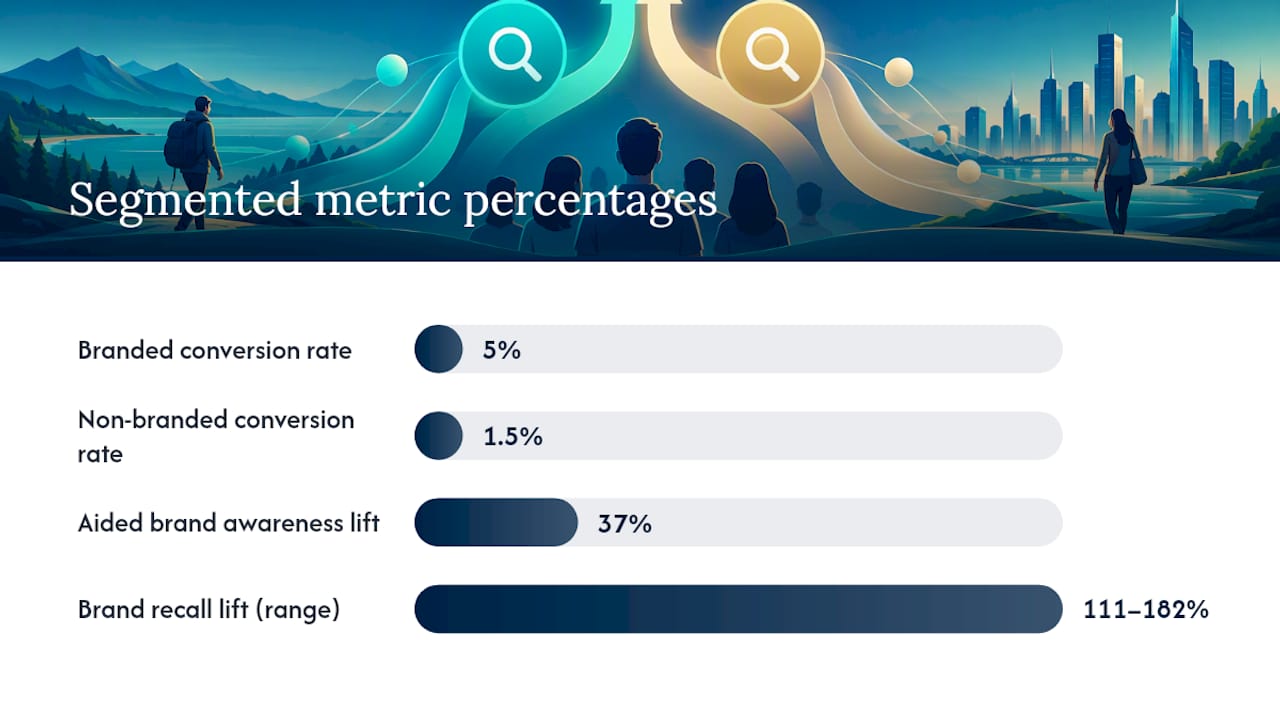
Statistic to know: optimized search campaigns that account for both segments can lift aided brand awareness by up to 37% and brand recall by 111 to 182%, which is a strong argument for tracking both sides rather than only chasing the one with the better ROAS on paper.
For teams building reports around this native filter:
- Turn on GSC’s branded-query filter first, since it’s free, first-party, and requires no manual list maintenance for organic search.
- Maintain a parallel brand-terms list in a spreadsheet or local keyword research document for paid search and Shopping, where no equivalent native filter exists yet.
- Tag every search-terms export by segment before it hits GA4 or Looker Studio, so dashboards never mix the two by default.
- Track impressions, clicks, CTR, CPC, conversion rate, and ROAS separately for each segment every reporting cycle.
Paid vs Organic: Different Rules for Each Channel
Organic and paid search need different guardrails for the same branded vs non branded split. Organic relies on GSC’s native filter and generally stays stable for branded terms, since fewer competitors chase your exact name in the rankings. Paid search is the riskier side, because competitors can and do bid on your brand name directly.
- Build a dedicated branded campaign with exact or phrase match to defend your name at the lowest possible CPC.
- Keep non-branded campaigns separate, optimized for reach and creative testing rather than brand defense.
- Set brand inclusions and exclusions at both campaign and ad-group level; ad-group settings override campaign settings, which matters when AI-driven broad match starts expanding into territory you didn’t intend.
- For Shopping campaigns specifically, there’s no built-in branded/non-branded split. You have to classify search terms manually to see how much spend is defending existing demand versus winning new customers.
Benchmarks and Budget Allocation by Brand Maturity
Practitioner data offers useful ranges, not guarantees. Branded search often converts at 3 to 6% with ROAS in the 600 to 1,200% range, while non-branded typically lands at 1 to 3% conversion with ROAS closer to 200 to 500%. Branded CPCs tend to be lower than non-branded, given exclusivity to the brand term bidding, according to practitioner data
| Brand maturity | Branded budget share | Primary goal |
|---|---|---|
| New brand | 10 to 15% | Build recognition through non-branded discovery |
| Growing brand | 20 to 30% | Balance defense with expansion |
| Established brand | 35 to 50% | Protect share, harvest high-intent demand |
| Household name | 50%+ | Defend against competitor bidding on name |
Your Action Checklist for This Week
Fixing a blended report doesn’t require a quarter-long project. It requires an afternoon and a checklist.
- Pull your last 90 days of search-terms data and validate your brand-terms list against it, adding any misspelling or variant you missed.
- Turn on the GSC branded-query filter for your organic reporting and let it run for a full week before drawing conclusions.
- Split your paid search account into branded-only and non-branded-only campaigns, then add ad-group-level brand exclusions to any broad-match campaign that might be bidding on your own name.
- Build one dashboard with branded and non-branded as separate rows, baseline this week’s ROAS for each, and set a recurring weekly check.
Pro Tip: Don’t wait for a “big reveal” moment. Run the split for two weeks before changing budgets. Segment data almost always looks different in week two once campaigns settle.
How Tradewinds United Media Applies This Playbook
Tradewinds United Media builds this branded and non-branded split into every client engagement, pairing SEO for organic discovery with Google Ads management for paid defense and acquisition. Website design and Google Business Profile work round out the picture, since a page that can’t convert branded traffic wastes the intent it already earned. Every client gets performance reports that separate the two segments, not one blended number that hides which channel is actually working.

Lessons From the Data: Measurement Hygiene Comes First
The teams that get branded vs non-branded right almost never start with better creative or bigger budgets. They start by fixing how they measure, because scaling a campaign before you can tell which segment is actually working just scales the confusion faster.
— Michael
Get Your Branded and Non-Branded Search Working Together
Most small businesses either overspend defending a brand name nobody’s attacking yet, or underspend on the non-branded discovery campaigns that would grow that name in the first place. Some agencies build the split with dedicated branded protection, separate non-branded growth campaigns, and reporting that shows exactly which dollar did what.

That’s the gap most agencies never close, mainly because it takes ongoing reporting discipline, not a one-time setup. Tradewinds United Media’s SEO and Google Ads services come with regular performance updates that show branded and non-branded results side by side, so you always know where your budget is actually working. Request a free performance review to see how your current campaigns split today.
Sources
- Search for Branding (Think with Google)
- Branded vs Non-Branded Google Shopping Queries: How to Measure the Split (SKU Analyzer)
- Apply brand inclusions to Search campaigns (Google Ads Help)
- Search Console branded queries filter (Google Developers blog)
FAQ
What Is the Difference Between Branded and Non-Branded Search?
Branded search includes your company or product name; non-branded search describes the need or category without naming you. Branded traffic tends to convert faster since intent is already decided, while non-branded traffic represents new demand still being discovered.
What Is the Difference Between Branded and Non-Branded Traffic?
Branded traffic arrives already knowing your business, often through direct navigation or a name search, and converts at notably higher rates. Non-branded traffic arrives through category or problem searches and needs to be nurtured before it converts, which is why optimized campaigns across both can lift brand recall significantly.
How Do I Separate Branded and Non-Branded Data in Reports?
Use Google Search Console’s native branded-query filter for organic data, since it classifies terms automatically with AI. For paid search and Shopping, maintain your own brand-terms list and tag every search-terms export before it reaches your dashboard.
What Is the 3-7-27 Rule of Branding?
Definitions of this rule vary across marketing sources and it isn’t tied to a single documented standard, so treat any specific numbers attached to it with caution. The safer approach is to rely on documented frameworks like Brand-Category-Affinity when deciding how to split branded, category, and affinity search coverage.
Should I Prioritize Branded or Non-Branded Keywords First?
Neither works alone. Defend branded terms first since they’re cheap and high converting, then invest steadily in non-branded discovery, because that’s what generates the branded searches you’ll be defending next year.




