

Yes, you can improve where your business appears on Google Maps, and the highest-impact first move is claiming and verifying your Business Profile with every core field filled out. Google ranks local results on three factors: relevance, distance, and prominence. Measure progress through profile views, calls, direction requests, and lead volume, not gut feeling.
TL;DR:
- Claiming and verifying your Business Profile, with all core fields completed, is essential for improving relevance and prominence in local search results.
- Focusing on building recent, detailed reviews and uploading multiple relevant photos can significantly increase visibility and user engagement.
- Maintaining consistent name, address, and phone number details across all web and social platforms strengthens Google’s trust and boosts local ranking.
- Using a geo-grid method to track rankings across your service area provides a reliable measure of progress, as search results fluctuate based on device, location, and query.
- Paid options like Local Services Ads and Google Ads can supplement organic efforts, especially in competitive markets, until your profile’s prominence naturally grows.
Table of Contents
- What Determines How You Rank in Google Maps?
- Verify and Complete Your Google Business Profile
- Get and Manage Reviews Without Risking Penalties
- Use Photos and Videos to Increase Clicks and Conversions
- Onsite Signals and Structured Data That Strengthen Your Local Entity
- Measure Maps Visibility Correctly: Geo-Grid Method and Tool Choices
- Quick Checks: How to Check Your Google Maps Ranking Right Now
- Common Pitfalls and Google Policy Cautions
- Role of Q&A Section in the Business Profile
- How to Optimize for Voice Search Related to Google Maps
- Leveraging Google Maps Advertising Options to Boost Visibility
- A 30 to 90 Day Plan for Small-Business Map Pack Results
- Get Hands-On Help Ranking in the Map Pack
- Sources
- FAQ
What Determines How You Rank in Google Maps?
Google’s own guidance boils down Maps ranking to three levers: relevance, distance, and prominence. Relevance measures how well your profile matches what someone typed. Distance measures how close you are to the searcher or the location implied in their query. Prominence measures how well known and trusted your business is, based on signals like reviews, links, and general web presence.

Here’s the part most owners get wrong: they treat these three factors as equally movable. Distance isn’t. If a competitor sits four blocks from downtown and you’re in an industrial park fifteen minutes out, no amount of profile polishing closes that gap for “near me” searches. What you can control is relevance and prominence, and that’s where nearly every tactic in this guide points.
Search Engine Land’s breakdown of Maps architecture makes a useful point: there’s no single ranking formula. Maps results run through multiple stages and dozens of signals, so a tactic that moves your rank in one city might do nothing in another. That’s not a reason to skip optimization. It’s a reason to test every tactic against the question: does this improve relevance, distance, or prominence? If a tip doesn’t map to one of the three, it’s probably noise.
Verify and Complete Your Google Business Profile
Verification unlocks the features that make a profile competitive. Unverified listings can appear on Maps, but they miss out on messaging, Google Posts, and full performance data, and Google trusts them less. You verify through a postcard, phone, email, or video call, depending on your business category and location, inside your Google Business Profile dashboard.
Once verified, work through these fields in order of ranking impact:
- Primary category: pick the single most specific option that describes your core business (choose “Italian Restaurant” over the generic “Restaurant”).
- Additional categories: add only the ones that genuinely apply. Category stuffing hurts more than it helps.
- Address or service area: exact and consistent with how the business actually operates, not padded to cover extra territory.
- Hours, phone, website, and services: keep these current, especially around holidays. Stale hours cost clicks and trust.
- Business name: use your real-world name only. No keywords bolted on.
Google’s representation guidelines exist precisely to prevent gamed listings, and they get enforced. Consistency across your website, social profiles, and directories reinforces every field you fill in here.
Get and Manage Reviews Without Risking Penalties
Review count, recency, and average rating feed into prominence, though none of them decides your rank on its own. A profile with a strong number of recent, detailed reviews and a high star rating generally outperforms one with many old reviews, even if the older profile’s raw number looks stronger.
The safest way to build reviews is to ask at the moment of highest satisfaction, right after a completed job or purchase. Build the request into your workflow instead of treating it as an afterthought:
- Add a review link to receipt emails and invoices with a one-line ask.
- Send a follow-up text 24 to 48 hours after service, framed as a quick favor, not a demand.
- Train staff to mention it verbally when a customer expresses satisfaction on-site.
Reply to every review, positive or negative, within a few days. Thank happy customers by name and reference specifics. For negative reviews, acknowledge the issue, move the conversation offline, and escalate to Google support only if the review is clearly fake or from someone who was never a customer.
Pro Tip: Never offer discounts or freebies in exchange for reviews. Google’s Fake Engagement policy allows removal of incentivized reviews and can restrict the whole profile, not just the offending review.
Use Photos and Videos to Increase Clicks and Conversions
Google’s own guidance confirms that profiles with strong photo coverage generate more clicks and direction requests than bare-bones listings. Media doesn’t just decorate your profile. It signals to searchers, and indirectly to Google, that the business is active and legitimate.
Prioritize these categories, and don’t stop at one photo per type:
- Exterior shots: help customers spot your storefront and confirm they’re in the right place.
- Interior shots: set expectations for atmosphere, especially for restaurants and retail.
- Product or service shots: show exactly what you sell or do.
- Team-at-work photos: build trust faster than any stock image ever will.
- Short video clips (30 to 60 seconds): a quick walkthrough or a service in progress works better than a polished commercial.
Upload in good lighting, avoid heavy filters, and add a short, descriptive caption to each image. Verification is what allows uploaded media to display publicly, so if photos aren’t showing, check your verification status before assuming there’s a technical glitch.
Onsite Signals and Structured Data That Strengthen Your Local Entity
Your Business Profile doesn’t operate in isolation. Google cross-references it against your website and the broader web to build confidence in your identity, and inconsistencies quietly undercut prominence.
Keep your name, address, and phone number (NAP) identical everywhere they appear, your website footer, contact page, directory listings, and social profiles. Even small discrepancies (a suite number here, an abbreviated street name there) create doubt Google resolves by trusting you less.
Local landing pages help too, especially for multi-location or service-area businesses:
- List services specific to that location or territory, not generic boilerplate copied across pages.
- State the service area explicitly rather than relying on the map to imply it.
- Add a testimonial or two relevant to that specific location.
- Embed LocalBusiness JSON-LD schema so Google can parse your name, address, hours, and category directly from the page code.
Pro Tip: If hand-coding schema sounds tedious, a JSON-LD schema generator can build the markup for you in minutes, no developer required.
Local links and citations, mentions from chambers of commerce, industry directories, and local news, add to prominence the same way reviews do. Quality over quantity applies here just as it does with reviews.
Measure Maps Visibility Correctly: Geo-Grid Method and Tool Choices
A single manual search tells you almost nothing reliable. Results shift based on your device, your location, your search history, and even your browser’s viewport, so checking rank from your own phone at your desk is basically checking your own personalized results, not what a real customer sees.
The fix is a geo-grid approach:
- Pick a set of fixed coordinates spread across your service area, not just your business address.
- Search the same keyword from each point, using the same device type and a logged-out or incognito session.
- Record the date, time, device, and exact query for every check so results are comparable over time.
- Track at least one or two competitors from the same grid points to see relative movement, not just your own.
Business Profile’s performance dashboard reports views, searches, and actions like calls and direction requests, but it isn’t a rank tracker and never claims to be. For repeatable, comparable rank data across locations, a dedicated geo-grid tool fills the gap Business Profile leaves open.
Quick Checks: How to Check Your Google Maps Ranking Right Now
You don’t need special software for a fast snapshot. Run through this sequence:
- Open the Maps app on your phone, search your main keyword, and note where you land, then check your Business Profile’s performance tab for recent search and view trends.
- On desktop, open an incognito browser window and repeat the search to strip out most personalization and login bias.
- Try a couple of free online geo-grid demo tools or rank-checkers for a spot-check from locations outside your usual search radius.
- Note whether you’re showing in the three-pack, in the expanded map listings, or only in organic web results. Each carries different visibility and click behavior.
Treat every check as a snapshot, not a verdict. Ranking varies by minute, by device, and by exact query phrasing, which is exactly why the geo-grid method above matters more than any single search.
Common Pitfalls and Google Policy Cautions
Most ranking damage is self-inflicted. Google’s guidelines are specific about what triggers removal or restriction, and violations are easy to avoid once you know what to watch for:
- Never create a second listing for the same location. Duplicate profiles split your signals and often get suspended.
- Don’t use a virtual office, empty storefront, or a friend’s address just to appear closer to a lucrative search area.
- Skip keyword-stuffed business names (“Joe’s Plumbing Best Emergency 24/7 Plumber”) entirely; it violates naming rules and reads as spam to customers too.
- Report fake or competitor-planted reviews through Google’s review flagging tool rather than trying to argue in the replies.
- If a profile gets suspended or a legitimate issue isn’t resolving through standard channels, open a Google Business Profile support case, and consider bringing in a professional if the problem involves duplicate listings, suspensions, or multi-location complexity.
Role of Q&A Section in the Business Profile
The Questions and Answers section sits just below your business description on Maps and Search, and it’s more influential than most owners realize. Anyone can post a question, and anyone can answer it, including strangers who have never used your business. That’s the risk: unanswered or wrongly answered questions sit there in public view, sometimes for months.
Claim the advantage by seeding your own Q&A. Post the five or six questions you get most often, “Do you offer free estimates?”, “Is there parking on-site?”, “Do you take walk-ins?”, and answer them yourself as the business owner. This does two things. It gives searchers fast, accurate information without making them call, and it fills space that a competitor or a confused customer might otherwise occupy with inaccurate information.
Monitor the section regularly. A single unanswered question implying poor service, left unaddressed for weeks, does real damage to conversion even if your reviews are strong. Answer within a day or two whenever possible, and upvote your own accurate answers to keep them at the top.
There’s a relevance angle too. Q&A content is text Google can index and match against searcher queries, so answers that naturally include the services or products you offer add another small layer of context to your profile. Keep answers factual and specific. Vague responses waste the opportunity.
How to Optimize for Voice Search Related to Google Maps
Voice queries skew conversational: “find a plumber open now near me” instead of “plumber open now.” That shift changes what you should prioritize on your profile, because voice assistants tend to read directly from structured, specific data rather than parsing long descriptions.
Accurate hours matter more here than almost anywhere else. Voice assistants frequently answer “is it open now” queries directly from your listed hours, and a mismatch between your posted hours and your actual hours doesn’t just annoy a customer, it can make you invisible for that exact query at that exact moment.
Complete, specific service listings help too. Voice search tends to favor direct matches, so a profile that explicitly lists “emergency plumbing,” “water heater repair,” and “drain cleaning” has a better shot at matching a conversational query than one that just says “plumbing services.”
Local landing pages with LocalBusiness schema (covered earlier) support voice search the same way they support Maps ranking: they give Google structured, unambiguous data to pull from instead of guessing at unstructured text. Questions phrased naturally in your FAQ content, on your website and in your Q&A section, also tend to mirror how people actually speak into their phones, which gives you a small but real edge as voice queries keep growing.
Leveraging Google Maps Advertising Options to Boost Visibility
Organic optimization takes time, distance is fixed, and prominence builds gradually. Paid placement fills that gap while your organic signals mature.
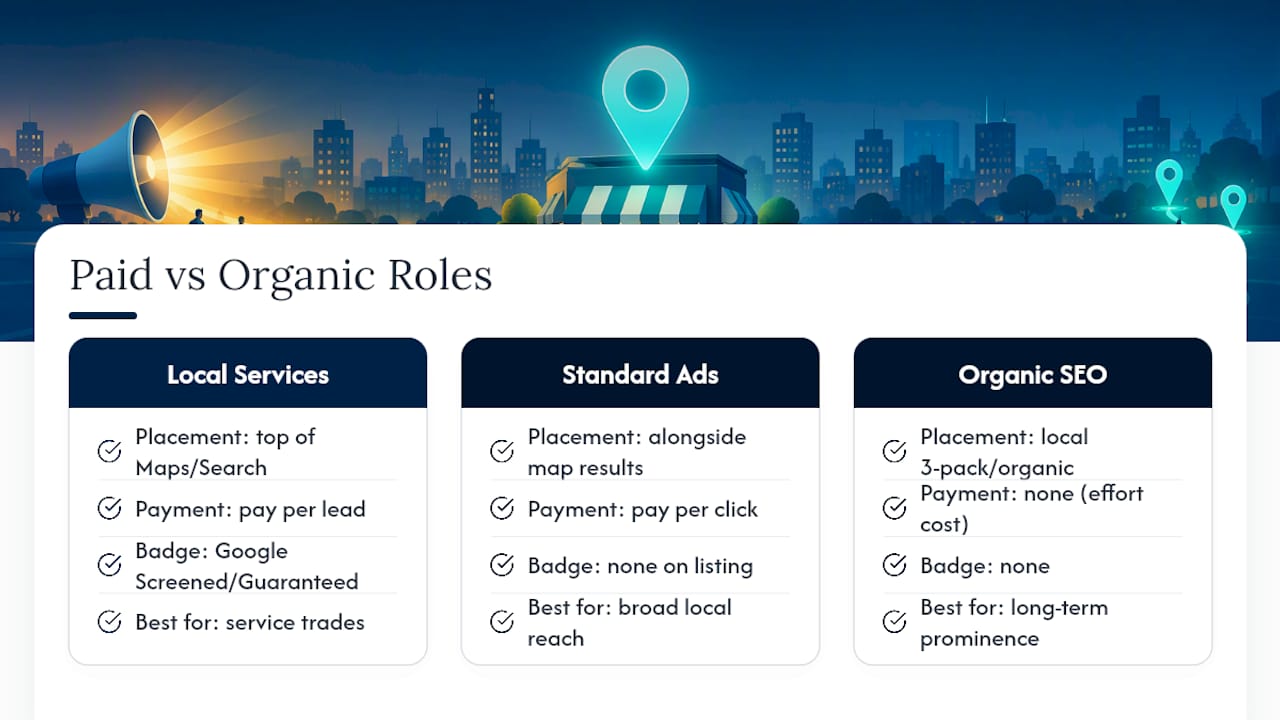
Local Services Ads put your business at the very top of Maps and Search results for qualifying service categories (plumbers, electricians, house cleaners, lawyers, and similar trades), marked with a Google Screened or Google Guaranteed badge that organic listings can’t display. You pay per lead rather than per click, which makes budgets more predictable for service businesses than standard pay-per-click campaigns.
Standard Google Ads campaigns with location extensions can also push a business listing to appear alongside map results for relevant searches, extending visibility beyond whatever your organic three-pack position happens to be that day. For businesses in categories where genuine ranking gains are slow (competitive urban markets, brand-new locations with no review history yet), paid visibility can carry lead flow until organic signals catch up.
The two approaches work best together, not as substitutes. Paid ads generate the traffic and reviews that eventually strengthen prominence, while organic optimization work keeps costs from creeping up indefinitely. A business that skips paid ads entirely while waiting for organic Maps ranking to improve is often leaving weeks or months of achievable leads on the table.
A 30 to 90 Day Plan for Small-Business Map Pack Results
Weeks 0 to 2: verify your profile, lock in the correct primary category, and complete every core field. Month one: build a steady review request habit and upload at least ten fresh photos across the categories covered earlier. Months two and three: build local citations, launch a geo-grid tracking routine, and refine based on what the data actually shows.
Watch profile views, direction requests, and call volume as your real scoreboard, not vanity impressions. Most owners can execute weeks 0 to 2 alone. Once you’re juggling multi-location citations, geo-grid tracking, and review management on top of running the business, that’s usually the point to bring in help with your Map Pack strategy.
— Michael
Get Hands-On Help Ranking in the Map Pack
Tradewinds United Media is the alternative to guessing your way through Business Profile settings and hoping reviews trickle in. We build the 30 to 90 day map pack plan outlined above directly into a managed engagement, with clear performance reports showing exactly how profile views, calls, and direction requests move month over month.

An engagement typically starts with an audit of your current Business Profile, categories, review velocity, and website’s local signals, so you know precisely where relevance, distance, and prominence are weakest before spending another dollar. From there we handle profile optimization, review generation systems, and citation building while you run the business. If Google Ads or a local SEO campaign makes sense as part of the mix, these services can be integrated into a single reporting dashboard to track performance. Request a local SEO report to see where your listing stands right now and what moving up actually looks like for your specific market.
Sources
For readers who want to go straight to the primary guidance:
- Tips to improve your local ranking on Google – Google Business Profile Help
- Inside Google Maps: 72 ranking signals and the architecture behind local search – Search Engine Land
- MapRankr compare
FAQ
How Do I Rank in Google Maps?
Claim and verify your Business Profile, complete every core field accurately, and build reviews, photos, and citations consistently over time. Google weighs relevance, distance, and prominence together, so no single fix guarantees a top spot, but the profile work above moves all three levers you actually control.
How Can I Check My Google Maps Ranking?
Use a geo-grid method: search the same keyword from multiple fixed coordinates across your service area, on the same device type, and record the results. Business Profile’s performance dashboard shows views and actions but isn’t built to track rank, so a dedicated geo-grid tool gives a more reliable read.
Is a 4.5 Google Rating Good?
A strong star rating is generally considered competitive in most local categories. What matters more for ranking is that reviews stay recent and consistent over time, since a high rating built entirely on old reviews carries less weight than steady, current feedback.
What’s the Highest Level on Google Maps?
Appearing in the local three-pack, the top three map results shown directly in Search, is the highest visibility tier a business can reach organically. Below that sit the expanded Maps listings and standard organic web results, each with progressively lower click-through rates.




