Competitor keyword research shows which search terms your rivals rank for or bid on that you don’t, and where your visibility is weaker than theirs. The fastest way to start is to run a keyword gap report and export the resulting “Missing” and “Weak” keyword lists, then pull Auction Insights for any active Google Ads campaigns. From there, treat it as an SMB-sized task: filter the export down, pick five to ten quick tests, and move.
TL;DR:
- Most keyword gaps are best prioritized by commercial intent and proximity to your current ranking, focusing on quick wins with low difficulty.
- Analyzing both organic and paid keywords separately helps identify where to build content versus where to test with paid ads for faster results.
- Clustering keywords by parent topics prevents overlaps and keyword cannibalization, simplifying content planning and optimization strategies.
- Regularly tracking rank, traffic, and conversions over several weeks ensures that keyword improvements translate into measurable business results.
- Chasing individual keywords, especially branded or competitor names, is less effective than focusing on high-intent clusters that are more likely to generate conversions.
Table of Contents
- What competitor keyword research actually means
- A step-by-step workflow to find and act on competitor keywords
- Which reports and tools surface competitor keywords
- How to prioritize keyword gaps once you have the list
- What Auction Insights tells you about paid competition
- Cluster keywords into topics before you build anything
- Track rank, traffic, and conversions over time
- How Tradewinds United Media applies this for local businesses
- What I’d actually watch out for
- Sources
- FAQ
What competitor keyword research actually means
Competitor keyword research is the process of pulling the search terms a rival ranks for organically or bids on in paid search, then comparing that list against your own. Moz defines competitor keyword analysis as identifying valuable keywords competitors rank for that you don’t, prioritizing the ones that are relevant, high volume, and likely to convert.
Most gap tools sort results into three buckets:
- Missing: keywords a competitor ranks for and you don’t rank for at all.
- Weak: keywords you already rank for, but well below the competitor’s position.
- Unique: keywords only your site ranks for, useful for spotting your own hidden strengths.
Semrush’s guide to competitor keywords points out that practitioners often prioritize Weak keywords first, since the site already has some baseline visibility there and a modest content or technical fix can push it up faster than starting from zero. Missing keywords take longer because you’re building a page from nothing, while Unique keywords are worth a glance mainly to confirm you’re not accidentally losing ground somewhere a competitor hasn’t noticed yet.
Keep organic and paid lists separate while you work. An organic Missing keyword tells you where to build or improve a page. A paid keyword a competitor bids on tells you they see commercial value there right now, which is a different kind of signal and often points toward a faster test through ads rather than a slower content build.
A step-by-step workflow to find and act on competitor keywords
Once you know the categories, the workflow is mechanical enough to run in an afternoon.
- Identify your real competitors, organic and paid. List the sites that outrank you for terms you care about, plus the advertisers showing up on the same search results, since these are not always the same businesses.
- Run a gap or overlap report. Enter your domain against two or three competitors and export the Missing and Weak lists as CSVs.
- Filter by intent, volume, and difficulty. Drop anything with no commercial relevance before you spend time scoring it.
- Score what’s left. Rank the remaining keywords by a rough combination of search volume, keyword difficulty, and how close you already are to ranking.
- Assign an action to each top scorer. Decide whether it needs a new page, an update to an existing page, or a paid test.
- Log the decision and move to the next batch. Don’t try to action an entire export in one sitting.
Ahrefs’ guide to competitor keywords frames the endgame in three options once you’ve exported and clustered a competitor’s keywords: create a new page to target the topic, optimize an existing page by filling in missing subtopics, or run the keyword through Google Ads as a paid test. Which option fits depends on whether you already have a page in the right neighborhood and how much commercial intent the keyword carries.
Pro Tip: Start with 15 to 20 Weak keywords instead of your full export. A small batch you actually finish beats a spreadsheet of 500 rows nobody touches.
For readers weighing whether to spend the follow-up budget on organic fixes or paid tests, our guide to splitting budget between SEO, Google Ads, and social media walks through the tradeoffs in more detail.
Which reports and tools surface competitor keywords
Three report types cover most of what you need, and each hands you a different slice of the picture.
- Site Explorer or Organic Keywords reports show the pages and keywords driving a competitor’s traffic today, which tells you where to look first for content ideas.
- Keyword Gap or overlap tools compare your domain against several competitors at once and label the results Missing, Weak, Unique, or Shared. Semrush’s Keyword Gap report can compare up to five competitors and lets you filter by database, device, date range, position, intent, and keyword difficulty before exporting.
- Paid keyword and ad copy reports show which terms a competitor is actively bidding on, along with their landing pages and ad copy, which is useful for judging commercial intent rather than just search volume.
When you pull an export, apply the same filters every time so your lists stay comparable month to month: same device type, same date range, same country or region if that matters to your business. Skipping this step is the most common reason gap data looks inconsistent between reports.
For paid data specifically, collect three things per keyword: the exact term, the landing page the competitor sends traffic to, and a screenshot or note on their ad copy angle. That last piece rarely shows up in exportable columns, but it tells you what message is winning the click, which matters when you’re deciding whether to test the same keyword yourself.
A vetted external walkthrough on SEO competitor analysis for digital marketers covers the discovery side of this process in more depth if you want a second reference alongside your tool’s own documentation.
How to prioritize keyword gaps once you have the list
A raw export of 300 Missing and Weak keywords is not a plan, it’s a spreadsheet. Prioritization is what turns it into one.
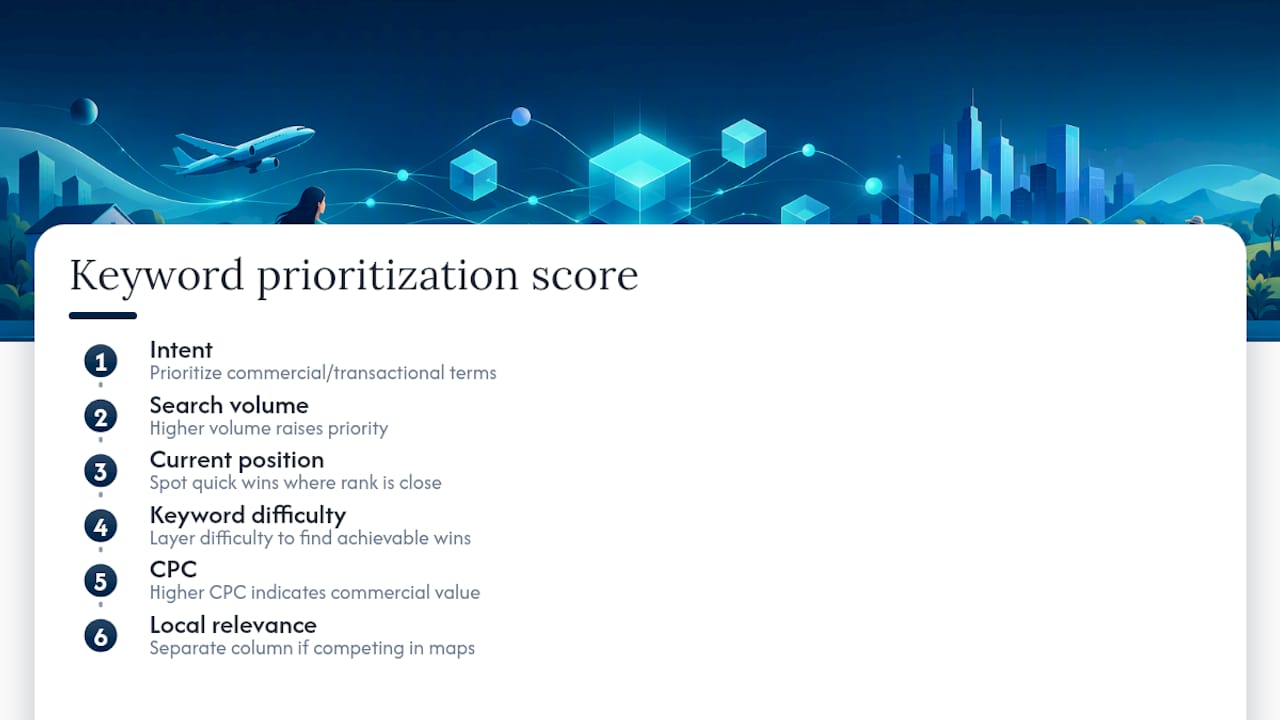
Start with intent. A commercial or transactional keyword (“emergency plumber near me,” “buy patio furniture online”) deserves attention before an informational one (“how does a water heater work”), if your goal is conversions rather than general awareness. Moz’s framework for keyword analysis reinforces this: a valuable keyword is one that’s relevant to your business and likely to convert, not just one that’s easy to rank for.
After sorting by intent, layer in more filters such as keyword difficulty alongside your current rank if you have one, to spot quick wins where you’re already close.
Semrush notes that filters for prioritization should include search volume, position, and intent, informational versus transactional, which lines up with the same logic. Build a short scored export with columns for intent, volume, difficulty, CPC, and local relevance if you serve a specific area, then sort by whichever combination matters most to your business this quarter. Local relevance deserves its own column if you’re a service business competing on map results as much as organic ones. Our local SEO reporting guide walks through how to filter and track that layer specifically.
What Auction Insights tells you about paid competition
Auction Insights is Google Ads’ built-in benchmarking report, and it’s the paid-search equivalent of a keyword gap report. Google’s own documentation explains that the report can be generated for keywords, ad groups, or campaigns that meet a minimum activity threshold, and that impression share figures may differ from what a competitor sees on their own account.
The metrics worth reading regularly:
- Impression share tells you what percentage of eligible auctions your ad actually showed in.
- Overlap rate shows how often a competitor’s ad appeared in the same auction as yours.
- Outranking share shows how often your ad ranked above theirs when you both showed up.
- Top-of-page and absolute top-of-page rate tell you how often your ad landed in the most visible positions on the page.
Karooya’s guide to Auction Insights frames these metrics as the toolkit advertisers use to benchmark against competitors and decide whether to raise bids, improve ad relevance, or test a new landing page. A low outranking share against a specific competitor, paired with a decent impression share, usually points to an ad relevance or landing page problem rather than a bidding problem.
Pro Tip: If Auction Insights shows no data for a keyword or ad group, it likely hasn’t hit the activity threshold yet. Wait for more volume before drawing conclusions, rather than assuming you have no competition.
Our breakdown of what a Google Ads competitor analysis actually reveals goes further into turning these metrics into bid and budget decisions, and our Google Ads budget guide is a useful next stop if you’re deciding how much to commit to a new paid test.
Cluster keywords into topics before you build anything
The single biggest mistake in acting on a keyword export is treating every row as its own page. That produces a pile of thin, overlapping pages that compete with each other in search results instead of building authority on one topic, a problem generally known as keyword cannibalization.
Ahrefs recommends exporting a competitor’s Organic Keywords report and using a Clusters by Parent Topic view to group similar queries so a single page can target the full topic instead of many overlapping ones. Once you have clusters instead of a flat list, the action decision gets simpler:
- If you have no page covering the cluster, build one. Target the parent topic and fold in the related subtopics as sections rather than separate pages.
- If you have a page that’s ranking Weak for the cluster, optimize it. Add the missing subtopics, update outdated sections, and strengthen internal links pointing to it.
- If the cluster shows strong commercial intent and a fast-moving opportunity, test it with Google Ads first. This gets you data on conversion value before you commit the time to a full content build.
Grouping by parent topic also makes it easier to see which clusters map to service pages versus blog content versus a dedicated landing page for a paid campaign, since each format serves a different stage of intent.
Track rank, traffic, and conversions over time
Running a gap report once and never checking back wastes the effort you put into the export. Set up recurring tracking so you know which keywords are actually moving.
- Rank position, checked weekly or biweekly for the keywords you targeted.
- Organic clicks and click-through rate, pulled from Google Search Console for the pages you built or optimized.
- Estimated traffic, from whichever tool generated your original gap report, to confirm the modeled numbers match reality.
- Form submissions or leads, tied back to the specific page or campaign, since rank and traffic mean little without conversions attached.
A reasonable test window is 4 to 12 weeks for organic changes, since search engines take time to re-crawl and re-rank pages, and 2 to 6 weeks for paid tests, where results show up almost immediately once a campaign has enough impressions. A simple spreadsheet with a row per keyword and a column per week is enough to start. Set a trigger rule in advance, for example: if a paid test hits a target cost per lead within its window, scale the budget; if an optimized page climbs into the top five positions, build an internal link push around it.
How Tradewinds United Media applies this for local businesses
Tradewinds United Media combines competitor keyword gaps with the services we already run for clients: website design, SEO, and Google Ads management. A gap export becomes a prioritized action list, some keywords route to a new or optimized page, others route to a paid test, and every client gets a report that shows exactly what changed and why. Data-driven reporting can help clients understand how their marketing budget is being used.
A typical engagement often produces a keyword gap export, a prioritized action list split between content and paid work, and a regular report tracking key performance indicators against the plan.
What I’d actually watch out for
The most common mistake I see is chasing every gap keyword instead of the clusters that carry real conversion intent. Branded keywords are a particular trap: ranking for a competitor’s name feels satisfying but rarely brings in a buyer who wasn’t already looking for that specific business. Test paid keywords with a small budget before committing serious spend. A two-week trial tells you more than a spreadsheet ever will.
— Michael
Sources
- How to find competitor keywords and close visibility gaps
- Google Ads Auction Insights 2026 guide
- How to Find and Use Competitor Keywords
- Use auction insights to compare performance – Google Ads Help
- How to Conduct a Competitor Keyword Analysis – Moz
FAQ
What’s the difference between Missing and Weak keywords?
Missing keywords are ones a competitor ranks for that you don’t rank for at all. Weak keywords are ones you already rank for, just at a lower position than the competitor, which usually makes them faster to improve.
How many competitors should I compare at once?
Two or three direct competitors is usually enough to spot real patterns without the export becoming unmanageable. Some gap tools support comparing up to five competitors at once if you want a broader view.
Why does Auction Insights show no data for some keywords?
Auction Insights only generates results for keywords, ad groups, or campaigns that meet a minimum activity threshold. Low-volume keywords or new campaigns often haven’t accumulated enough auctions yet to populate the report.
Should I build a new page for every keyword gap I find?
No. Cluster related keywords by parent topic first, then decide whether the cluster needs a new page, an update to an existing page, or a paid test, since building a separate page per keyword usually creates thin content that competes with itself.
Can an agency handle competitor keyword research for me?
Yes, agencies that offer combined SEO and Google Ads management, including Tradewinds United Media, can run the gap analysis, prioritize the keywords, and report on results as part of an ongoing engagement.