Google Maps spam is any listing, edit, photo or review that misrepresents a real business or invents one. The fix is a short routine: confirm it is spam, report it through the right Google form with evidence, keep your own profile clean, and keep building real reviews and accurate information so a fake listing cannot outrank you for long. This guide covers each step for local business owners in the U.S.
TL;DR
- Spam on Maps comes in several forms: fake business listings, fake or incentivized reviews, hijacked profile edits, and scam calls that borrow Google’s name. Each has a different report path.
- Use the in-Maps report for a single suspicious place. For misleading names, phone numbers or URLs, Google points to its Business Redressal Complaint form, which accepts many listings at once.
- Google says most of the bad content is caught by its own systems, so reporting works best as a supplement, with clear evidence and patience.
- Your best defense is a complete, accurate, policy-compliant profile and a steady flow of genuine reviews.
- Never fight spam with tactics that break the rules yourself, such as buying reviews or stuffing keywords into your business name.
Table of Contents
- What counts as Google Maps spam
- How to tell spam from a real competitor
- Does reporting actually work?
- How to report a spam listing, step by step
- If Google does not remove the listing
- Listing spam vs. scam calls and emails that use Google’s name
- Keep your own profile from being flagged
- Why fraudulent listings matter for local discovery
- Our perspective
- Get help protecting your local visibility
- FAQ
- Sources
What counts as Google Maps spam
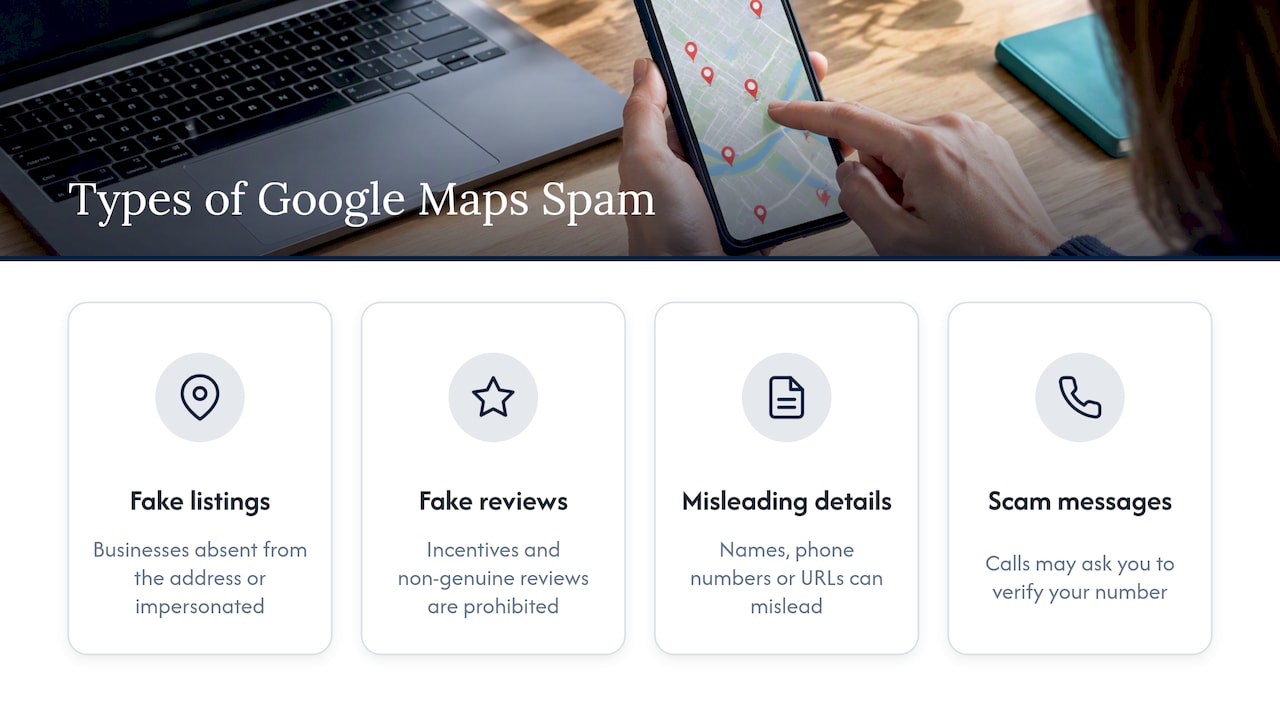
People use the phrase for four different problems, and mixing them up wastes time.
Fake business listings. These are profiles for businesses that do not exist at the stated address, or that impersonate a real company. Google says it pursues legal action against organized groups that impersonate legitimate businesses to scam consumers. Categories that attract this most are the ones where customers are in a hurry: locksmiths, towing and emergency repair. A MakeUseOf guide to spotting fake businesses lists those trades, along with requests for upfront or unconventional payment, as warning signs.
Fake or manipulated reviews. Google’s content policy bars merchants and users from soliciting content that does not reflect a genuine experience, offering incentives in exchange for reviews, and posting on a competitor’s listing to undermine it. The full wording is in Google’s prohibited and restricted content policy.
Keyword-stuffed or misleading details. Business names padded with services or city names, fake phone numbers and fake URLs fall here. Google’s report page singles out misleading business names, phone numbers and URLs that raise suspicion of fraud.
Scam messages that use Google’s name. A phone call claiming to be Google Maps and asking to verify your number is not a listing problem at all. More on that below.
How to tell spam from a real competitor
A competitor you dislike is not spam. A competitor who ranks above you with a better profile is not spam either. Before you report anything, check these points:
- Does the address exist? Look it up in Street View and on the county or state business registry. A mail drop, a vacant lot or a residential house with a dozen “businesses” attached is a red flag.
- Does the name match the storefront and website? A listing named for a service plus a city, with no matching signage or website, is suspicious.
- Do the phone number and website agree? A call-tracking number that rings a generic call center, or a URL that does not mention the business, suggests a lead-generation front.
- Do the reviews look organic? A burst of reviews in a short window, generic reviewer names, or vague and uniformly glowing text can indicate manipulation, according to the same MakeUseOf guide.
- Is there a rating alert? Google now shows alerts in the U.S. when it has recently removed suspicious five-star reviews, a signal covered in Google’s own explanation of its anti-fraud work.
If the business is real, has a real address and simply competes with you, the answer is better local SEO, not a report. If it fails several of these checks, document it.
Does reporting actually work?
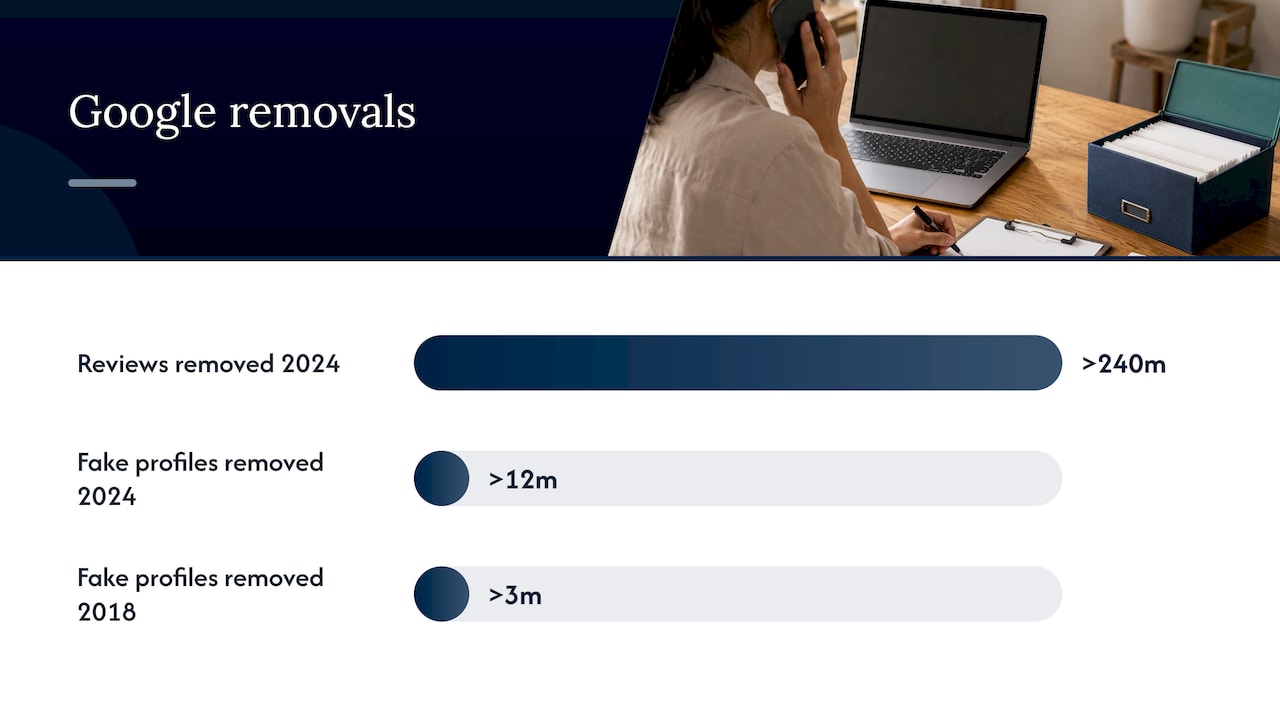
Sometimes, and less often than the forums suggest. Google says its systems do most of the work. In 2024 it blocked or removed more than 240 million policy-violating reviews and more than 12 million fake profiles, and most of the removed reviews were blocked before anyone saw them. Back in 2018, internal systems accounted for over 85 percent of the more than 3 million fake profiles taken down, as Google reported at the time.
User reports still matter. Google has said reports are used to investigate suspicious profiles and remove content that violates policy, and it may also investigate associated accounts for broader abuse. That means a good report can take down more than one listing, but it also means you should not expect an overnight result. Treat a report as an input to a review process, not a switch.
What we tell owners: report, document, and then keep working on your own visibility. A spam listing that survives for a few weeks should not change your plan.
How to report a spam listing, step by step
Google’s Report a business on Google Maps page describes two main paths.
Report a single suspicious place
- Open Google Maps and search for the business, or tap it on the map.
- Select Suggest an edit, then Place is closed or not here.
- Choose Offensive, harmful, or misleading, then Submit.
This is the quickest route for a listing you believe does not exist.
Report misleading names, phone numbers or URLs
When the issue is a misleading name, phone number or website that suggests fraud, Google’s help page directs you to the Business Redressal Complaint form. According to that page, you can report multiple businesses at once by uploading ten or more profiles or a spreadsheet of URLs. This is the right tool when a lead-generation network has planted dozens of fake listings across your service area.
Report a business that buys reviews
The same help page covers businesses that incentivize reviews: open the business in the Maps app, tap Suggest an edit, and use the option for reporting business conduct. Google’s policy lists payment, discounts and free goods or services in exchange for reviews as prohibited.
What evidence to include
There is no official checklist beyond the form fields, so build a file that makes the reviewer’s job easy:
- The listing’s URL and the date you found it.
- Screenshots of the name, address, phone number and website.
- Proof the address is not a business location: Street View capture, a registry search showing no such company, or a note from the landlord.
- Proof of impersonation, if relevant: your own business registration, your site and your verified profile showing the real details.
- A short, factual description. Skip the anger and the accusations about who is behind it.
Keep copies of everything. If the first report does not work, a second report with better documentation is stronger than the same one resubmitted.
If Google does not remove the listing
Spam listings sometimes survive. Here is what a sensible owner does next.
- Resubmit with stronger evidence. Add the registry search, signage photos or a statement that you visited the address.
- Use the right form. If you used the single-place report but the problem is a misleading name or phone number, move to the redressal form.
- Check for duplicates of your own. Sometimes the “spam” is an old duplicate of your business. Our guide on duplicate Google business listings explains how to request access first and merge or remove it.
- Ask your customers to flag it. Real customers who were misled by the listing are credible reporters. Do not ask them to leave retaliatory reviews, which would break policy.
- Keep reporting calmly. Repeated, accurate reports with new evidence are fine. Mass reports from fake accounts are not.
- Compete where it counts. Strengthen your profile, services, photos and reviews so that real customers choose you even when the fake appears. Our local map domination approach is built around exactly this.
If a fake listing uses your actual business name or address, the situation is more urgent. Take screenshots, verify and secure your own profile, and report the impersonation as soon as you find it.
Listing spam vs. scam calls and emails that use Google’s name
The top results for this keyword are largely about something else: people receiving calls, emails or notifications that claim to come from Google Maps. These are different problems with different fixes.
| Problem | What it looks like | What to do |
|---|---|---|
| Fake listing | A business that does not exist or impersonates a real one | Report through Maps or the redressal form |
| Fake or incentivized review | Bursts of vague five-star reviews, or reviews bought with discounts | Flag the review, report business conduct |
| Scam call | A caller says they are Google Maps and need to verify your number or profile | Hang up, do not give codes or payment, manage your profile only by logging in directly |
| Phishing email | A message with a document link or a vague “see my profile” prompt | Do not click, mark as spam, delete |
A practical rule: Google does not need you to read out verification codes to a caller, and nothing legitimate requires an unusual payment to “keep your listing”. If someone contacts you first and pressures you, assume it is a scam. Log in to your own Business Profile to see whether anything actually needs attention. Google’s help page on identifying scams for reviews and ratings also warns about unknown contacts that request or offer a financial transaction.
Photo scams are a related trick: a fake photo on a legitimate listing displays a phone number so customers call the scammer instead of the business. If you see one on your profile, report the photo and check your photo section regularly.
Keep your own profile from being flagged
Owners who report spam sometimes get their own listing suspended for policy problems. Avoid the common ones:
- Use your real-world name. Add no keywords, city names or taglines to the business name. Google’s policy language treats misleading names as a form of impersonation and misrepresentation.
- List a real, staffed location, or set up a service area business correctly with the address hidden if you do not serve customers on site.
- Never buy, trade or incentivize reviews. Discounts for positive reviews are explicitly prohibited, as are requests to remove negative reviews in exchange for anything.
- Do not review competitors or ask staff, friends and family to pad your rating.
- Keep your details consistent across your website, profile and major directories.
To see what a strong, compliant profile looks like, read our Google Business Profile optimization playbook. For reviews, a single honest follow-up request works better than any scheme, and our guide to getting more Google reviews shows how. When a real customer leaves a bad review, use the templates in how to respond to bad reviews rather than trying to buy it away.
Why fraudulent listings matter for local discovery
Spam does more than annoy. It splits attention, sends customers to the wrong phone number and weakens trust in the whole results pack. Fraudulent changes to profiles can also shift how customers find and judge real businesses, a theme explored in this piece on how service businesses get recommended in AI search. The takeaway for owners is that accurate, consistent information across the web is now a visibility asset, not housekeeping.
If you want a structured view of where you stand, a local SEO report shows how your listing, reviews and rankings compare in your area, so you can tell whether a spam listing is actually hurting you or whether another factor is.
Our perspective
Most owners come to us after a spam listing scares them. The usual finding is that the fake listing is a symptom, not the cause of their problem. A profile with thin categories, few photos, stale posts and a handful of reviews is easy to outrank, whether by a fake or by an honest competitor.
We handle the cleanup in this order: verify and secure the real profile, document and report the fakes, and then put the effort into the things Google rewards over time: accurate details, genuine reviews, and a website that backs up what the profile says. We pair this with clear reports so you can see what changed and what it did for calls and visits, not just rankings.
Reporting is worth ten minutes. Building a profile that real customers trust is worth the months, and that is the part we are built to do with you.
Michael
Get help protecting your local visibility
If spam listings, suspicious reviews or a neglected profile are costing you calls, we can audit your Google Business Profile, handle reputation management and build the local SEO that keeps you visible. We report in plain numbers so you can see what your investment returns.

Talk to us through the Tradewinds United Media site, or read how reputation management and local SEO work together for small businesses.
FAQ
Can I report a fake competitor listing and get it removed?
Yes, through Suggest an edit in Maps or the Business Redressal Complaint form for misleading names, numbers or URLs. Removal depends on Google confirming a policy violation, so include evidence such as address proof and screenshots. Do not expect instant results.
Will a spam listing hurt my local rankings?
It can compete with you for the same searches and split customer attention, especially in urgent trades. It is rarely the only factor, though. Check your categories, reviews, photos and website first, since those are within your control.
Someone called saying they are from Google Maps. Is that real?
Treat it as a scam, particularly if they ask you to verify a number, read a code or pay a fee. Hang up and log in to your Business Profile directly to check for any real notices.
Are my own reviews at risk if I ask customers for feedback?
Not if the request is honest. Asking customers to share their real experience is fine. Offering discounts, gifts or payment in exchange for reviews, or for removing a bad one, breaks Google’s policy and can get content removed.
Sources
- Google Maps uses AI to fight fake Business Profiles (Google Blog)
- How we fight fake business profiles on Google Maps (Google Blog)
- Google Maps Is Removing Fake Businesses, but You Should Still Check (MakeUseOf)
- Report a business on Google Maps (Google Maps Help)
- Prohibited and restricted content (Google Business Profile Help)
- AI Search Visibility: How Service Businesses Get Recommended