

The fastest, policy-safe way to get more Google reviews is simple: hand customers a direct review link or QR code at the exact moment they’re happiest, then send one short follow-up text or email within 24 hours if they haven’t posted yet. Skip incentives and never ask for “5 stars” specifically. Aim for steady monthly reviews rather than a one-time push.
TL;DR:
- Sending a single review request with a direct link or QR code within 24 hours of service is most effective for building steady review volume.
- Automate review follow-ups triggered by completed orders, appointments, or deliveries, but keep batch sizes small to avoid detection as spam.
- Never offer incentives or ask clients to give five-star ratings explicitly, as such practices violate Google’s policies and can lead to profile removal.
- Respond to all reviews promptly within 48 hours, using specific references to improve local search visibility and enhance credibility across platforms.
- Consistently monitor reviews on multiple platforms and follow legal and ethical guidelines by asking all customers equally without filtering.
Table of Contents
- Quick Checklist: High-Impact Tactics You Can Start Today
- How to Set Up Your Review Link, Ask in Person, and Follow Up
- Automating Follow-Ups Without Triggering Google’s Suspicion
- What Google’s Policy Actually Prohibits
- Turn Every Review Into a Sales Asset
- Tracking the Numbers That Actually Matter
- Connecting Google Reviews to Your Broader Reputation
- Where Review Requests Cross Into Legal or Ethical Gray Areas
- Getting Reviews From Different Customer Types and Platforms
- Why This Workflow Works: A Publisher’s Take
- Let Tradewindsunitedmedia Set Up Your Review System
- Sources
- FAQ
Quick Checklist: High-Impact Tactics You Can Start Today
Before touching automation tools or scripts, get these fundamentals in place. Most businesses that struggle with Google review generation are missing one of these basics, not lacking some advanced trick.
- Create your Google review link and shorten it with a free URL shortener so it’s easy to text or print.
- Generate a QR code straight from your Business Profile and save it for receipts, signage, or table tents.
- Train every employee who interacts with customers on one short, natural-sounding ask, delivered right after a compliment or a smooth transaction.
- Send a single follow-up message with the direct link within 24 hours of service. Skip repeated reminders. They read as pressure, not persistence.
- Automate the follow-up where it makes sense, but keep batch sizes small. Blasting 200 review requests in one afternoon after months of doing nothing looks suspicious to Google’s systems.
- Reply to new reviews within a day or two, and pull the best quotes into your website and social posts.
None of this requires software. It requires a habit, and habits are what most owners skip.
How to Set Up Your Review Link, Ask in Person, and Follow Up
Getting the mechanics right takes about fifteen minutes. Here’s the sequence that works for most local businesses:
- Open your Google Business Profile, find the “Get more reviews” option, and copy your unique review link. You can also generate a QR code directly from your profile, though Google currently requires you to do this from a desktop browser rather than a phone.
- Print that QR code onto receipts, invoices, table tents, or a small card handed over at checkout. A dentist’s office might tape it to the exit door; a contractor might put it on the final invoice.
- Ask verbally at the peak moment of satisfaction. A plumber finishing a repair might say, “Glad that’s fixed. If you have thirty seconds, a Google review really helps us out. There’s a QR code on your receipt.” Keep it that plain.
- Send one digital follow-up within 24 hours. A text or email with a single sentence and the direct link outperforms long paragraphs. Something like: “Thanks again for choosing us today. If you have a moment, we’d appreciate a quick review here: [link].”
- Stop after one reminder. If they wanted to leave a review, one nudge was enough.
Automating Follow-Ups Without Triggering Google’s Suspicion
Automation earns its keep when it removes the human tendency to forget. Wire your request to trigger off a specific event, not a calendar reminder that gets ignored.
- Order closed, appointment completed, or delivery confirmed are the three most reliable automation triggers for service and retail businesses.
- Channel choice matters. Text messages tend to get opened and clicked faster than email for most local service businesses, while email works better for higher-ticket purchases where customers expect a slower, more formal touchpoint. QR codes convert well at physical points of sale, and in-app messages work if you already have a loyalty or booking app customers check daily.
- If you’re catching up on months of past customers, send requests in small batches of 20 to 30 per day rather than dumping your entire list at once. A sudden spike looks unnatural, both to customers and to Google’s spam detection.
- Always give customers a clear way to opt out of future messages, and never message someone who didn’t provide contact information specifically for this purpose.
What Google’s Policy Actually Prohibits
Google’s rules here are specific, not vague suggestions. Google explicitly prohibits offering rewards, discounts, or free goods in exchange for a review, a specific star rating, or removal of a negative one.
- No discounts, gift cards, or free products for leaving a review, positive or otherwise.
- No “review gating,” meaning you can’t filter customers so only happy ones get sent the request while unhappy ones are quietly diverted elsewhere.
- No scripting the review’s content or asking directly for five stars.
- Buying reviews outright, or trading them with other business owners, can get your profile flagged, reviews stripped, or your listing suspended entirely.
The safest posture is to ask every customer, not just the ones you expect to rave, and to phrase the request as wanting honest feedback rather than a specific rating.
Turn Every Review Into a Sales Asset
Replying to reviews isn’t optional busywork. It signals to Google that your profile is active, and it gives future customers proof that someone’s actually paying attention.
- Reply to every review, good or bad, ideally within 48 hours.
- Use a simple structure: thank them by name, reference something specific they mentioned, and note a next step if relevant (“We’d love to see you again next month”).
- Each reply adds fresh, keyword-relevant text to your profile, which helps your local search visibility over time.
- Pull strong quotes (with permission where required) into your website’s testimonials page, landing pages, and social ads. A five-star review about your response time makes better ad copy than anything a copywriter invents.
- Budget about 20 to 30 minutes a week for replies once you’re getting five or more reviews a month. It’s a manageable habit, not a full-time job.
If a review turns negative, respond with a template that acknowledges the issue and moves the conversation offline rather than arguing in public.
Tracking the Numbers That Actually Matter
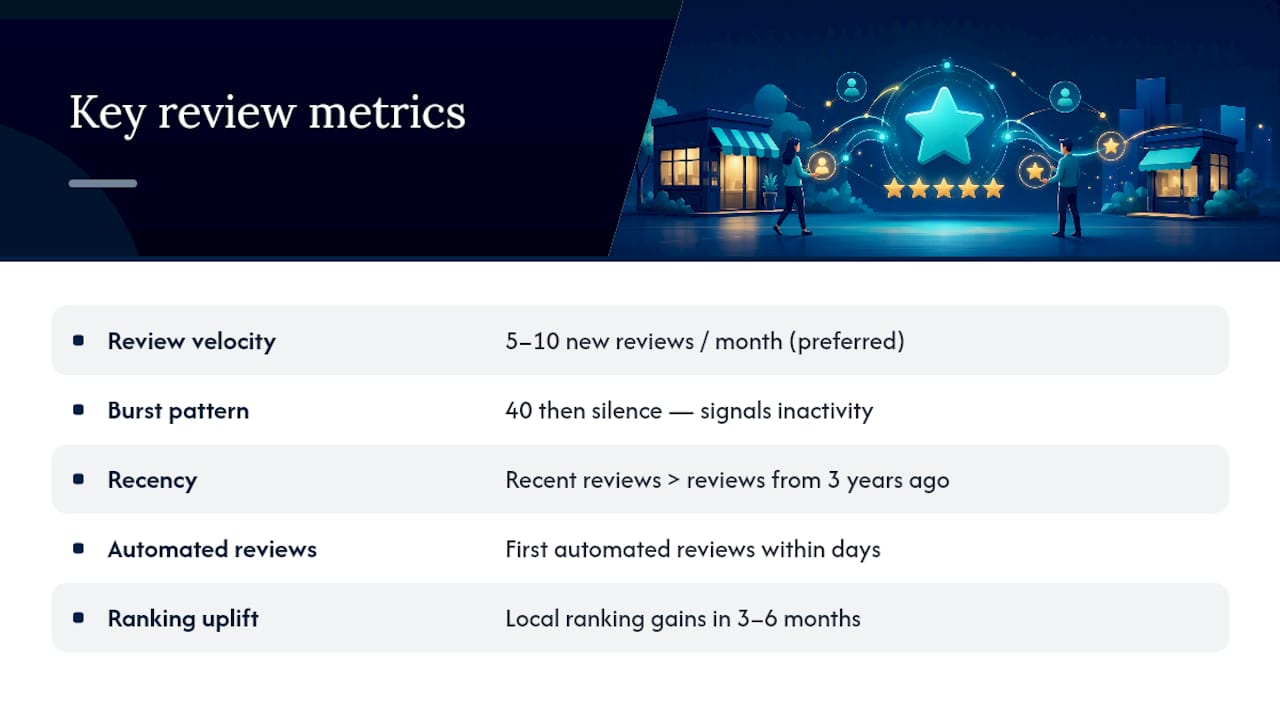
Track review velocity, meaning new reviews per month, over your star rating alone. A steady pace of 5 to 10 new reviews monthly signals an active business better than a single burst of 40 reviews followed by silence.
Recency matters just as much. Many consumers weigh only recent feedback when deciding whether to trust a business, so a profile with reviews from three years ago and nothing since looks stale even with a strong average rating.
Watch your reply rate and the click-through rate on your shortened review link if you’re tracking clicks separately from submissions. Expect your first automated reviews within days of launching the system, but local ranking improvements from increased review volume typically take three to six months to show up in search results.
Connecting Google Reviews to Your Broader Reputation
Google reviews carry outsized weight because they show up directly in search and Maps results, but they’re one piece of a bigger reputation picture. Customers researching a plumber, dentist, or contractor increasingly check Yelp, Facebook, industry-specific platforms (Angi for contractors, Healthgrades for medical practices), and even your own website’s testimonial page before deciding.
Treat these channels as connected, not separate projects. If your follow-up message includes a Google review link, consider a lighter secondary touch, months later, pointing loyal repeat customers toward a platform relevant to your industry. Don’t ask for reviews on five platforms at once. That splits attention and usually results in fewer reviews everywhere instead of more anywhere.
Consistency across platforms matters for trust, too. If your Google profile shows 4.8 stars but your Facebook page is riddled with unanswered complaints, savvy customers notice the gap. Monitor all your active listings on a regular schedule, even a simple monthly check, so a negative pattern on one platform doesn’t quietly undercut the credibility you’ve built elsewhere.
Your website plays a role here as well. A dedicated testimonials or reviews section that pulls from multiple platforms, updated periodically, reinforces what a Google star rating alone can’t: breadth of praise across different customer touchpoints. This kind of cross-channel reputation management is exactly where a coordinated local SEO and reputation strategy earns its value, because it treats review generation as one input into a larger local visibility system rather than an isolated task.
Where Review Requests Cross Into Legal or Ethical Gray Areas
Google’s policy is the floor, not the whole picture. A handful of legal and ethical issues sit outside Google’s rules but still carry real risk for small businesses.
Federal Trade Commission guidance treats fake or deceptive reviews, including reviews written by employees, family members, or paid actors pretending to be genuine customers, as a form of consumer deception. That applies regardless of what Google’s own terms say. Never write reviews yourself under a customer’s name, and never ask staff to post reviews for their own employer without clearly disclosing the relationship, if you allow it at all.
Privacy law also matters more than most owners realize. If your follow-up requests go out by text message, you’re subject to the Telephone Consumer Protection Act, which generally requires prior consent before sending automated marketing texts. Email requests fall under CAN-SPAM rules, which require an unsubscribe option and accurate sender information. These aren’t Google’s problem to enforce, but a customer complaint to a regulator is a real headache regardless of what your Business Profile policy says.
Ethically, the line is simpler than the law: ask everyone the same way, don’t filter who gets asked based on how happy you think they are, and never make a review contingent on anything of value changing hands. A business that follows that standard rarely runs into legal trouble, because deceptive review practices and policy violations tend to overlap almost completely.
Getting Reviews From Different Customer Types and Platforms
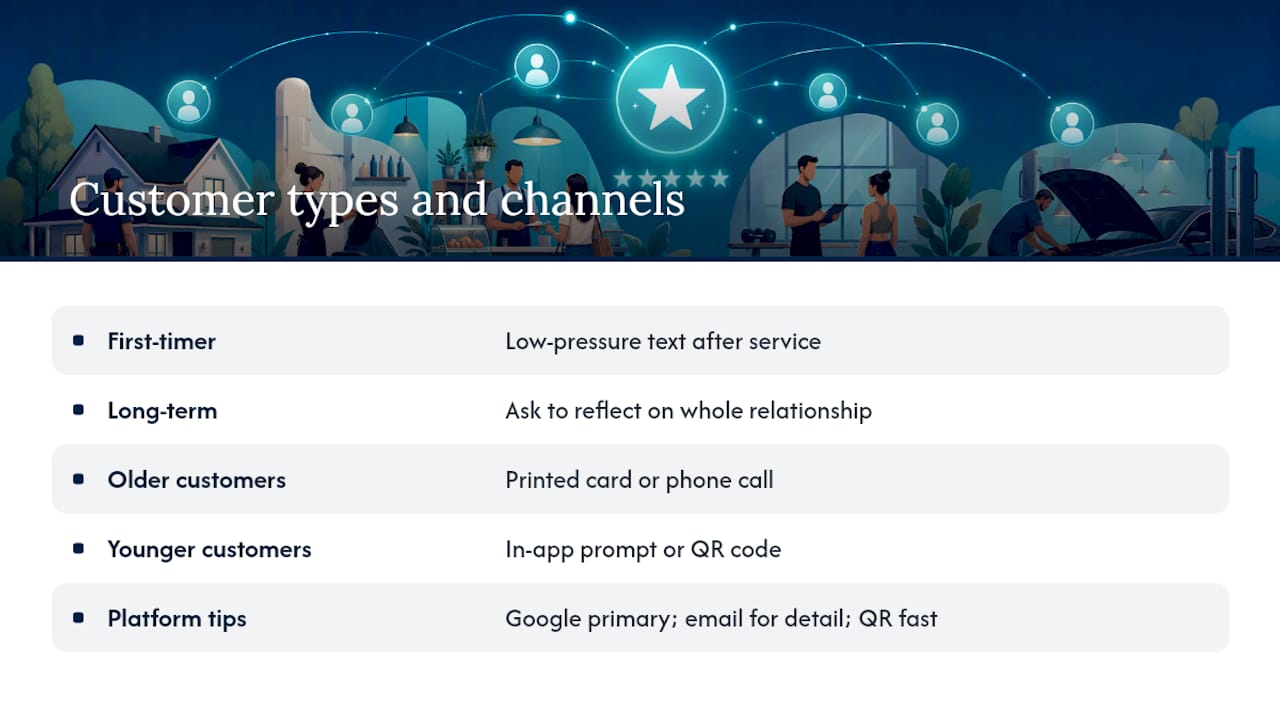
Not every customer responds to the same ask, and treating your review strategy as one script for everyone leaves reviews on the table. A first-time customer needs a different tone than a five-year regular. The first-timer might respond well to a simple, low-pressure text right after service. A long-term client, on the other hand, might leave a richer, more detailed review if you ask them to reflect on the whole relationship rather than a single transaction.
Consider the channel each customer type actually uses. Older customers in many service categories respond better to a printed card or a phone call mention than a text message. Younger customers, particularly in retail and hospitality, are more likely to act on an in-app prompt or a QR code they can scan without typing anything.
Diversify where you’re gathering feedback, too, even while keeping Google as your primary focus. A landscaping company might get more written detail from an email survey, while a restaurant might see faster responses from a QR code on the table. Customers who leave detailed reviews on one platform are often willing to leave a shorter version elsewhere if you make it easy and don’t ask too often.
Authenticity comes from variety in wording and timing, not from every review sounding like it followed the same script. If your review profile shows customers mentioning different employees, different services, and different moments (a fast repair, a friendly receptionist, a fair price) that variety itself signals real feedback rather than a templated campaign, which is part of why a mix of positive and detailed reviews reads as more trustworthy to both customers and to Google’s own systems.
Why This Workflow Works: A Publisher’s Take
Local visibility and reputation are the same conversation in disguise. Experience shows that a QR code plus one automated follow-up beats any clever script, because consistency, not cleverness, drives review velocity. This system slots directly into a broader local SEO campaign rather than standing apart from it. For deeper examples of how this plays out across different business types, our case studies and contact page are worth a look.
— Michael
Let Tradewindsunitedmedia Set Up Your Review System
A practical alternative to hiring a specialized reputation firm on top of your existing marketing spend is a single team that handles your review workflow, your Google Business Profile, and your local SEO reporting together, so nothing falls through the cracks between vendors.

Here’s what that looks like in practice. This service audits your current Google Business Profile setup and review history, builds or verifies your profile if it isn’t already claimed, creates your review link and QR code assets, and coaches your front-line staff on scripts that fit your business. From there, automated follow-ups run on a schedule sized to your customer volume, and you get monthly reporting that ties review growth to actual local search ranking changes, not just a star count. Businesses tracking this kind of data alongside revenue often lean on analytics practices built for measuring real impact rather than vanity metrics.
If your Google reviews have stalled or your profile has sat untouched for months, talk to Tradewindsunitedmedia about reputation management and local SEO and get a straightforward plan for your specific business, not a generic template.
Sources
For policy questions or technical setup, go straight to Google Business Profile Help for review policies and instructions for creating review links and QR codes.
- Create a Google link or QR code to request reviews – Google Business Profile Help
- How To Get More Google Reviews for Your Business (Legal, 2026 Guide) | ReplyWithCare
- Google Reviews: How to Get More for Your Business (2026) – Shopify
FAQ
Is It Legal to Buy Google Reviews?
No. Buying reviews violates Google’s terms of service and can trigger review removal, profile restrictions, or suspension, and it can also expose you to Federal Trade Commission scrutiny for deceptive advertising.
How Do I Get 1,000 Google Reviews?
There’s no shortcut to a number that large. It comes from consistently asking every customer over months or years, typically at a pace of 5 to 10 new reviews monthly, which compounds into hundreds over a couple of years for a busy local business.
How Can I Increase Google Reviews for Free?
Use your existing Google Business Profile to generate a free review link and QR code, place it on receipts and invoices, ask verbally at the moment of peak satisfaction, and send one follow-up text or email. None of this requires paid software.
How Many 5-Star Reviews Does It Take to Raise My Rating?
It depends on your current rating and total review count. A business with fewer reviews needs far fewer new positive reviews to move its average than one with many reviews, since each new review carries less mathematical weight as your total grows.
Should I Ask Every Customer for a Review or Just Happy Ones?
Ask every customer the same way. Filtering who gets asked based on how satisfied you think they were is a form of review gating, which violates Google’s policy and can put your profile at risk.




