Most missing Google reviews fall into three buckets: automated spam filtering, a permanent policy removal, or an account or profile restriction. Moderation delays typically resolve within a few days, while account-level issues can make a review visible only to the person who posted it. Start by checking your account status, then wait 24–48 hours before running the troubleshooting checklist below.
TL;DR:
- Reviewers should check the contributions page for a pending status, then view the listing in incognito mode; repeated edits can restart moderation.
- An account restriction can hide all of one reviewer’s Maps contributions, while a profile pause blocks new content on one listing; neither guarantees reinstatement.
- Business owners should verify the profile, check the Reviews Management Tool for flags or appeals, then contact support with dates, screenshots, and reviewer details.
- Google permanently removes reviews that violate policy, including incentivized or fake posts, so businesses should never offer payment or perks for customer feedback.
Table of Contents
- How Google Moderates Reviews Before They Go Live
- Common Causes and Quick Fixes When a Review Doesn’t Appear
- Checklist for Reviewers: Is Your Review Pending, Hidden, or Lost?
- Checklist for Business Owners: Prioritized Steps When Reviews Go Missing
- Account Restrictions Versus Profile Pauses: What to Realistically Expect
- What Businesses Should Prioritize While a Review Is in Limbo
- Getting Steady Help With Review Visibility and Reputation
- FAQ
- Sources
- Official Google Pages and Community Threads to Consult
How Google Moderates Reviews Before They Go Live
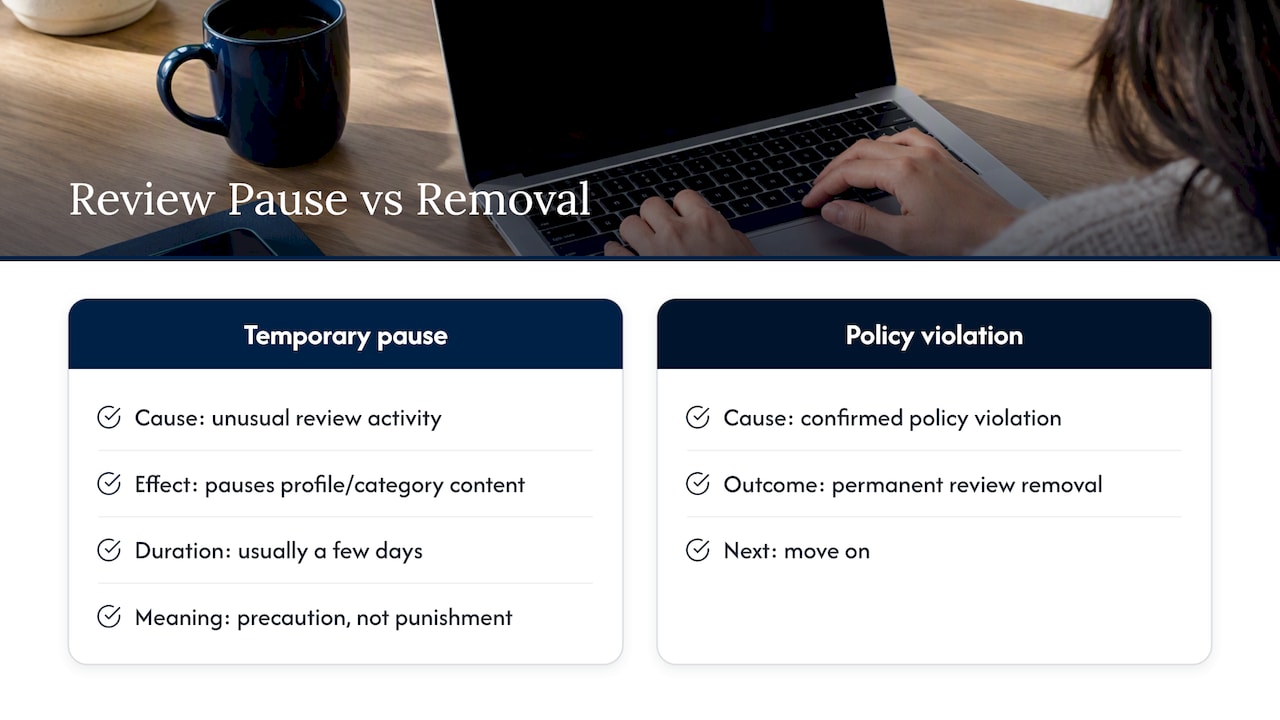
Google relies on a mix of machine learning and human moderators to keep reviews genuine and catch spam, fake accounts, and incentivized posts before they reach the public page. This system also watches for unusual activity, like a sudden burst of reviews for one business, which can trigger a temporary pause on all user-generated content for that profile or category.
These pauses are not punishments. They’re a precaution while the system sorts genuine activity from coordinated spam, and Google says they usually last a few days. Policy violations are different: once a review is confirmed to break the rules, removal is permanent. Understanding this distinction matters because it tells you whether to wait or move on.
Common Causes and Quick Fixes When a Review Doesn’t Appear
A few patterns explain most disappearing or delayed reviews:
- Automated spam filter: Wait 24–48 hours, ask the reviewer to confirm their account is in good standing, and avoid editing the review repeatedly since that can reset the moderation clock.
- Policy violations: Check Google’s prohibited content rules for incentivized, fake, or conflict-of-interest reviews; a review removed on these grounds will not come back.
- Account-level restrictions: If a reviewer’s contributions are hidden across all their reviews, not just one, the account itself may be flagged, and restoration depends on an automated review cycle rather than a manual fix.
- Profile-level content pauses: After a suspected spam spike, a business may see an email or banner noting that reviews are temporarily paused, typically for a few days.
- App or cache issues: A hard refresh, an app update, or checking in an incognito window often reveals a review that was posted correctly but hasn’t synced on your device yet.
- Merged or recently edited profiles: Combining two business listings can delay when reviews from either original profile show up on the merged page.
Pro Tip: Before assuming the worst, check the listing from a different device or browser. What looks “missing” is sometimes just a caching issue on your end.
Checklist for Reviewers: Is Your Review Pending, Hidden, or Lost?
If you posted a review and can’t find it, work through these steps in order:
- Open your Google account’s contributions page and look for a “Not posted” or pending status message.
- View the business listing on Google Maps in incognito mode or while signed out to see what the public actually sees.
- Resist the urge to repost or edit the same review multiple times; community troubleshooting guidance notes that repeated edits can restart moderation and extend the delay.
- Update the Google Maps app and your operating system, or try submitting from the web version instead of the app.
If none of these steps turn up your review after a few days, it’s worth checking whether your account has a broader restriction rather than a one-off glitch.
Checklist for Business Owners: Prioritized Steps When Reviews Go Missing
Work through these in order of impact:
- Confirm your business profile is verified and check your Reviews Management Tool for any flags or available appeal options.
- Never solicit incentivized reviews. Google’s policy explicitly forbids offering payment or perks in exchange for reviews, and violations can trigger broader moderation action.
- If you received an email or banner about paused content, monitor your inbox and allow the typical few-day window to pass before escalating.
- If a reasonable wait produces no change, contact Google Business Profile support with specific dates, screenshots, and reviewer details as documentation.
Pro Tip: Keep a simple log of when reviews were posted and when they disappeared. That timeline becomes your strongest evidence if you need to escalate to support.
Account Restrictions Versus Profile Pauses: What to Realistically Expect
These two issues get confused often, but they work differently. An account-level restriction hides everything a specific reviewer has posted across Maps, and community reports describe these as resolved only through future automated review cycles, with no guaranteed manual override.
A profile-level pause is narrower: it affects new content on one business listing during a suspected spam spike and usually lifts within a few days. Formal appeals are limited outside specific regulatory regions. Outside of places covered by frameworks like the EU’s Digital Security Act, there’s no universal path for a business owner to force a review’s reinstatement, only the standard report-and-wait workflow.
What Businesses Should Prioritize While a Review Is in Limbo
Filters catch some genuine reviews by mistake, and that’s frustrating but not unusual. Rather than chasing workarounds, we think the better use of your time is documenting every outreach attempt to customers and keeping that evidence ready if you do contact support. Use the waiting period to tighten up your profile details and diversify how you collect feedback instead of depending on any single channel.
— Michael
Getting Steady Help With Review Visibility and Reputation
Chasing down a missing review on your own often means toggling between incognito tabs, support threads, and guesswork about timelines. We built our reputation management process to take that uncertainty off your plate.

Our team can help troubleshoot Google Business Profile issues, identify process issues, and document steps taken with platform support. Specifically, we:
- Audit your profile for verification status, compliance flags, and signs of restriction.
- Track review visibility over time and report what changed and when.
- Document support interactions so you have a clear record if an issue needs escalation.
If a review disappeared and you want a clear answer instead of more guessing, request a profile health check and we’ll walk through what’s happening with your listing.
FAQ
Why isn’t my Google review showing up publicly?
Your review may still be in automated moderation, which usually clears within a few days, or it may have been removed for violating Google’s content policy. It’s also possible your account has a restriction that hides your contributions from everyone except you.
How do I retrieve a missing Google review?
Check your account’s contributions page for a status message, then view the business listing in incognito mode to see what’s public. If the review doesn’t reappear after a reasonable wait, there’s no guaranteed way to force restoration since automated systems control most removals and restorations.
What happened to Google reviews that suddenly disappeared?
Some vanish due to policy enforcement, others due to temporary profile-wide pauses triggered by a suspected spam spike, and a smaller number due to account-level restrictions on the reviewer. Each cause has a different timeline and a different likelihood of the review coming back.
Why can I see my Google review but others can’t?
This usually means the review is cached on your device or browser but hasn’t fully synced across Google’s systems yet, or your account is subject to a restriction that only affects how your contributions appear to other people. Trying an incognito window or a different device usually clarifies which situation you’re dealing with.
Sources
- Searchenginewatch
- Report inappropriate reviews on your Business Profile – Google Business Profile Help
- Prohibited & restricted content – Maps User Generated Content Policy Help
Official Google Pages and Community Threads to Consult
For policy details, see Google’s guidance on reporting inappropriate reviews and prohibited content. For real-world examples, Google’s Maps Community hosts threads on account restrictions and review removal patterns. For broader reputation workflow guidance, see this step-by-step guide for SMBs.