The best UTM tagging practice is simple: tag every external link you control, use the same lowercase naming rules every time, never tag links inside your own site, and test each link before it goes live. Do that and Google Analytics 4 (GA4) will show which emails, ads, posts and listings bring you customers. Skip it and your reports fill with “(not set)” rows and traffic that looks like it came from nowhere.
This guide is written for owners and managers of small and local businesses. It covers what each parameter does, how to build a naming convention your whole team can follow, how to tag email campaigns, how to test a link, and how to check the results in GA4.
TL;DR
- Always set
utm_source,utm_mediumandutm_campaigntogether. Useutm_contentandutm_termonly when you need to tell links or paid keywords apart. - Use lowercase everywhere, underscores instead of spaces, and one fixed spelling per source and medium. GA4 treats “Email” and “email” as different values.
- Tag only links that live outside your website. UTMs on internal links can overwrite the real source of a visit.
- For email, keep
utm_medium=emailon every send and name the campaign after the message, then useutm_contentto separate buttons and links. - Keep a shared spreadsheet of every tagged URL, test each link in a few browsers, and check Traffic acquisition in GA4 after launch.
Table of Contents
- What UTM tags do, in plain terms
- The five parameters and when to use each
- Build a naming convention before you tag anything
- Which links to tag, and which to leave alone
- UTM tagging for email campaigns
- Build and test every link
- Check your results in GA4
- Perspective
- Let us handle the tracking setup
- FAQ
- Sources
What UTM tags do, in plain terms
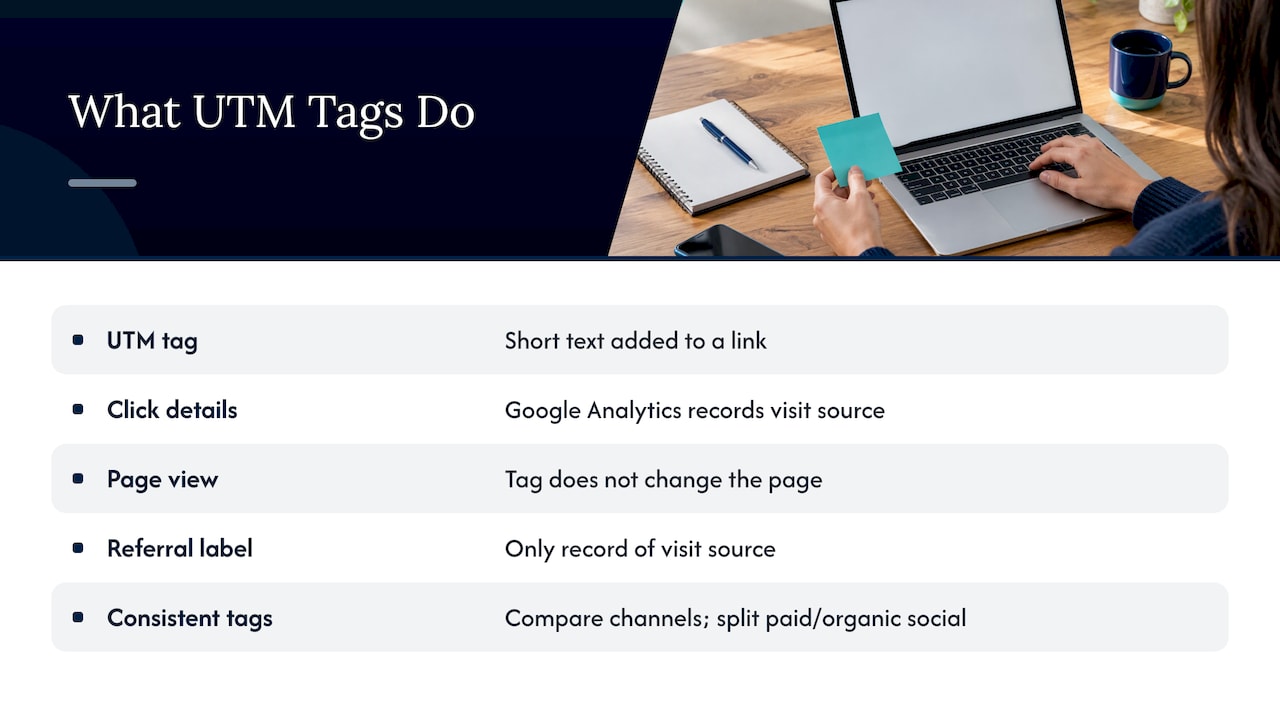
A UTM tag is a short piece of text added to the end of a link. When someone clicks, the extra details travel with the visit, and Google Analytics reads them to record where the visitor came from. HubSpot describes a UTM code as a snippet that can hold up to five parameters: campaign, source, medium, content and term. The name comes from Urchin, the software company Google acquired and turned into Google Analytics.
The tag does not change the page the visitor sees. It only labels the click. That is why the labels matter so much: the label is the only record you will have of which email, ad or social post sent the visit.
For a small business this answers the questions that decide budgets. Did the spring newsletter bring more visits than the Facebook post? Did the flyer with a QR code get scanned? Is the Google Ads campaign sending people who actually call? Shopify notes that consistent tags let you compare several channels pointing at the same page, and separate paid from organic social traffic.
The five parameters and when to use each
Google’s own documentation on campaign URLs lists the standard parameters. Three are the working core, and two are optional.
| Parameter | What it answers | Example value | Required? |
|---|---|---|---|
utm_source | Which platform or sender | newsletter, facebook, google | Yes |
utm_medium | Which type of channel | email, cpc, social, qr | Yes |
utm_campaign | Which promotion or initiative | spring_tuneup_2027 | Yes |
utm_content | Which link or creative | hero_button, video_ad | Optional |
utm_term | Which paid keyword | ac_repair_stuart | Optional |
The CDC’s campaign link tagging job aid takes the same view: medium, source and campaign are required for successful data collection, while content and term add detail about the placement of the link.
Google also recommends setting all relevant parameters whenever you set any, in particular source, medium and campaign, along with utm_id and utm_source_platform. Missing values show up as “(not set)” in reports. A link with only a source is a link you will struggle to read later.
How the three core fields fit together
Think of them as a sentence: who sent the click (source), how it was delivered (medium), and why (campaign). A postcard QR code for a fall promotion might read: source postcard, medium qr, campaign fall_promo_2027. A Facebook post for the same promotion: source facebook, medium social, campaign fall_promo_2027. The shared campaign name lets you add everything up. The CDC job aid gives the same example, using one campaign name across paid search, banner and email links to see consolidated results at a glance.
Build a naming convention before you tag anything
People searching for UTM naming conventions are usually trying to fix a mess that already exists. Fix it by deciding the rules once and writing them down.
Rule 1: lowercase only
Google’s documentation says to keep values case-consistent because capitalization creates separate values. Plausible’s guide repeats the warning: inconsistent capitalization splits one campaign across several rows in your dashboard. UTMManager’s troubleshooting guide gives a typical case: fall_sale, Fall_Sale and fall-sale showing up as three campaigns. Lowercase is the standard that stops this.
Rule 2: underscores, no spaces
The University of Minnesota’s UTM guidelines recommend underscores between terms. Pick underscores or hyphens and never mix them. Underscores are what the CDC and Minnesota both use, so use them and move on.
Rule 3: one name per platform and per channel
Use one utm_source per platform and one utm_medium per channel. Not “fb” in one link, “facebook” in another and “Facebook.com” in a third. Here is a starter list a local business can adopt as is:
| Where the link lives | utm_source | utm_medium |
|---|---|---|
| Monthly newsletter | newsletter | email |
| Google Ads search campaign | google | cpc |
| Facebook organic post | facebook | social |
| Instagram bio link | instagram | social |
| Google Business Profile website button | google_business_profile | organic_local |
| Printed flyer or yard sign QR code | flyer | qr |
| Partner or chamber of commerce listing | chamber_of_commerce | referral |
Rule 4: name campaigns so a stranger can read them
Short and descriptive wins. A campaign name should tell a new employee what it was without a decoder. Larger organizations build structured names. The University of Illinois brand guidelines, for example, describe a campaign structure with components such as the marketing activity, fiscal year, audience and date. A small business can borrow the idea in lighter form: offer, then season or month, then year. spring_tuneup_2027 is plenty.
Rule 5: keep the order the same
Minnesota’s guidance also suggests ordering the parameters source, medium, campaign every time, so that if a long URL is cut off, the most important fields survive. It is a small habit that pays off when links get pasted into systems with length limits.
Rule 6: no personal information, ever
Page URLs are collected by analytics tools, so anything you put in a tag can be stored. Shopify warns against putting personal information in UTM values. That means no customer names, email addresses or phone numbers in tags, including in email links.
Which links to tag, and which to leave alone
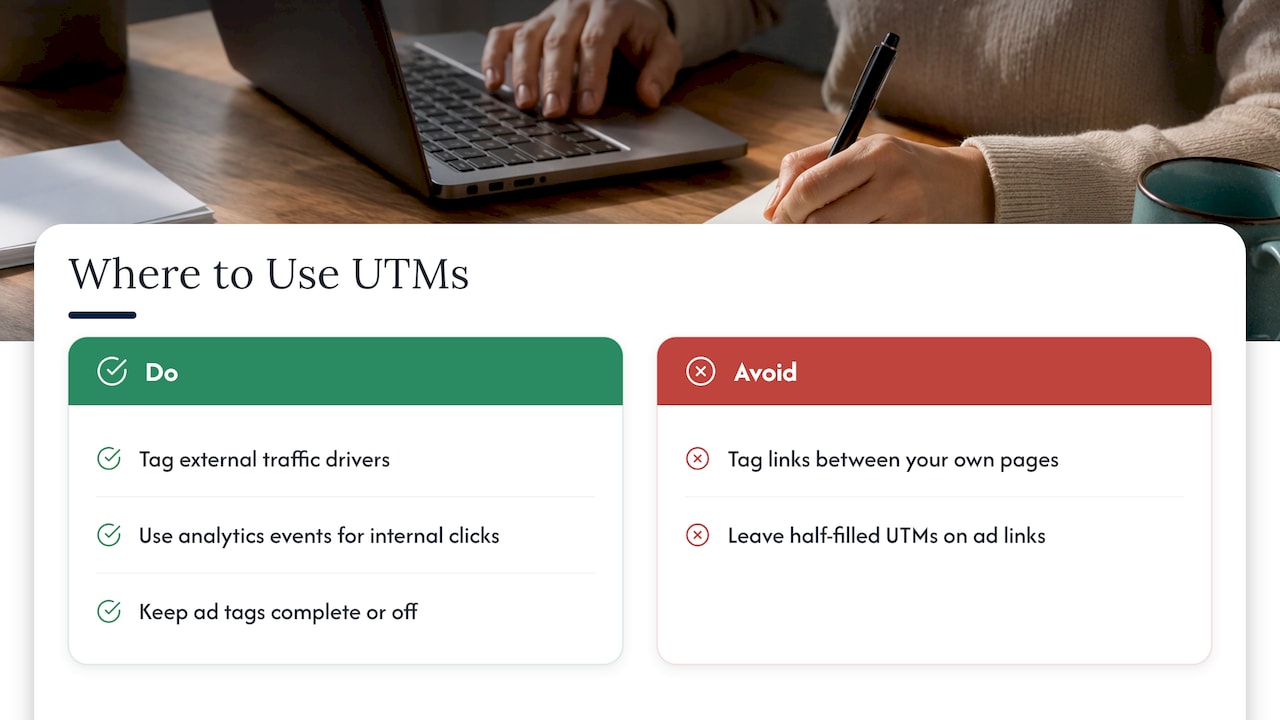
Tag anything that sends people to your site from somewhere you control outside it: email, paid ads, social posts, QR codes, partner pages, and the website button on your listings. Do not tag links between pages on your own site.
The University of Minnesota’s guidelines say to use UTMs only with traffic drivers external to your website, because internal ones can misrepresent metrics by starting a new session. Plausible explains the mechanism: a UTM overwrites the original referral source, so a visitor who came from your newsletter can be recorded as a new direct visit after clicking an internally tagged banner. If you want to track clicks on a homepage banner or a button, use an analytics event instead.
A related point: when Google Ads auto-tagging is on, Google Analytics normally uses the click ID. But Google’s documentation on traffic-source dimensions says that if the click ID cannot be used as intended and any UTM parameter is on the URL, GA derives all the traffic source values from the UTMs alone. A half-filled manual tag on an ad link can therefore leave gaps in your paid reports. If you run ads, keep manual tags on them complete or leave them off and let auto-tagging work. Our guide to Google Ads conversion tracking covers the conversion side.
UTM tagging for email campaigns
Email is where messy tagging costs the most, because email clicks are easy to lose. When emails go out untagged, clicks often get lumped in with direct traffic, and you cannot tell the newsletter from someone typing your address.
A workable email setup has four parts:
- Medium is always
email. Not “Email”, not “e-mail”. One spelling, forever. - Source names the sender or list.
newsletter,promo_listorcustomer_updatesall work. Pick names that describe the audience rather than the software. - Campaign names the message.
spring_tuneup_2027for the send, and the same name in your social posts and ads for the same promotion if you want a combined view. - Content tells links apart. When one email has a hero image link, a button and a footer link, give each its own
utm_content, such ashero_link,main_buttonandfooter_link. Now you know which one earned the click.
Set defaults in your email platform
Most email platforms can add UTM tags automatically. Set the values that never change once, then override only when needed. A Klaviyo UTM guide from Terminus describes this model: fixed defaults for source and medium, a campaign value that pulls the campaign or flow name, and overrides for the exceptions. Apply the same discipline to automated emails like welcome series and review requests, not only to one-off newsletters.
A worked example
A plumbing company sends a March email about water heater checkups. The button link looks like this:
https://example.com/water-heater-checkup?utm_source=newsletter&utm_medium=email&utm_campaign=water_heater_checkup_2027&utm_content=main_button
The link after the footer text uses utm_content=footer_link. In GA4 both roll up under one campaign, and you can see that the button outperformed the footer. Next month the team reuses the same structure with a new campaign name. Nobody has to guess what Mar-Email-v2-FINAL meant.
Build and test every link
The structure is straightforward. Per the University of Minnesota guidelines, the tags start with a question mark after the main URL, each parameter is a key=value pair, and pairs are separated by an ampersand. Google offers a free campaign URL builder that assembles this for you, and a shared spreadsheet with locked drop-downs for source and medium makes it harder to invent new spellings.
A pre-launch checklist
- Fill in the spreadsheet row first: date, channel, source, medium, campaign, content, final URL, owner.
- Build the URL from those cells so nothing is retyped by hand.
- Click the link in several browsers. The CDC job aid recommends testing in Chrome, Edge and Safari to make sure the link does not error or redirect to a page that drops the parameters.
- Use secure (https) URLs. The CDC also lists this among its best practices.
- If you use a link shortener, build the full tagged URL first and shorten it afterward. Cuttly’s guidance is that adding UTMs to an already shortened link will not work and breaks attribution.
- Run a test hit with “test” values so you can recognize and exclude it later. Minnesota’s guidelines suggest this approach, and Wicked Reports’ live test instructions describe a similar one: tag with test values, visit the page, complete the action and confirm it was recorded.
Watch for redirects
A common failure is a redirect that strips the query string. The visitor lands on your page, but the tags are gone, so GA4 never sees them. UTMManager lists redirects that remove parameters and published links that differ from the tagged version as frequent causes. This happens often after a website redesign or when a page moves to a new address, so retest your active links whenever the site changes.
Check your results in GA4
In GA4, go to Reports, then Acquisition, then Traffic acquisition. Google’s documentation says this report offers Session source/medium, Session medium, Session source and Session campaign. The default view groups by channel, so change the primary dimension dropdown to Session source/medium or Session campaign to see your actual UTM values.
If a new link does not appear right away, that is normal. Analytics Mania’s troubleshooting guide suggests using DebugView to confirm the tags arrive, then waiting for standard reports to catch up.
Monthly cleanup routine
- Sort Session source/medium and look for near-duplicates such as
facebookandFacebook. - Look for “(not set)” in campaign. It points to a link with missing parameters.
- Look for your own internal pages showing as a source. That signals an internally tagged link.
- Compare your spreadsheet against what GA4 shows. Anything in GA4 that is not in the sheet was tagged off-process.
Perspective
We see the same pattern with small business owners who come to us after a frustrating run with another agency: the reports they were shown had numbers, but nobody could say which ad, email or listing produced a customer. In most cases the tagging was never standardized, so the data could not answer the question.
Our view is that tracking is part of the marketing, not an add-on. A campaign whose links are tagged consistently gives you a straight answer to what you spent and what came back. That is why our approach to SEO, Google Ads and reputation work is built around clear performance reports and regular updates, so you can see how an investment turns into business results.
If you take one thing from this guide, make it the spreadsheet. A shared, locked naming list costs an afternoon and keeps your data usable for years.
Michael
Let us handle the tracking setup
Tagging is the easy part to describe and the easy part to let slide. If you would rather have a team set up the naming system, tag your campaigns and report the results in plain language, that is what we do for small and local businesses. Our Google Ads management and SEO services come with performance reporting, so you can see which channels are bringing customers.
To talk through your current setup, start at Tradewinds United Media. If you want to understand how tracking connects to the bottom line first, read our small business guide to marketing ROI tracking.
FAQ
What is the minimum set of UTM parameters I should use?
Use utm_source, utm_medium and utm_campaign on every tagged link. Google’s documentation recommends setting all relevant parameters together because missing values appear as “(not set)” in reports. Add utm_content when a page or email has several links, and utm_term for paid keywords.
Does capitalization really matter in UTM tags?
Yes. GA4 treats “Email” and “email” as two different values, so your results split across rows. Use lowercase for every parameter and you avoid the problem entirely.
Should I add UTM tags to links on my own website?
No. Internal UTMs can overwrite the original source of a visit and start a new session, which makes your reports less accurate. Tag links that come from outside your site, and use analytics events for on-site clicks.
How do I name UTM campaigns for email?
Keep utm_medium=email, name the source after the list or sender, and give each campaign a descriptive lowercase name with underscores, such as spring_tuneup_2027. Use utm_content to tell apart the buttons and links within one email. Set the unchanging values as defaults in your email platform.
Why are my UTM campaigns not showing in GA4?
Check whether a redirect is stripping the parameters, whether the published link matches the tagged one, and whether you are viewing the right dimension. In Traffic acquisition, switch the primary dimension to Session source/medium or Session campaign. Also allow time for standard reports to update.
Sources
- URL builders: Collect campaign data with custom URLs (Google Analytics Help)
- Traffic-source dimensions, manual tagging, and auto-tagging (Google Analytics Help)
- Tracking Website Engagement Using Campaign Links (CDC)
- UTM Tracking Guidelines (University of Minnesota)
- UTM Guide (University of Illinois Brand Guidelines)
- How to run a live test (Wicked Reports)
- UTM codes and tracking URLs (HubSpot)
- What is UTM tracking (Jetpack)
- UTM parameters: how to use UTM tracking links (Shopify)
- How to use UTM parameters (Plausible)
- UTM campaigns not showing in GA4 (UTMManager)
- UTM parameters not working in GA4 (Analytics Mania)
- Klaviyo UTM tracking guide (Terminus)
- UTM parameters and URL shorteners (Cuttly)