

A small business can have a working, lead-generating website fast by doing three things right: leading with a clear value proposition, choosing a mobile-first template or a small custom build, and running a launch checklist that covers SEO, speed, and analytics. That is the whole game. The rest is execution.
Your two-path action plan:
- DIY path: Pick a template with a clean hero section, build five core pages (home, services, about, contact, FAQ), connect Google Analytics 4 and Google Search Console, then run a PageSpeed Insights check before you go live.
- Hire path: Request a fixed-scope proposal from a web design agency, confirm they include performance targets and a reporting cadence in the contract, and ask for a free audit of your current site first.
According to Figma’s web design resource library, users form a first impression very quickly. That means your homepage has less than a blink to signal credibility. Get the value proposition above the fold, put a single primary CTA next to it, and you are already ahead of most small business sites.
Pro Tip: Before you touch a template or call an agency, run your current site (or a competitor’s) through Google PageSpeed Insights. The score tells you exactly what you are up against and where the biggest gains are.
Table of Contents
- Which platform type fits your business: builder, CMS, ecommerce, or custom?
- What pages does every small business website need?
- What SEO, performance, and accessibility basics does your site need?
- What does a small business website realistically cost and how long does it take?
- Should you build your own site or hire a professional?
- What does your launch checklist and post-launch plan look like?
- Key Takeaways
- What Tradewindsunitedmedia actually prioritizes in small business web design
- Tradewindsunitedmedia’s done-for-you web design and marketing service
- Tools and sources worth bookmarking
Which platform type fits your business: builder, CMS, ecommerce, or custom?
The right platform depends on what your site needs to do, not on what is most popular. Zapier’s guide to website builders for small business identifies five selection criteria that matter most: ease of use, built-in SEO tools, third-party integrations, template flexibility, and payment processing capability.
| Business Type | Recommended Platform Category | Best For |
|---|---|---|
| Local service provider | Hosted website builder | Fast launch, low maintenance, no coding |
| Retailer or product seller | Ecommerce-focused platform | Product catalog, cart, payments |
| Content-heavy or blog-driven | Self-hosted CMS | Full content control, SEO flexibility |
| Complex integrations or custom UX | Custom build | Unique workflows, API-heavy needs |
| Budget-constrained but conversion-focused | Premium template + small custom work | Best ROI for most small businesses |
Hosted builders are the fastest path to a live site. They handle hosting, security updates, and most technical maintenance automatically. The trade-off is limited flexibility. If your business grows and needs custom integrations or a large product catalog, you may outgrow the platform.

Self-hosted CMS platforms give you more control over SEO, content structure, and design. They require more technical management, including plugin updates, backups, and occasional security patches. Good for businesses that publish content regularly or need granular control over metadata.
Ecommerce-focused platforms are purpose-built for selling. They handle inventory, shipping, taxes, and payment processing out of the box. If you sell more than a handful of products, this category is worth the higher monthly cost.
Custom builds make sense when your business has a workflow no template can accommodate: a multi-location booking system, a complex product configurator, or a customer portal. Budget and timeline both increase significantly. For most small businesses, custom is overkill at launch.
The hybrid approach (a premium template with targeted custom work on the homepage and key landing pages) often delivers the best return on a constrained budget. You get a professional look without the full cost of a ground-up custom build, and a good agency can simplify complex product catalogs within that framework.
Questions to ask yourself before choosing:
- Do I need to sell products online now, or is that a future possibility?
- How often will I update content, and can I do it without a developer?
- What third-party tools (CRM, booking software, email platform) must the site connect to?
- What is my realistic budget for year one, including ongoing costs?
What pages does every small business website need?
Shopify’s breakdown of website anatomy makes a useful point: every element on a page, from the header to the footer, should move a visitor toward a conversion. That framing helps you decide what to include and what to cut.
Here is the core page set and what each one needs:
- Landing pages for ads: — Single-purpose pages with no navigation menu, one offer, and one CTA. Shopify’s guidance is clear on this: landing pages should be stripped down to remove every distraction from the conversion goal.
Place at least one primary CTA above the fold on every page. Add secondary CTAs at logical stopping points: after a service description, after a testimonial block, and in the footer. Visitors who scroll to the bottom are often your most interested prospects.
What SEO, performance, and accessibility basics does your site need?
This is where most small business sites leave money on the table. A site that looks great but loads slowly, ranks nowhere, or fails basic accessibility checks is not doing its job.
Core Web Vitals are Google’s measurable thresholds for page experience. According to pxlpeak’s web design guide, the targets are:
- LCP (Largest Contentful Paint): ≤ 2.5 seconds. This measures how fast the main content loads.
- INP (Interaction to Next Paint): ≤ 200 milliseconds. This measures responsiveness to clicks and taps.
- CLS (Cumulative Layout Shift): ≤ 0.1. This measures visual stability (elements jumping around as the page loads).
Sites that pass these thresholds see lower abandonment rates. Sites that fail them lose visitors before the page finishes loading.
On-page SEO checklist:
- Write a unique title tag (50–60 characters) and meta description (150–160 characters) for every page.
- Use one H1 per page, followed by H2 and H3 subheadings in logical order.
- Add LocalBusiness schema markup so Google can display your name, address, phone, and hours in search results. This is one of the highest-impact, lowest-effort SEO tasks for a local business. For more on making local SEO work for your business, the fundamentals start with schema and a verified Google Business Profile.
- Submit an XML sitemap through Google Search Console.
- Check your robots.txt file to confirm you are not accidentally blocking pages from being indexed.
Mobile-first and accessibility must-dos:
- Use a responsive layout that adapts to any screen size. Mobile traffic accounts for a majority of visits on many small business sites, per pxlpeak’s performance data.
- Set touch targets (buttons, links) to at least 44–48px so they are tappable without zooming.
- Keep body font size at 16px minimum.
- Add descriptive alt text to every image.
- Confirm that a keyboard user can navigate the entire site without a mouse. This covers the most common accessibility requirement and protects you from ADA-related complaints.
Testing tools to use at launch:
- Google PageSpeed Insights: Core Web Vitals score and specific recommendations.
- Google Search Console: Index coverage, search queries, and crawl errors.
- Google’s Mobile-Friendly Test: Confirms responsive rendering.
- aXe or WAVE: Free browser extensions that flag accessibility issues with specific fix guidance.
Run all four before you publish. Fix the critical issues first, then address the warnings.
What does a small business website realistically cost and how long does it take?
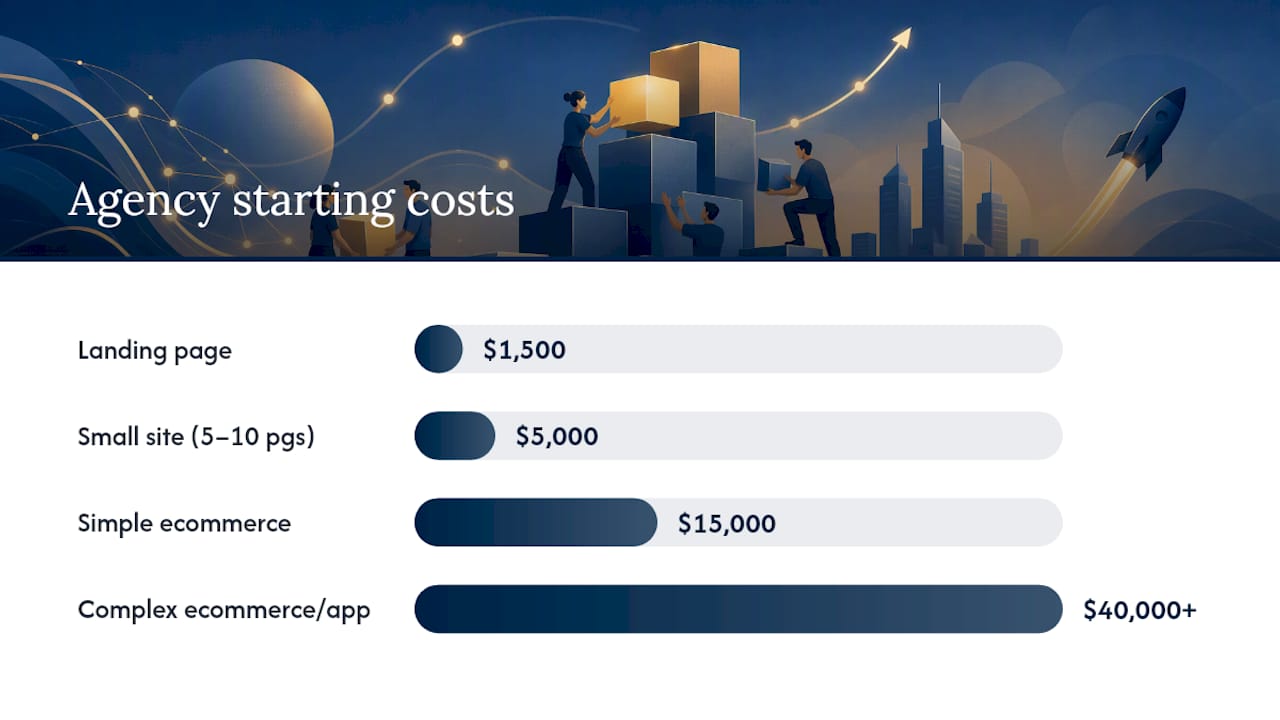
Budget and timeline depend almost entirely on scope. Pxlpeak’s web design cost data gives these ranges as a practical starting point:
| Project Type | Typical Cost Range | Typical Timeline | What’s Usually Included |
|---|---|---|---|
| Single landing page | $1,500–$5,000 | 1–3 weeks | One page, one CTA, basic SEO setup |
| Small business site (5–10 pages) | $5,000–$15,000 | 4–8 weeks | Core pages, mobile-responsive, analytics, basic SEO |
| Simple ecommerce | $15,000–$40,000 | 8–16 weeks | Product catalog, cart, payments, shipping setup |
| Complex ecommerce or custom app | $40,000+ | 16+ weeks | Custom integrations, advanced UX, ongoing dev support |
These are agency rates. DIY platforms cost far less in cash but more in time. Expect to spend 20–40 hours building a five-page site yourself on a hosted builder, plus ongoing time for updates.
Common causes of timeline overruns:
- Content not ready when the designer starts (the most common delay by far)
- Revision cycles that expand beyond the agreed scope
- Third-party integrations (booking systems, CRMs, payment processors) that require back-and-forth with vendors
- Domain and DNS issues at launch
Ongoing costs to budget for:
- Hosting: $10–$50/month for most small business sites; more for high-traffic or ecommerce
- SSL certificate: often included with hosting, but confirm
- Maintenance and updates: $50–$200/month if you hire someone; free if you do it yourself
- Content updates: budget time or money for at least one update per month
The hybrid approach (a premium template with targeted custom work) cuts agency costs significantly while preserving conversion performance. For most small businesses launching their first professional site, it is the right call. If your site is not generating leads at all, diagnosing why your website isn’t making money is a faster starting point than a full rebuild.
Should you build your own site or hire a professional?
The honest answer: it depends on four variables. Complexity, time, conversion importance, and budget. Here is how to think through each one.
Decision criteria:
- Complexity: If your site needs custom integrations, a large product catalog, or a booking system with real-time availability, hire a professional. Template builders handle simple sites well; they struggle with anything that requires custom logic.
- Time: Building a five-page site yourself takes 20–40 hours minimum. If that time is worth more than the cost of hiring, hire.
- Conversion importance: If the site is your primary lead source, the cost of a poorly converting site is higher than the cost of professional design. A site that converts at 1% instead of 3% on 500 monthly visitors is 10 lost leads per month.
- Budget: DIY is the right call when budget is genuinely constrained. A clean, well-structured DIY site beats a cheap agency site built without a strategy.
What to expect from a professional agency:
- A written scope of work that defines deliverables, page count, revision rounds, and timeline
- Content readiness requirements (what you need to provide and by when)
- Performance targets stated in the contract (page speed, mobile score)
- Training on how to update the site yourself after launch
- A reporting cadence: monthly or quarterly performance reports
Interview questions to ask before you sign:
- What does your process look like from kickoff to launch?
- What do you need from me, and when?
- What performance targets are you committing to?
- How do you handle revisions beyond the agreed scope?
- What does post-launch support look like?
Red flags in a proposal:
- No written scope or deliverables list
- No mention of mobile performance or SEO setup
- Vague timelines (“a few weeks”)
- No reporting or analytics setup included
Tradewindsunitedmedia frames its work around measurable lead generation outcomes, which is the right framing. A website that does not generate leads is a cost, not an asset. Ask any agency you evaluate to show you before-and-after performance data from a comparable client.
Pro Tip: Ask for a free audit of your current site before you commit to a rebuild. A good audit tells you whether you need a full redesign or just targeted fixes. Tradewindsunitedmedia offers this at no cost.
What does your launch checklist and post-launch plan look like?
Pre-launch checklist
- DNS is pointed to the correct hosting server and propagation is complete.
- SSL certificate is active (the padlock shows in the browser).
- All 301 redirects from old URLs to new ones are in place.
- Google Analytics 4 is installed and firing on every page.
- Google Search Console is verified and the XML sitemap is submitted.
- Every form has been tested: submission works, confirmation email arrives, and the lead lands in your inbox or CRM.
- Core Web Vitals snapshot taken and critical issues resolved.
- Mobile rendering checked on at least two real devices (not just a browser simulator).
- Final accessibility check run with aXe or WAVE.
- All tracking pixels (Google Ads, Meta, etc.) are verified in Google Tag Manager.
Security basics
- Use a strong, unique admin password and enable two-factor authentication.
- Run automated daily or weekly backups stored off-server.
- Install a malware scanning tool and review alerts weekly.
- Keep all software, themes, and plugins current. Outdated plugins are the most common entry point for site compromises.
Key Takeaways
A well-designed small business website requires a clear value proposition, mobile-first performance, on-page SEO basics, and a structured launch checklist to generate consistent leads from day one.
| Point | Details |
|---|---|
| Mobile-first is non-negotiable | Over 60% of visits on many small business sites come from mobile; use responsive layouts and 44–48px touch targets. |
| Core Web Vitals set the performance floor | Target LCP ≤ 2.5s, INP ≤ 200ms, and CLS ≤ 0.1 to reduce abandonment and support search rankings. |
| Agency costs follow scope | A small business site with a moderate number of pages typically costs $5,000–$15,000 and takes 4–8 weeks at agency rates. |
| Content readiness drives timelines | Prepare all copy and images before design starts; waiting on content is the most common cause of project delays. |
| Tradewindsunitedmedia offers a free audit | Request a no-cost site audit to identify whether targeted fixes or a full redesign will generate the most leads. |
What Tradewindsunitedmedia actually prioritizes in small business web design
Most web design conversations start with aesthetics. The right conversation starts with outcomes: how many leads did the site generate this month, and what changed?
What I can say from working through the framework in this guide is that the gap between a site that looks good and a site that performs is almost always the same three things: a value proposition that is too vague, a mobile experience that was tested in a browser simulator instead of a real phone, and no analytics baseline set at launch. Fix those three and you have a site worth building on.
Tradewindsunitedmedia’s approach puts performance reporting at the center of every engagement. You should know, within 30 days of launch, whether the site is moving the needle. If it is not, you need to know why, not wait until the quarterly review. That transparency is what separates a marketing partner from a vendor.
If you are not sure whether your current site needs a full rebuild or targeted fixes, request a free audit before you spend anything.
Tradewindsunitedmedia’s done-for-you web design and marketing service
Your site is your best salesperson. When it is built right, it works around the clock, generating leads while you focus on the business. Tradewindsunitedmedia delivers professional small business website design paired with local SEO, Google Ads management, and monthly performance reporting so you can see exactly what your investment is producing.

The service covers everything from initial strategy and copywriting through launch, post-launch SEO setup, and ongoing reporting. For businesses with product-heavy sites, the team specializes in simplifying complex catalogs so visitors find what they need and convert faster. For service businesses, the focus is local visibility and lead generation, the combination that fills your calendar.
Ready to find out what your site is missing? Get your free audit and walk away with a clear picture of what to fix first.
Tools and sources worth bookmarking
Use these to test, monitor, and keep learning after launch.
Testing and monitoring tools:
- Small Business Website Design Best Practices & Examples – Forbes Advisor
- What is web design? | Figma resource library
- Parts of a Website: Essential Website Elements, Explained (2026) – Shopify
- The 9 best website builders for small business — Zapier
- Web Design Ultimate Guide: Creating Websites That Convert in 2026
- Generate More Leads Online – Grow Your Business Today
- Tradewinds Website Design Simplify Complex Product Catalogs
- Why Professional Web Design & Digital Marketing Matters | Free Audit
Authoritative reading:
- Forbes Advisor’s small business website design guide: Practical coverage of typography, color, CTAs, and testing for small business sites.
- Figma’s web design resource library: Solid foundation on UX, visual hierarchy, wireframing, and mobile-first principles.
- Shopify’s website anatomy guide: Page-by-page breakdown of every element and its conversion role.
- Zapier’s website builder comparison: Platform selection criteria explained without the sales pitch.
- Pxlpeak’s web design ultimate guide: Deep coverage of Core Web Vitals, cost ranges, and performance-driven design.
One tool per problem:
| Problem | Tool |
|---|---|
| Site loads slowly | Google PageSpeed Insights |
| Not ranking on Google | Google Search Console |
| Mobile layout broken | Google Mobile-Friendly Test |
| Accessibility issues | aXe or WAVE |
| Not generating leads | Tradewindsunitedmedia free audit |




