A GCLID is a click ID that Google Ads adds to your ad links automatically. A UTM is a set of labels you write yourself and add to any link. They do different jobs, and for Google Ads the best setup is usually to keep auto-tagging (GCLID) on and add UTMs as a safety net and for clean reporting. Here is how each one works, what happens when both are on the same link, and what to do in your own account.
TL;DR
- GCLID (Google Click Identifier) is added by Google Ads when auto-tagging is on. It is what powers website and offline conversion tracking and the link between Google Ads and Google Analytics.
- UTM parameters are labels you choose (source, medium, campaign, term, content). They work on any link: email, social posts, other ad platforms, and Google Ads.
- When both are present on a Google Ads click, Google Analytics prioritizes the auto-tagged values for source and medium, so they are not rivals. They are two layers.
- Keep auto-tagging on for Google Ads. Add UTMs with at least source, medium and campaign so reports do not fill up with “(not set)”.
- Every non-Google channel you run needs UTMs, because a GCLID only exists for Google Ads clicks.
Table of Contents
- What a GCLID is and what it does
- What UTM parameters are and what they do
- GCLID vs UTM side by side
- What happens when a link has both
- When to use GCLID, UTMs, or both
- How to set up both without breaking either
- An illustrative example
- Common mistakes that cost you data
- Our perspective
- Get tracking that holds up
- FAQ
- Sources
What a GCLID is and what it does
GCLID stands for Google Click Identifier. Per Google, it is a URL parameter passed along with ad clicks that identifies the campaign and other click attributes for tracking and attribution. You do not create it. It appears because you switched on a Google Ads feature called auto-tagging.
Here is the sequence. When auto-tagging is enabled and someone clicks your ad, Google Ads adds a GCLID to the destination URL. If you also have a Google Analytics tag on your site, the GCLID is stored in a new Google Analytics cookie on your site’s domain. That cookie is how a later action, like a form submission or a purchase, can be tied back to the exact ad click.
What that unlocks for a small business:
- Website conversion tracking. Google states the GCLID is required for Google Ads website conversion tracking.
- Offline conversion tracking. If a lead calls, gets a quote and signs a week later, the GCLID is what lets you report that sale back to Google Ads. We cover that in more detail in our guide to fixing offline conversion tracking.
- Google Ads and Google Analytics linking. Auto-tagging supports importing key event data into Google Ads from Analytics, and pulling Google Ads campaign and cost data into Analytics.
- Detailed ad dimensions in reports. Google Analytics lists a set of auto-tagged dimensions, including account name, ad group, campaign, keyword text and query. That is far more detail than you would normally type into a link by hand.
In short, the GCLID is the machine-generated, per-click identifier that connects the ad platform to your measurement.
What UTM parameters are and what they do
UTM parameters are tags appended to a destination URL to identify the campaign that referred the traffic. Google Analytics documents five fields in its URL builder guidance:
| Parameter | What it identifies | Example value you might choose |
|---|---|---|
| utm_source | The referrer | google, newsletter, facebook |
| utm_medium | The marketing medium | cpc, email, social |
| utm_campaign | Product, slogan or promo code | spring_tuneup |
| utm_term | The paid keyword | emergency_plumber |
| utm_content | Differentiates creatives or links | headline_a, button_blue |
Google’s guidance is to always include utm_source, utm_medium and utm_campaign when you add parameters to a destination URL. Term and content are optional extras.
The important difference from a GCLID is who writes the value. With UTMs, you decide the names, so you control the vocabulary of your reports. You also decide which links get them. A flyer QR code, an email footer, a Facebook post and a Google Ad can all carry UTMs, and they all show up in Analytics under names you recognize.
One practical note from Google: UTM parameters are omitted from the “Landing page + query string” and “Page path + query string” dimensions. The UTM information is not lost. It is captured elsewhere in reporting, including the Page location dimension. If you go looking for your UTMs in a landing page report and do not see them, that is why.
GCLID vs UTM side by side
| GCLID | UTM parameters | |
|---|---|---|
| Who creates it | Google Ads, automatically | You, manually or with a URL builder |
| Where it works | Google Ads clicks only | Any link on any channel |
| What it carries | A per-click identifier tied to campaign details | Labels you choose: source, medium, campaign, term, content |
| Setup | One account setting (auto-tagging) | Tag each URL, or set a tracking template |
| Conversion tracking in Google Ads | Required for website conversion tracking | Does not replace it |
| Offline conversion import | Used to match a sale to a click | Not the matching key |
| Link to Google Analytics | Enables Ads and Analytics integration and cost data import | Basic traffic-source dimensions only |
| Risk | Turned off by mistake means lost data | Typos and missing fields create messy or “(not set)” data |
The simplest way to remember it: a GCLID answers “which exact Google ad click was this?” and a UTM answers “which campaign, on which channel, did you intend this to be?”
What happens when a link has both
This is the question that trips up most business owners, so it is worth being precise. Google Analytics states that when manual tagging and auto-tagging are used together, source, medium and the other traffic-classification dimensions use the auto-tagged values. Your manually tagged utm_content and utm_term still populate the Manual Ad Content and Manual Term dimensions.
Google Ads auto-tagging is prioritized over manual tagging in GA4, and there is no override option. So you cannot make your hand-typed utm_source beat the GCLID for Google Ads clicks, and you do not need to.
There is also a fallback worth knowing. If the GCLID cannot be used as intended and any UTM parameter is present, Google Analytics derives all cross-channel traffic source dimensions from the UTMs exclusively. That is the reason to tag your Google Ads URLs even with auto-tagging on. Google recommends setting all relevant UTM parameters, especially utm_source, utm_medium, utm_campaign, utm_id and utm_source_platform, and warns that missing parameters result in “(not set)” values in your reports.
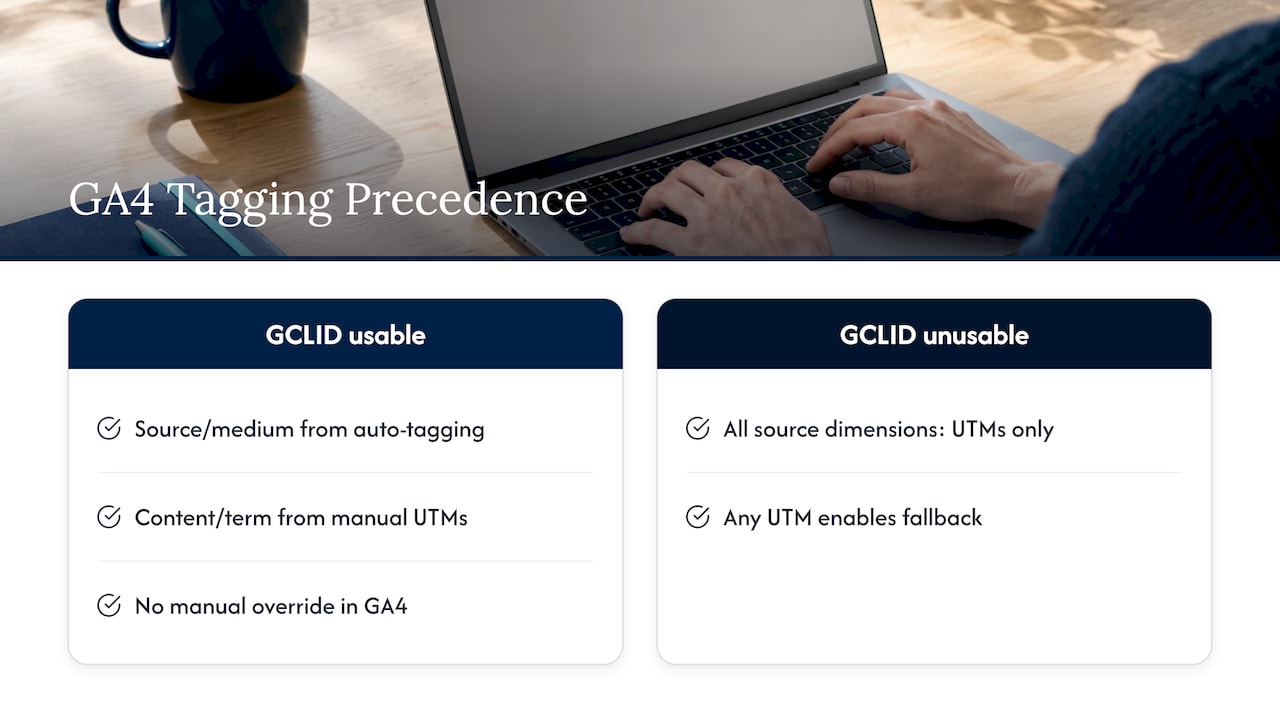
Translated into plain English: the GCLID is the primary system, and your UTMs are the backup that keeps reports readable if the primary system cannot do its job.
When to use GCLID, UTMs, or both
Google’s own guidance gives a clear split. Use the GCLID through auto-tagging when you need website or offline conversion tracking. Use UTMs to manually track Google Ads traffic only if you do not plan to create an Analytics and Google Ads integration. Google Analytics says the same thing: without integrations, you can manually tag ad destination URLs with UTMs to collect a basic set of traffic-source dimensions.
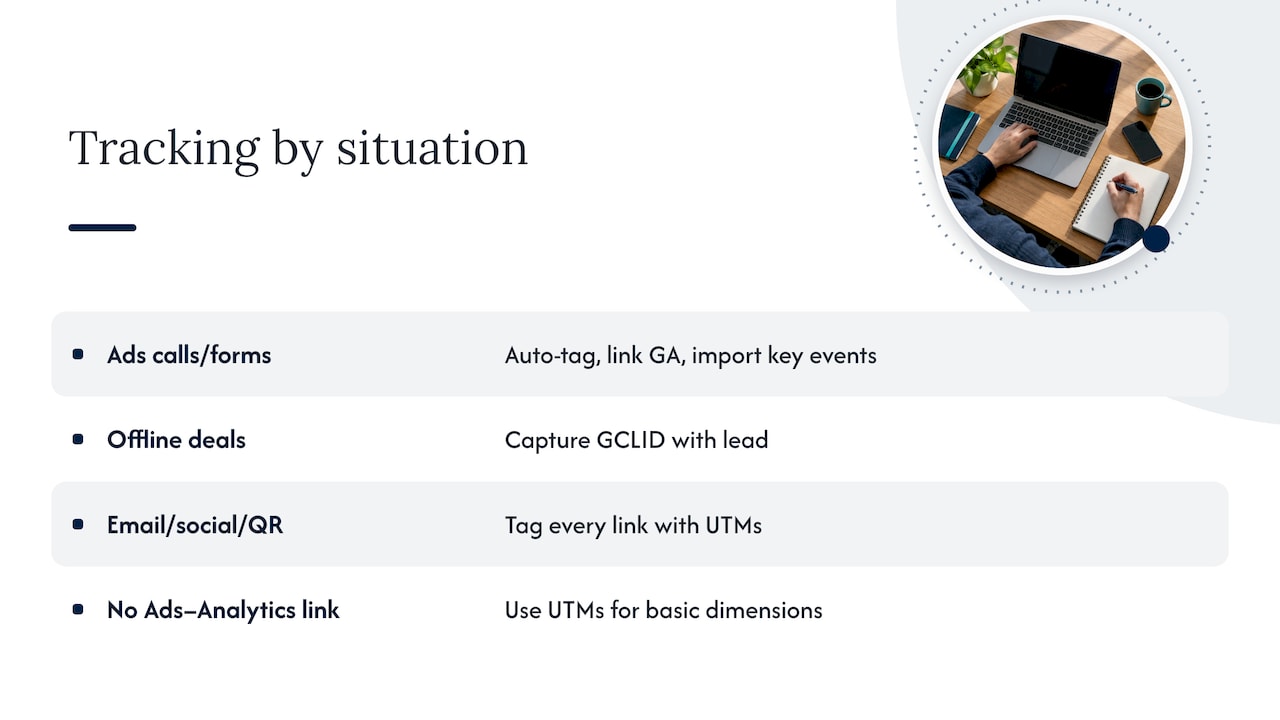
Applied to common small business situations:
You run Google Ads to generate calls and form fills. Keep auto-tagging on, link Google Analytics, and import your key events. Add UTMs as a backup so any broken link still lands in a labeled bucket.
You also send email, post on social media, or print QR codes. Those links have no GCLID. Tag all of them with UTMs, or they will blur together as generic referral or direct traffic. If you are weighing where to put your money, our piece on Google Ads versus Facebook Ads shows why consistent tagging makes that comparison possible.
You close deals offline. A roofing quote, a legal consult or a salon booking by phone all fit here. You need the GCLID captured with the lead so the eventual sale can be matched to the click. UTMs alone will not do that matching.
You are not connecting Google Ads to Analytics at all. Then UTMs are your basic option, and you should know the data will be less detailed than what auto-tagging provides.
How to set up both without breaking either
Step 1: Turn on auto-tagging
In Google Ads, go to Admin, then Account settings, then Auto-tagging. Check the box labeled “Tag the URL that people click through from my ad” and save. Google lists these exact steps in its auto-tagging setup guide. Google defines auto-tagging as a feature that adds the GCLID to the URLs people click, so you can tell which ad was clicked for each visit.
Step 2: Decide your naming rules
Before tagging anything, write down a short naming convention and stick to it. Use lowercase, no spaces, and one name per channel. If one person types “Facebook” and another types “facebook”, you get two rows for the same thing. A shared spreadsheet is enough for a small business.
A workable starting set:
- utm_source: google, facebook, newsletter, gbp (for Google Business Profile links)
- utm_medium: cpc, social, email, organic
- utm_campaign: a short descriptor of the offer or season, such as fall_furnace_check
Step 3: Tag your Google Ads URLs
Add utm_source, utm_medium and utm_campaign to your Google Ads final URLs, or apply them through a tracking template at the account or campaign level so you are not editing every ad by hand. Remember the precedence rule: for Google Ads clicks, GA4 will use the auto-tagged values for classification when the GCLID works. Your UTMs are the fallback and fill the content and term fields.
Step 4: Tag everything that is not Google Ads
Email campaigns, social posts, QR codes, links in a Google Business Profile post or in your email signature: each gets a UTM with the three core fields. Google Analytics’ URL builder documentation describes how to build these links.
Step 5: Check one test click
Click your own tagged link and confirm the URL carries what you expect and that the visit shows up in Analytics under the right source and medium. Fix any naming issues now, while you have ten clicks to clean up instead of ten thousand.
An illustrative example
Imagine a local HVAC company running a Google Ads campaign for furnace tune-ups, plus a postcard with a QR code and a monthly email. This is a hypothetical setup, not a client result.
- The Google Ads link carries a GCLID automatically. It also has utm_source=google, utm_medium=cpc and utm_campaign=fall_furnace_check as a backup.
- The postcard QR code points to the same landing page with utm_source=postcard, utm_medium=print and utm_campaign=fall_furnace_check.
- The email carries utm_source=newsletter, utm_medium=email and the same campaign name.
Now the owner can compare three channels for one offer in one report, and the Google Ads portion also feeds conversion data back into the ad account for bidding and reporting. Without UTMs, the postcard and email visits would blend into direct or referral traffic. Without the GCLID, the Google Ads side would lose its conversion matching.
Common mistakes that cost you data
- Switching auto-tagging off to “use UTMs instead.” That removes the identifier that Google Ads conversion tracking relies on. Keep it on.
- Expecting UTMs to override the GCLID. In GA4 they will not for Google Ads clicks, and there is no setting to change that.
- Partial tagging. Leaving off utm_medium or utm_campaign produces “(not set)” values, which Google specifically warns about.
- Inconsistent naming. “cpc”, “CPC” and “paid” split one channel into several rows.
- Tagging internal links. UTMs are for links that bring people to your site from elsewhere. Putting them on links between your own pages can overwrite the original source of a visit.
- Hunting for UTMs in the wrong report. As noted above, they are omitted from the landing page plus query string dimension, so look at Page location or the traffic acquisition reports instead.
If conversion numbers in Google Ads and Analytics disagree, start with the basics in our Google Ads conversion tracking guide, then decide which numbers you will use to judge performance. Our overview of Google Ads KPIs can help with that choice.
Our perspective
Most small business owners who come to us frustrated with a past agency have the same complaint: they were sent reports, but the numbers never connected to real customers. Very often the cause sits in the tagging. Auto-tagging was off, or UTMs were typed three different ways, or the Google Ads and Analytics accounts were never linked.
We treat tracking as the foundation of a campaign, not a cleanup task. Before we spend a dollar of your ad budget, we want the GCLID flowing, the naming convention agreed, and your calls and form fills counted as conversions. That is what lets us show you clear performance reports and explain what your investment turned into.
Our advice is simple. Let Google Ads do what it does best with auto-tagging, and use UTMs to give every other channel a name you understand. If you would rather have a team own that setup and report on it regularly, that is exactly the kind of work we do for local businesses.
Michael
Get tracking that holds up
If your Google Ads reports and your actual leads do not match, the fix usually starts with how clicks are tagged and counted. Tradewinds United Media manages Google Ads for small and local businesses, with data-driven performance reports and regular updates so you can see what your spend is producing.

If you are earlier in the process and your site is the bottleneck, our website design service builds the pages your tracked clicks land on. To talk through your setup, start from our home page.
FAQ
What is a GCLID used for?
A GCLID identifies the specific Google Ads click that brought a visitor to your site. Google uses it for website conversion tracking, and it can also link Google Ads data with Google Analytics. It appears automatically once auto-tagging is enabled.
Can I use GCLID and UTM parameters together?
Yes. Google Analytics supports both on the same link. For Google Ads traffic, the auto-tagged values drive source and medium, while manually tagged utm_content and utm_term fill the manual content and term dimensions. If the GCLID cannot be used, Analytics falls back to your UTMs.
What are the five UTM parameters?
They are utm_source, utm_medium, utm_campaign, utm_term and utm_content. Google recommends always including source, medium and campaign. Term is meant for paid keywords and content is for telling creatives or links apart.
Do I need UTMs if auto-tagging is on?
For Google Ads clicks, they are not strictly required, but they are a sensible backup because Analytics uses them when the GCLID cannot be used. For every other channel, such as email, social and print, UTMs are how you tell sources apart.
Which one should I choose?
You do not have to choose. Use auto-tagging for Google Ads, particularly if you need website or offline conversion tracking. Use UTMs on all other links, and add them to your Google Ads URLs with at least source, medium and campaign.
Sources
- Google Click Identifier (GCLID): Definition, Google Ads Help
- About auto-tagging, Google Ads Help
- Auto-tagging: Definition, Google Ads Help
- Enable auto-tagging, Google Ads Help
- Traffic-source dimensions, manual tagging, and auto-tagging, Google Analytics Help
- URL builders: Collect campaign data with custom URLs, Google Analytics Help