Bing Places for Business is Microsoft’s free tool for listing your business in Bing Search and Bing Maps. To get on it, you sign in, check whether Bing already has a listing for you, claim it or create a new one, then verify it with a PIN. Most owners can finish the setup in under an hour. The part that takes longer is keeping the details consistent, because Bing pulls information from many places besides the listing you control.
If you already run a Google Business Profile, you have done most of the hard thinking. This guide walks through the Bing side step by step, shows where owners get stuck, and explains how it fits into the rest of your local visibility.
TL;DR
- Bing Places for Business is free. You claim an existing listing or create a new one so your business appears in Bing Maps and local search.
- Search for your business first. Claiming an existing listing is faster than creating a duplicate.
- Verification uses a PIN sent by phone, mail, email or text. A mailed postcard in the US typically takes 5 to 6 business days.
- Bing blends data from other sources, so wrong details elsewhere can override your listing. Fix the source, not just the listing.
- Microsoft rebuilt the Bing Places dashboard in October 2025, with bulk editing and a recommendation tool.
Table of Contents
- What Bing Places for Business is
- Why a Bing listing is worth an hour
- What to gather before you start
- How to claim or add your business, step by step
- Verification: proving the business is yours
- What changed with the new Bing Places
- Keeping your listing accurate and complete
- Fixing a missing or wrong listing on Bing Maps
- Where Bing fits in your local plan
- Our perspective
- Get your local presence handled
- FAQ
- Sources
What Bing Places for Business is
Bing Places for Business is the Microsoft equivalent of a Google Business Profile. Microsoft describes it as a free platform where businesses create and manage listings so they show up in Bing search results and Bing Maps. A listing carries your name, address, phone number, website, hours and photos, so a searcher can see who you are and how to reach you without clicking through to your site.
The word “local” matters here. A listing is not your website and it is not an ad. It is a structured record of your business that Bing can show when someone searches for what you do near them, or searches for your name directly.
Who can list
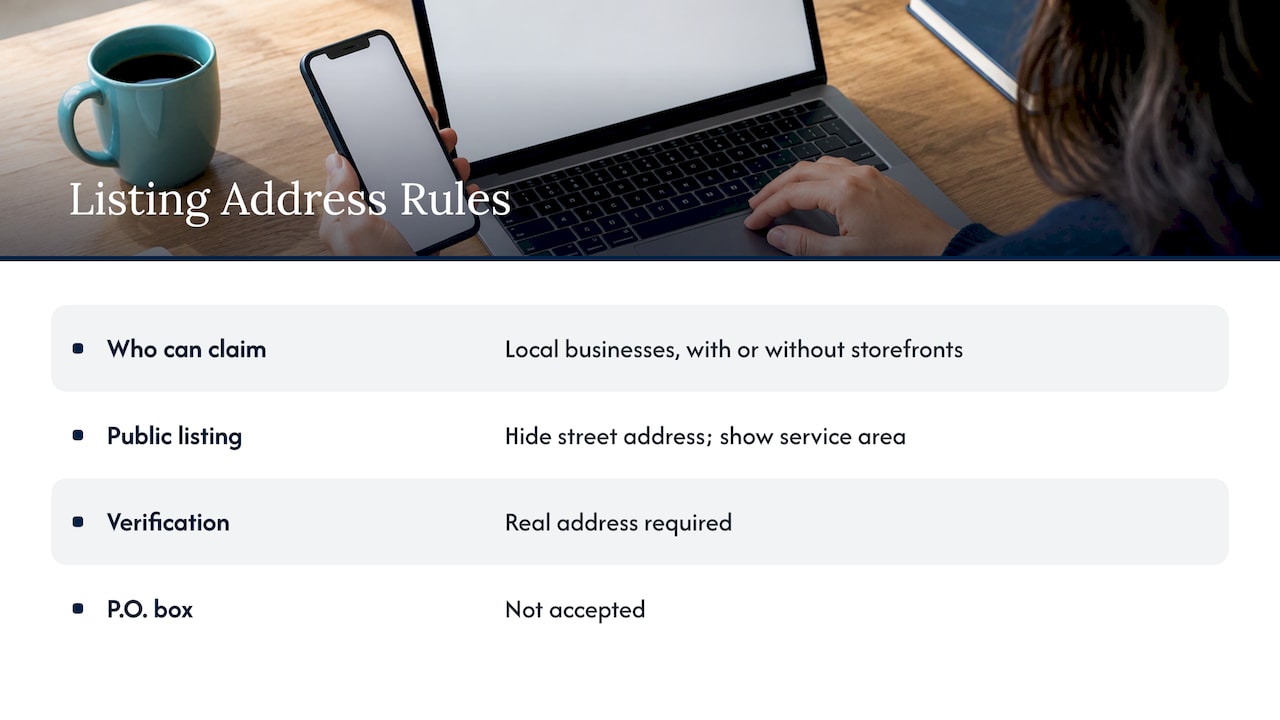
Local businesses can claim a listing, including those without a storefront. If you are a plumber, a tutor or a mobile detailer who works at customers’ homes, you can usually hide your street address from the public listing and show a service area instead. Bing still needs a real address from you for verification, so a P.O. box will not work for this.
Why a Bing listing is worth an hour
Most owners put all their local effort into Google, and that is a sensible priority. But Bing is the search engine behind Microsoft’s products, and a listing there is free. The cost of setting it up is your time, and the cost of skipping it is that Bing may show a thin, outdated or wrong record of your business built from whatever data it found elsewhere.
That last point is the real risk. A listing you never claimed does not mean nothing shows up. It means you do not control what shows up. Wrong hours or an old phone number can send a customer to a competitor or to a closed door.
Think of it as one more place where a customer decides whether you look real and open for business. For a small business trying to attract new customers, consistency across those places is a core part of local SEO.
What to gather before you start
Have these ready so you do not stall halfway through:
- Business name exactly as it appears on your sign, website and Google profile.
- Street address that is real and where you actually work. Use the same format everywhere (Suite vs. Ste. matters less than being consistent).
- Phone number that customers can reach, ideally one that can receive a call or text, since phone verification may be offered.
- Website URL pointing to the page you want customers to land on.
- Hours, including holiday exceptions.
- Primary category and any secondary ones that describe what you do.
- Photos of your storefront, work, team and products.
- A sign-in account: Bing Places accepts a Facebook, Google, Microsoft or work account.
One practical tip: use a business-owned email address for the account, not a personal one that belongs to a former employee or an outside contractor. This matters later, as you will see in the verification section.
How to claim or add your business, step by step
- Go to the Bing Places sign-in page and sign in. Microsoft’s guidance says you can use a Facebook, Google, Microsoft or work account. Pick the account your business will keep using long term.
- Select the country where the business is located.
- Search for your business by name and location. This is the step owners skip, and it is how duplicates get created.
- If a matching address appears, claim it. Claiming takes over the existing record, so you start with whatever Bing already knows and correct it.
- If nothing matches, choose Create new business and enter your details.
- Check the details carefully before submitting: name, address, phone, website, hours and categories.
- Verify the listing (covered next).
Where this goes wrong
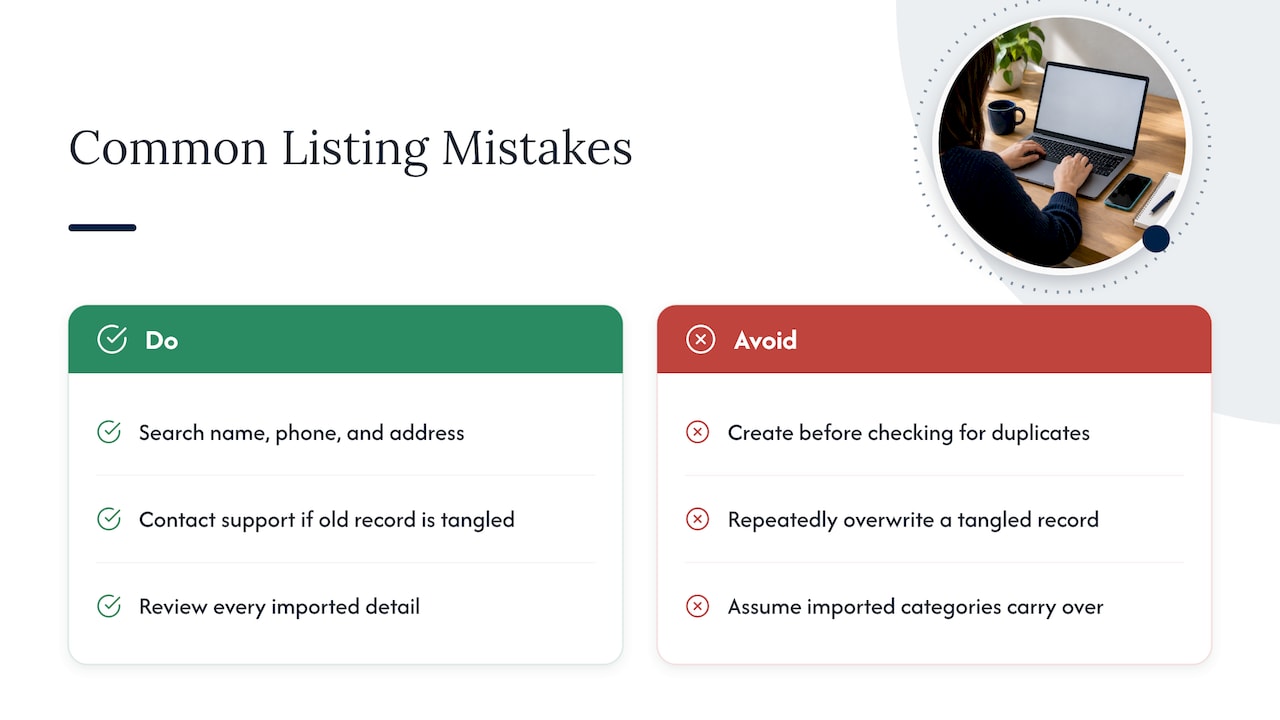
Creating a duplicate. If you skip the search, you may end up with two records for the same business. Search by name, by phone number and by address before you create anything.
Editing the wrong thing after a move or rename. If your business changed its name or address, an old record can stay tied to outside data sources that keep feeding in the old details. Think this through before you edit; if the old record is tangled, contact Bing Places support rather than repeatedly overwriting it.
Importing from Google without checking. Bing Places lets you import from a Google Business Profile. Microsoft says its rebuilt import flow is faster and better at keeping name, hours and contact details. Still, review everything after the import, because a category or attribute may not carry over the way you expect.
If you manage a Google profile and a Bing listing for several locations or trades, a dedicated service can keep them in sync. For example, Google Business Profile management for home-service businesses covers the profile side of that workload while you handle your Bing record.
Verification: proving the business is yours
Bing will not let you manage a listing until you prove you are connected to the business. Microsoft explains that it sends a unique PIN by phone, mail, email or text, though not every option is available to every business.
A few details that save time:
- Phone verification is limited. It is offered only when the listing already holds your business phone number and you have not edited it. If you changed the number during setup, you may lose that option.
- Postcards are slow. In the US, a mailed PIN typically takes 5 to 6 business days. Microsoft recommends waiting at least 12 days before contacting support.
- Use the same account. If a PIN fails with a permission error, the PIN has to be entered on the account that requested it. An agency, a web developer or a former employee may have started verification from a different account.
- Request a new PIN or contact support if the code still fails.
That last point is a common headache for business owners who were burned by a previous marketing company. If someone else set up your listing, you may find that the verification is tied to their sign-in. Ask for access, or ask them to hand over ownership, before you start a new request. Whoever manages your local presence should leave you holding the keys to every listing.
Businesses with many locations can use a group feature and bulk verification. Microsoft says support review for that route takes 5 to 7 business days.
What changed with the new Bing Places
Microsoft launched a rebuilt Bing Places on October 3, 2025. The business-owner experience moved to bing.com/forbusiness, and Microsoft said current users and listings would be migrated automatically. If you read a guide written before that date, the screens it describes may look different from what you see.
According to coverage of the launch, the new interface includes bulk editing, real-time stats and health indicators, and a dashboard-style management view. There is also a Recommendation Tool that suggests adding photos, completing missing fields such as website link, hours and social links, and adding segment-specific items such as a menu or order link for restaurants.
For a small business, the Recommendation Tool is the useful part. It turns “optimize your listing” from vague advice into a short to-do list. Complete what it flags, starting with hours, website and photos.
Microsoft also said it plans to keep investing, including deeper integrations with Bing Maps and Copilot and expanded support for agencies and partners. Since features may shift, check the dashboard itself for what is available to you.
Keeping your listing accurate and complete
A claimed listing is a starting point. What keeps it useful is accuracy.
Consistency is the main job
Your name, address and phone number should match across your website, your Google profile, your Bing listing and any directories. Microsoft explains that Bing draws on many internal and external data sources for local listings, and that Bing Places data may be overridden when other sources are fresher, for example if your Bing Places data has not been updated in more than six months, or when sources conflict.
In plain terms: if you updated your phone number in Bing Places but a directory Bing trusts still shows the old one, the old one can win. Updating the listing is half the job. Updating the sources is the other half.
A short checklist for a complete listing
- Hours that are true. Do not leave defaults in place. Update for holidays and seasonal changes.
- The right primary category, plus secondary categories that describe real services.
- A short description in plain language, with the city or neighborhood you serve where it fits naturally.
- Photos that look like your business today: exterior, interior, work in progress, team.
- Your website link pointing to the page that best matches the listing.
- Service area, if you travel to customers, instead of a public street address.
- Social profile links where you are active.
Edit in batches
Changes to a listing do not appear instantly. Gather your corrections and submit them together, rather than making several small edits in a row, so you are not left wondering which change is live. Then check the live listing on Bing after a few days.
Watch your reviews
Customers form an impression from your reviews before they ever call. Keep an eye on the review sources that show alongside your business and reply professionally, especially to complaints. If this is a weak spot, our guides on how to respond to bad reviews and reputation management and local SEO explain the routine.
Fixing a missing or wrong listing on Bing Maps
If Bing shows the wrong business, wrong hours or no listing at all, work through this order:
- Claim and verify the listing in Bing Places so you can edit it directly.
- Look at the “Data from” section on the Bing Maps listing. Microsoft’s guidance says this shows where the data originates, such as Yelp or TripAdvisor, and that you should correct it at that source.
- Use the three-dot menu, choose Suggest an edit, then Correct details.
- Use Bing’s Report a Concern tool if the problem persists.
Expect some patience. Corrections go through review and can take days to appear. If you moved or renamed the business, also update your other profiles at the same time. For a Google-side address change, see our note on what to file before changing your Google business address.
Where Bing fits in your local plan
Google is usually where most local customers come from, so your Google Business Profile deserves the first and deepest effort. Our Google Business Profile optimization playbook covers that in detail, and our piece on ranking in the Google Map Pack shows what moves the needle.
Bing then becomes a maintenance task: claim it once, keep it matching your other listings, and review it a few times a year. If you want a sequenced plan that includes listings, our 90-day local SEO checklist puts the tasks in priority order.
A good rule: never let a listing become the only place a fact lives. Your website should state your hours, address, services and service area clearly, because that is the page every listing points back to. If the site is out of date or hard to use, listings only send people to a weak destination. That is where website design pays back.
Our perspective
Most small business owners we talk to do not have a listing problem. They have a consistency problem. The business is on a few directories, set up at different times by different people, and nobody owns the whole picture.
We think of local visibility as one job with several surfaces: your website, your Google Business Profile, your reviews, and the other listings that search engines read. Bing Places is one of those surfaces. It is free and quick to claim, and it only helps when the details match everything else.
What frustrates owners about past agencies is rarely the work itself. It is not knowing what was done. That is why we focus on clear performance reports and regular updates, so you can see how local visibility turns into calls, visits and customers, and so you hold the logins to your own listings.
Claim your listing, keep it accurate, and measure what it brings in. That is the whole approach.
Michael
Get your local presence handled
If you would rather not chase listings, PINs and conflicting directory data yourself, Tradewinds United Media offers Google Business Profile services, reputation management, SEO and Google Ads management for small and local businesses, along with clear performance reports so you can see what your investment returns. Start with our Google Business Profile and local visibility services, or request a local SEO report to see where your business stands.

FAQ
Is Bing Places for Business free?
Yes. Microsoft describes it as a free platform for creating and managing business listings that appear in Bing search and Bing Maps. You do not pay to claim or edit a listing. Paid advertising on Bing is a separate product.
How long does Bing Places verification take?
It depends on the method. Phone, text and email PINs can arrive quickly where they are offered. A postcard in the US typically takes 5 to 6 business days, and Microsoft recommends waiting at least 12 days before contacting support. Phone verification is offered only if the listing already has your unedited business phone number.
Can a business without a storefront get a Bing listing?
Yes, service businesses can be listed and can show a service area instead of a public street address. Bing still needs a real address for verification, so a P.O. box is not accepted. Use the address where you actually work.
Why does my Bing listing show the wrong information after I updated it?
Bing blends data from several sources. If another source is newer or the sources conflict, it can override your Bing Places data. Check the “Data from” section on the Maps listing, correct the information at that source, then use Suggest an edit or Report a Concern if the error stays.
Do I need Bing Places if I already have a Google Business Profile?
They are separate listings on separate platforms. Having one does not create the other, though you can import details from Google into Bing Places. Claiming both keeps your information under your control on each.
Sources
- Introducing the New Bing Places for Business (Microsoft Bing Blogs)
- Add and manage your business listing (Microsoft Support)
- Transfer ownership of existing listing (Microsoft Q&A)
- Bing Places: PIN verification fails (Microsoft Q&A)
- Bing Listing/Bing Map showing wrong business (Microsoft Q&A)
- Microsoft Introduces the New Bing Places for Business (Search Engine World)