

Build or upgrade your FAQ content now, but skip the schema first, structure second mindset. Write answer-first Q&As, place them where user intent actually lives, and only then check whether FAQPage schema applies. Run every page through Google Search Console and the Rich Results Test before you call it done. The rest of this guide walks through exactly how.
TL;DR:
- Clear, answer-first formatting and covering unique long-tail questions are essential because AI search favors concise, quotable responses and niche topics.
- FAQs should be placed on dedicated pages for broad topics and embedded on product pages for purchase-related questions to maximize relevance.
- Write answers in 40 to 60 words with specific terminology, avoiding promotional language and toggles that hinder AI citation.
- Use FAQPage schema only on pages built as genuine Q&A content, not on promotional or sales pages, and validate schema with Google tools before publishing.
- Regularly review FAQ content every three months to ensure accuracy, relevance, and to capitalize on new questions surfacing from support or search data.
Table of Contents
- Why FAQ Page SEO Still Pays Off for AI Search and Users
- Where Should FAQs Live on Your Site?
- How Do You Write an FAQ Answer AI Can Actually Cite?
- Should You Add FAQPage Schema to Your Site?
- How Do You Find the Questions Your Customers Are Actually Asking?
- What Makes an FAQ Answer Actually Useful, Not Just Optimized?
- How Do You Know If Your FAQ Changes Are Working?
- How an Agency Approaches FAQ SEO for Clients
- The Part of FAQ SEO Most Guides Get Backwards
- Let Tradewindsunitedmedia Handle Your FAQ SEO Build-Out
- Where to Validate and Learn More
- Sources
Why FAQ Page SEO Still Pays Off for AI Search and Users
FAQ page SEO earns its keep for a simple reason: short, self-contained answers are exactly what AI systems and search engines want to extract. A well-written question-and-answer pair is a ready-made passage. Google’s featured snippets, People Also Ask boxes, and tools like ChatGPT and Perplexity all favor content that answers a specific question in a tight, quotable block, and that’s precisely what a good FAQ entry is built to do.
There’s also a traffic case. Dedicated FAQ pages have driven meaningful organic traffic by ranking directly for question-based searches, and some well-targeted pages land in the top 10 results for the exact question a buyer is typing. That’s long-tail traffic most competitors ignore because they treat FAQs as an afterthought instead of a content asset.
The user experience payoff is just as real. Visitors who find their answer in ten seconds don’t open a support ticket, don’t abandon a cart to search elsewhere, and don’t bounce back to Google. That’s fewer emails for your support team and fewer lost conversions at the worst possible moment: right before checkout.
FAQ visibility has shifted, not disappeared. Google pulled back the visual rich-result treatment for most FAQ markup in 2023, so the schema alone won’t win you a snippet anymore. What still works is the underlying structure: clear questions, direct answers, and logical grouping.
Here’s what actually moves the needle today:
- Answer-first formatting that AI tools can lift cleanly
- Long-tail question coverage your competitors haven’t bothered writing
- Fewer support tickets and faster paths to conversion
- Internal linking opportunities that spread authority across your site
Structure is doing the heavy lifting now. Markup is just the paperwork.
Where Should FAQs Live on Your Site?
Put comprehensive, topic-wide questions on a dedicated FAQ page. Put buyer-stage questions right where the buyer is standing: on the product or service page, next to the price and the “Add to Cart” button.
A dedicated FAQ hub works when you’re building topical authority around a subject with genuine depth: shipping policies, warranty terms, “how does X work” explainers, or an entire category of buyer education. Ahrefs’ research on FAQ page structure shows these pages perform best when organized by type, whether that’s homepage FAQs, product FAQs, or standalone hub pages, rather than dumped into one catch-all list.
Embedded FAQ blocks work when the question is tied directly to a purchase decision happening on that page. “Does this fit a 2019 Honda Civic?” belongs on the product page, not three clicks away on a general FAQ hub.
Use this quick decision process:
- Ask whether the question applies site-wide or to one specific product/service.
- If it’s site-wide and substantial, route it to a dedicated FAQ page.
- If it’s tied to a purchase decision, embed it directly on that page.
- If a question fits both contexts, answer it briefly on the product page and link to the fuller explanation on the hub.
The rule of thumb: single-topic depth goes to a dedicated page, and objection-handling goes wherever the buyer is standing.
How Do You Write an FAQ Answer AI Can Actually Cite?
Start every answer with a direct 40 to 60 word response, no throat-clearing, no setup. Follow it with one or two sentences of context, a caveat, or a next step. That’s the format HubSpot’s research on answer engine optimization points to as the pattern most likely to get pulled into AI-generated answers.
The technical formatting matters as much as the writing. Put the question in an H2 or H3 tag, and put the answer in the paragraph immediately following it, with nothing in between. No promotional banner, no “Learn more” button, no image carousel wedged between the question and the answer. Anything you insert there breaks the clean question-answer pairing that crawlers and AI extraction tools are scanning for.
Specificity helps more than most writers expect. Naming the actual platform, standard, or measurement your answer refers to, like “Google Search Console,” “Core Web Vitals,” or a specific certification, gives the answer stronger matching signals than a vague paraphrase.
A few formatting habits worth locking in:
- Keep the direct answer under 60 words, always
- Never bury the answer under a story, a disclaimer, or a sales pitch
- Make sure the text is in visible HTML, not hidden behind a toggle that only loads on click
- Test the page on mobile; a huge share of AI crawlers and human readers hit your site there first
Pro Tip: Write your direct answer as if someone will read only that one sentence and nothing else on the page. If it doesn’t stand alone, rewrite it.
Should You Add FAQPage Schema to Your Site?
Add FAQPage schema only when your page is genuinely built as a visible Q&A, and skip it entirely on anything promotional. Google’s own guidance is blunt on this point: FAQ markup on marketing or sales pages violates policy, and Google reduced how often FAQ rich results even appear in search, so the potential upside is smaller than it used to be.
Run this checklist before you publish schema:
- Confirm every question and answer in your JSON-LD is visible to a human visitor on the page, word for word.
- Validate the markup with Google’s Rich Results Test before pushing it live.
- Check Search Console periodically for markup errors or manual actions tied to structured data.
- Skip schema entirely if multiple valid answers exist for the same question. Rewrite that content as a short article instead of forcing it into FAQPage format.
Schema tends to help most on genuine knowledge hubs, support documentation, and government or reference-style pages, where the Q&A format is the actual content, not a decoration on top of a sales pitch. On a landing page built to convert, spend your effort on the answer copy instead of the markup.
How Do You Find the Questions Your Customers Are Actually Asking?
Pull from five sources before you write a single answer: support tickets, site search logs, sales call notes, Google Search Console query data, and the People Also Ask boxes tied to your target keywords. Ahrefs recommends this kind of layered research precisely because each source surfaces different question types; support tickets reveal friction, search queries reveal intent, and PAA boxes reveal what Google already thinks people want to know.
Once you’ve got a raw list, cluster the questions by intent and funnel stage. Group cost questions together, troubleshooting questions together, and pre-purchase objections together. Clustering also raises how AI systems and searchers perceive the depth of your coverage on a topic.
Then triage. Not every question deserves an answer today. Filter for:
- Search volume, even modest volume on a specific long-tail phrase
- Direct tie to a conversion decision, like pricing or compatibility
- Low effort to answer well versus high effort for a niche edge case
Answer your highest-intent, easiest-to-nail questions first. Everything else goes on a backlog, not the trash pile.
What Makes an FAQ Answer Actually Useful, Not Just Optimized?
Lead every answer with the answer itself, then layer in supporting detail. Never open with a marketing line, a company mission statement, or a rhetorical question restating the headline. Readers and AI extraction tools both skip past filler to find substance, and if the substance never arrives, you lose both audiences.
Keep internal links light. One relevant link per answer, pointing to a genuinely useful next step, works better than five links crammed into a single paragraph. Group related questions into topical clusters, cost questions near cost questions, setup questions near setup questions, since structuring FAQs into clear intent groups improves how AI systems assess topical coverage.
Maintenance isn’t optional. Review your FAQ content on a quarterly cadence:
- Remove duplicate questions that crept in from multiple content updates
- Check whether a product change or policy update has made an answer wrong
- Merge near-identical questions that split your ranking signals across two URLs
- Watch for new questions surfacing in support tickets since your last review
Pro Tip: If you haven’t touched your FAQ page in six months, treat that as a warning sign, not a badge of stability. Stale answers erode trust faster than missing ones.
For a deeper look at pairing FAQ content with a broader editorial calendar, Tradewindsunitedmedia’s guide on consistent content marketing covers how ongoing updates compound over time.
How Do You Know If Your FAQ Changes Are Working?
Track four numbers in Google Search Console: query impressions, organic clicks, click-through rate, and how often your pages appear in People Also Ask or featured snippet placements. A rising impression count with a flat click count usually means your title or snippet copy needs work, not your answer content.
Validate the technical side with Google’s Rich Results Test and the URL Inspection tool inside Search Console, and spot-check a few of your priority questions inside AI tools directly to see whether they’re being extracted or cited at all.
Run changes on a 30 to 90 day cycle:
- Publish or rewrite a batch of FAQ entries and log the date.
- Check Search Console weekly for indexing and markup errors.
- Compare impressions and clicks at the 30 and 90 day marks against your pre-change baseline.
- If a page drops in visibility, check for a schema error first, then a content freshness issue second.
How an Agency Approaches FAQ SEO for Clients
Tradewindsunitedmedia treats FAQ work as a structured project, not a content afterthought. The process starts with scoping the client’s site and pulling real questions from search data, support logs, and sales conversations. From there, we draft answer-first Q&A pairs, decide page by page whether FAQPage schema is even appropriate, and validate everything against Google’s Rich Results Test before launch.
Clients get a prioritized question list, reusable content templates, validated schema code where it applies, and a quarterly report tied to actual local SEO performance. The timeline runs in phases: research and drafting in the first month, technical validation in the second, then measurement and refinement every quarter after that. No guesswork about whether the work is paying off.
The Part of FAQ SEO Most Guides Get Backwards
Most FAQ advice still treats schema as the goal and structure as an afterthought. That’s backwards. Google scaled back FAQ rich results specifically because too many sites were gaming the visual real estate with markup instead of writing genuinely useful answers, and AI search engines don’t care about your JSON-LD at all. They care whether your answer is clear enough to lift cleanly.
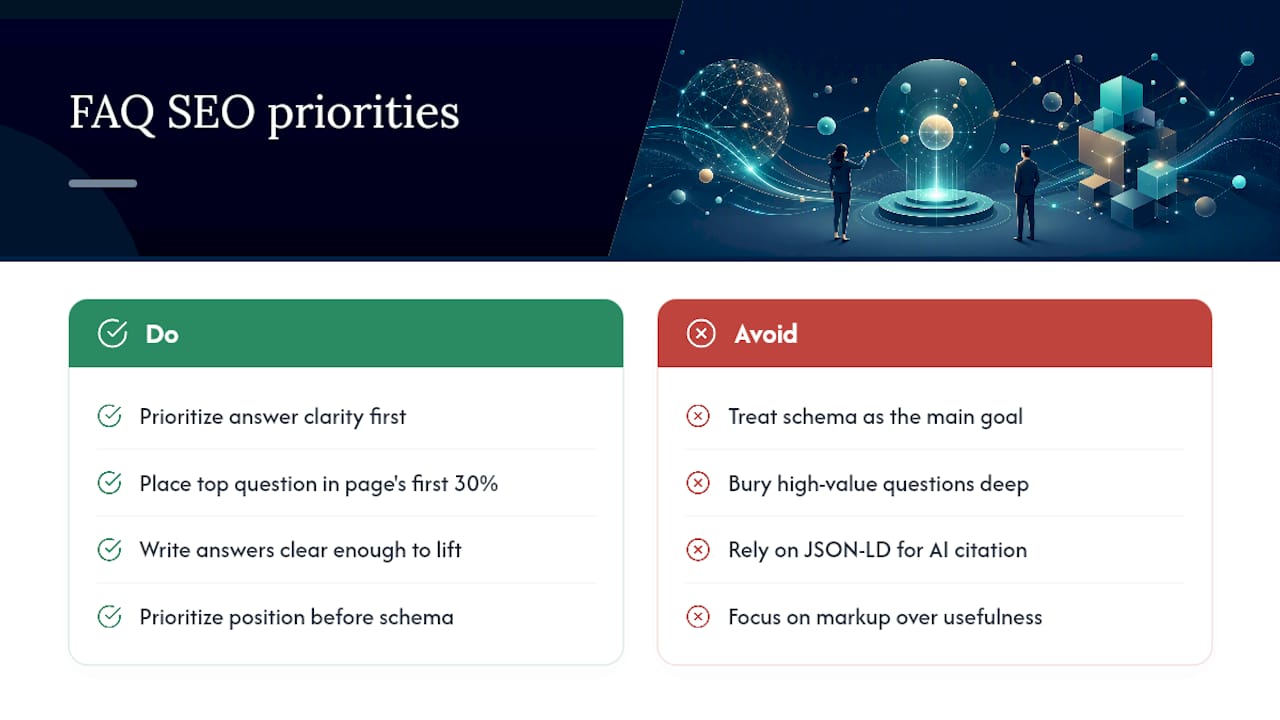
The overrated piece of conventional wisdom is “add schema to every FAQ page for the rich snippet.” That advice is stale. The underrated piece is where you place the question relative to the top of the page. Content in the first 30% of a page carries outsized weight in AI citation patterns, which means your highest-value question, the one you most want an AI answer engine or a human to see, belongs near the top of the page, not buried as entry fourteen of twenty.
If you take one thing from this guide, prioritize the answer’s clarity and position before you touch a line of structured data. Schema is a compliance checkbox. Clear, well-placed answers are the actual ranking mechanism, and they’re the part most teams still get wrong.
— Michael
Let Tradewindsunitedmedia Handle Your FAQ SEO Build-Out
Tradewindsunitedmedia gives small businesses a faster path to answer-first FAQ pages than trying to reverse-engineer AI citation patterns on your own. We handle the research, the writing, the schema validation, and the reporting, so you get pages built to be cited and clicked, not just published and forgotten.

If your product pages are cluttered or your navigation buries the answers customers need before they buy, that’s often a design problem as much as a content one. Our website design services built to simplify complex product catalogs address both at once, pairing FAQ structure with a layout that actually surfaces it.
For a broader look at where your site stands today, request a local SEO report and see exactly which questions your competitors are ranking for that you aren’t.
Where to Validate and Learn More
Test your markup with Google’s Rich Results Test before publishing. Monitor performance in Search Console. For structural examples, review Ahrefs’ FAQ page breakdown and HubSpot’s AEO formatting guide. For writing tone that reads human first, see this content authenticity guide.
Sources
- The rise and fall of FAQ schema – and what it means for SEO
- FAQs for AEO: How to structure answers that rank in answer engines — HubSpot
- FAQ Pages for SEO (+ Examples & Best Practices) — Ahrefs




