

Google Business Messages, the customer messaging system Google built into Search, Maps, and Ads, no longer exists in the form most small business owners remember. Google shut down the original Google Business Profile messaging feature in July 2024, and the developer-facing Business Communications API tied to it wound down around the same time. If you ran messaging through your profile before that, you need booking links, click-to-call, or website chat live today, and you should keep an eye on Google’s new AI agent pilot for what might replace it.
TL;DR:
- Google shut down the native Business Messages feature in July 2024, and its API is no longer available for small business owners.
- Current alternatives include click-to-call buttons, booking links, and website chat widgets, with a new AI-based messaging pilot in limited testing.
- The underlying Business Messages framework still supports rich media, rich text, and customer verification features via RCS chats, but rely on fallback options for now.
- Proper setup of profiles, quick response times, and seamless handoffs are essential for maintaining customer engagement and conversion.
- Businesses should proactively build integrated fallback channels and optimize response practices to adapt to the deprecation effectively.
Table of Contents
- What Google Business Messages Actually Is (And Where Customers See It)
- The 2024 Shutdown and What’s Testing Now
- Features and Capabilities Still Relevant to Understand
- How to Register and Set Up an Agent
- Best Practices That Actually Protect the Customer Experience
- What SMBs Should Do Right Now, According to Tradewinds United Media
- Security and Privacy Considerations You Can’t Ignore
- Common Troubleshooting Issues and How to Fix Them
- Metrics and Analytics That Actually Tell You Something
- Real-World Use Cases Worth Learning From
- Where Messaging Fits in a Local Strategy
- Get Your Fallback Channels Built Right the First Time
- Sources
What Google Business Messages Actually Is (And Where Customers See It)
Business Messages is the technical name for the rich, asynchronous messaging service Google built so customers could contact brands directly from the places they already discover them. It was never a single button. It was an agent framework that could surface across:
- Google Search results, next to your listing
- Google Maps, inside a business profile
- Google Ads, as a click-to-message extension
- Branded entry points like a website widget or app
The distinction that matters for small business owners: this isn’t SMS, and it isn’t WhatsApp. Business Messages ran through Google’s own infrastructure with its own conversation rules, representative types, and rich media formats. That gave Google tighter control over the experience but also meant the whole thing lived or died by Google’s product roadmap, not yours.
The 2024 Shutdown and What’s Testing Now
Here’s the timeline that trips up most business owners: Google didn’t quietly deprecate GBP messaging, it pulled the plug outright. As of July 2024, the native messaging feature inside Google Business Profile stopped working, and the developer API behind it followed shortly after.
Google’s official guidance since then points businesses toward three fallbacks:
- Click-to-call buttons on your profile
- Booking links through Reserve with Google or your own scheduling tool
- Website chat widgets you control directly
There’s a wrinkle worth watching. Reports have surfaced showing Google testing a new native messaging interface inside the Business Profile dashboard, this time built around an AI agent that fields initial inquiries before handing off to a human. It’s in limited pilot testing, not a broad rollout, and Google has a track record of killing underused features. Treat it as something to monitor, not something to build a strategy around yet.
Features and Capabilities Still Relevant to Understand
Even with the consumer-facing GBP messaging button gone, the Business Messages framework itself still underpins RCS business chats and any future messaging product Google ships. Knowing what it supports helps you evaluate whatever comes next.
Message types include:
- Plain text and rich text formatting
- Images and media attachments
- Rich cards and carousels for showcasing products or services
- Suggested replies and suggested actions that let customers tap instead of type
RCS, the messaging standard powering rich chats in Google Messages, adds verification badges, a branded header, and interactive actions that plain SMS can’t match. That verification matters for trust. A customer sees a checkmark and a business name instead of an unrecognized number.
On the technical side, conversations operate on a 30-day window after a customer’s last message, read receipts function similarly to consumer messaging apps, and the system falls back to plain text for devices that don’t support rich formatting. Representatives can also switch between BOT and HUMAN status mid-conversation, which matters for the handoff design covered below.
How to Register and Set Up an Agent
If you’re integrating Business Messages capability through a partner platform, or preparing for whatever surface Google ships next, the setup sequence follows a consistent pattern in Google’s developer documentation:
- Choose partner or direct registration. Most small businesses go through a partner platform rather than building against the raw API, since partners handle infrastructure and updates.
- Create a service account key. This authenticates your business with Google’s systems and is required before any messages can send or receive.
- Set your webhook URL and secret token. This is the endpoint that receives incoming messages and verifies they’re genuinely from Google.
- Configure the agent. Set a welcome message, define availability windows, and decide whether the default representative type is BOT or HUMAN.
- Test the webhook end-to-end before pointing any live traffic at it.
Pro Tip: Write your welcome message to set expectations on response time before you launch anything. “We typically reply within 2 hours during business hours” prevents more frustration than any automation you’ll build afterward.
Best Practices That Actually Protect the Customer Experience
Whatever messaging channel you run, whether it’s a website chat widget, click-to-call, or a future Google-native option, the operational discipline is the same. A handful of habits separate businesses that convert messaging leads from ones that just generate noise:
- Set a clear response SLA and state it up front, don’t make customers guess
- Design bot flows so handoff to a human is visible, not silent. Label BOT and HUMAN messages distinctly
- Use suggested actions to drive the customer toward booking, calling, or paying inside the conversation itself
- Track response time, customer satisfaction, and conversion rate as separate metrics, not one blended number
- Honor opt-out requests immediately. A customer who tries to unsubscribe and gets ignored will leave a review about it
Businesses that respond to messages within five minutes see dramatically higher qualification and close rates than those that wait hours, a pattern that holds across chat, SMS, and messaging platforms generally. Speed is the single biggest lever you control, and it costs nothing but attention.
What SMBs Should Do Right Now, According to Tradewinds United Media
Skip the wait-and-see approach. Here’s the priority order we’d put in front of any client asking about messaging today:
- Audit your Google Business Profile fields. Hours, service categories, and attributes all feed any future AI agent Google builds. Bad data in means bad answers out. Our Google Business Profile guide walks through the fields that matter most.
- Add booking links and click-to-call now. Don’t wait for Google to reintroduce native messaging. These fallbacks recover most of the lead volume messaging used to capture.
- Install website chat as a backstop. You own this channel completely, no deprecation risk.
- Assign a human owner for escalations. Someone needs to catch the handoff when automation hits its limit.
- Feed every chat lead into your CRM and revisit your automated replies monthly based on what actually converts.
Pro Tip: Check your Google Business Profile attributes quarterly. Google adds and retires fields more often than most owners realize, and stale data quietly tanks your visibility in the Map Pack.
Security and Privacy Considerations You Can’t Ignore
Messaging channels carry different privacy obligations than a static profile page, and the gap catches a lot of small business owners off guard. RCS business messages, while more feature-rich than SMS, are not end-to-end encrypted on the business side the way personal RCS chats can be. That means sensitive information, payment details, medical history, legal specifics, shouldn’t travel through any business messaging channel without a secondary verification step.
Verification itself cuts both ways. The branded header and checkmark that build customer trust also mean your business identity is now a target. If a bad actor gains access to your messaging credentials, they can send messages that carry your verified badge. Treat your service account key and webhook secret the way you’d treat a banking password, not a marketing tool login.
Data retention matters too. The 30-day conversation window isn’t just a technical constraint, it’s also a privacy boundary. Anything a customer shares expires from active conversation state after that period, but if you’re logging conversations into a CRM or analytics tool, you’re now the party responsible for that data under whatever privacy law applies to your customers’ location. Know what you’re storing and why before you turn any automation on.
Finally, opt-out compliance isn’t optional. A customer who messages “stop” or “unsubscribe” needs that request honored immediately across every channel you operate, not just the one they used. Regulators increasingly treat business messaging the same way they treat email marketing.
Common Troubleshooting Issues and How to Fix Them
Most messaging problems small businesses hit fall into a handful of repeatable categories, and nearly all of them trace back to setup, not the platform itself.

Messages not delivering. Check your webhook URL first. A misconfigured endpoint or an expired service account key is the most common cause, and it’s usually invisible until a customer complains that you never responded.
Rich cards or carousels not rendering. This almost always means the customer’s device doesn’t support RCS or rich formatting, and your fallback text isn’t configured. Every rich message needs a plain-text version behind it.
Verification badge missing or inconsistent. Verification can lapse if business details change, a name update, an address correction, without the corresponding update on the messaging platform side. Keep your profile and your messaging registration in sync.
Slow or missed handoffs from bot to human. This is a workflow problem, not a technical one. If your BOT-to-HUMAN escalation trigger is buried three menu layers deep, customers give up before reaching a person. Simplify the trigger, don’t just monitor it more closely.
Conversations going stale past the 30-day window. If a customer returns after a month, the old conversation thread closes and they start fresh. Don’t rely on conversation history alone for context. Log key details into your CRM before the window lapses.
Metrics and Analytics That Actually Tell You Something
Response time and message volume are the two numbers everyone tracks and the two least useful on their own. Volume tells you traffic exists. It says nothing about whether that traffic turns into revenue.
The metrics worth building a dashboard around:
- First response time, measured in minutes, not hours, since qualification drops fast after the first few minutes
- Resolution time, from first message to booked appointment, completed sale, or closed inquiry
- Handoff rate, how often bot conversations escalate to a human, and whether that rate is climbing or falling over time
- Conversion rate by entry point, since a message that started from a Google Ad often converts differently than one from an organic Maps listing
- Customer satisfaction, captured through a simple post-conversation rating rather than assumed from silence
Cross-reference these against your Google Maps visibility, since a spike in messaging inquiries often tracks directly with a ranking improvement in the Map Pack. If your messaging volume jumps but conversion stays flat, the problem usually isn’t the channel, it’s the response quality or speed behind it.
Real-World Use Cases Worth Learning From
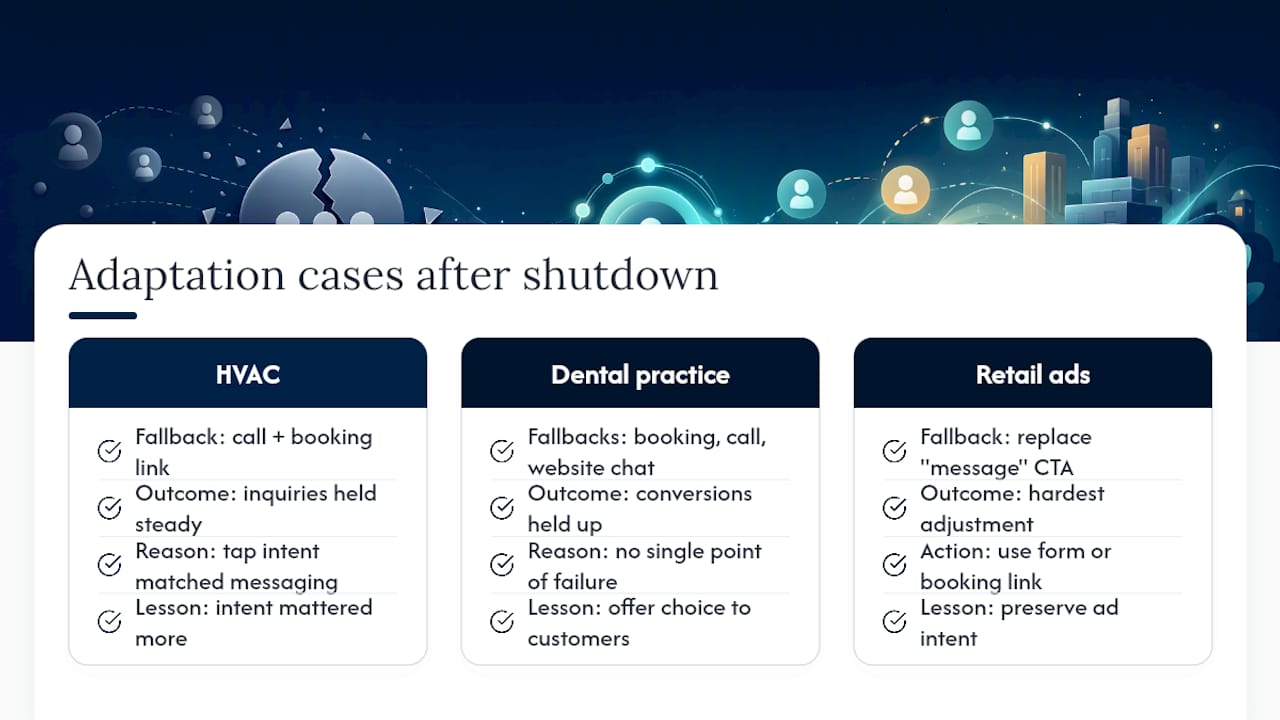
A local HVAC company that added click-to-call and a booking link in place of native messaging saw inquiry volume hold steady within weeks of the July 2024 shutdown, because the friction of tapping “call now” turned out to be nearly identical to tapping “message.” The lesson wasn’t that messaging was irreplaceable, it was that the intent behind the tap mattered more than the channel carrying it.
A boutique dental practice took a different approach: rather than replacing messaging with a single fallback, they stacked booking links, click-to-call, and website chat simultaneously, letting the customer choose. Conversion held up because no single point of failure existed.
Retailers running Google Ads with click-to-message extensions before the shutdown had the hardest adjustment, since ad copy and landing pages were built around a “message us” call to action. Businesses that pivoted fastest simply swapped that copy for “get a quote” tied to a form or booking link, preserving the ad’s intent without depending on a deprecated feature.
The pattern across all three: businesses that treated messaging as one tool in a broader lead-capture system adapted quickly. Businesses that had built their entire lead flow around the single Google-native button had to rebuild from scratch.
Where Messaging Fits in a Local Strategy
Messaging shouldn’t be the centerpiece of your lead strategy, it should be one option among several. Prioritize booking links when the sale is transactional and click-to-call when urgency matters, like emergency repairs. Conversational touchpoints build trust faster than a contact form, but a slow or robotic response damages your reputation faster than having no chat option at all. Spend on automation only after you’ve proven a human can handle the volume manually. Automation should scale a working process, not substitute for one you haven’t tested.
— Michael
Get Your Fallback Channels Built Right the First Time
Google’s messaging changes left a lot of small business owners scrambling to patch together booking links, click-to-call buttons, and chat widgets on their own, often with mismatched branding and no way to measure what’s actually converting. We build that infrastructure as one connected system instead of three disconnected patches, so a lead entering through Maps, Search, or a Google Ad lands on a site built to close it, not just receive it.

Starting with a local SEO audit to assess which fields on your Google Business Profile affect visibility, this is paired with website design that puts booking, calling, and chat options where customers actually look. If you’re not sure whether your current setup is capturing the leads it should, consider requesting a discovery call to evaluate your profile and site before spending more on ads.
Sources
- Business Messages | Google for Developers
- RCS chats with businesses – Google Messages
- GBP Messaging: Definition, Discontinuation & 2026 Alternatives | theStacc Glossary
- Google testing native messaging interface with AI agent (SERoundtable)




