A “service” on your Google Business Profile is a specific line item, like “drain cleaning” or “brake repair,” that tells searchers exactly what you offer before they ever call. Adding services costs nothing and directly feeds the bookings, quote requests, and map visibility that turn a search into a customer. If you haven’t touched your profile in a while, the fastest win is claiming or verifying it, then opening the Edit services menu and filling it in.
TL;DR:
- Correctly categorizing your profile as a service-area or hybrid business ensures your address and service visibility match customer expectations.
- Adding clear, descriptive service labels with pricing details and grouping related services helps your profile rank higher and attracts relevant searches.
- Enabling booking, quote requests, and active posting significantly increases the chances of converting profile views into actual customer inquiries.
- Regularly updating hours, verifying contact information, and analyzing Google Insights guides you to optimize service offerings and improve visibility.
- Connecting Gemini or managing structured offering data through the API can enhance profile updates and AI-driven insights, especially for multi-location or complex businesses.
Table of Contents
- What Are Google Business Services and Which Profile Type Fits You?
- How Do You Add Services From the Google Business Dashboard?
- Should You Use Structured Services or Write Your Own Labels?
- Which Features Actually Turn Profile Views Into Customers?
- What Should You Fix First on Your Profile?
- What’s New With Gemini and Structured Offering Data?
- Our Take: What Actually Moves the Needle on a Business Profile
- Get a Profile Audit From a Digital Marketing Agency
- Official Google Resources Used in This Guide
- Sources
- FAQ
What Are Google Business Services and Which Profile Type Fits You?
Every service business falls into one of two categories on Google, and picking the wrong one skews what customers see. A service-area business travels to customers and hides its street address, like a plumber, electrician, or mobile pet groomer. A hybrid business does both: it has a physical storefront customers can visit and also sends staff out, like an auto shop that also offers roadside towing.
The distinction changes your public profile in real ways:
- Service-area profiles show a coverage radius or list of cities instead of a pin-drop address.
- Hybrid profiles display both a storefront address with driving directions and a service area.
- Getting this wrong can mean showing an address you don’t want public, or hiding a location customers expect to visit.
Google documents both designations, with examples for service businesses. You can check or switch yours from the Business Profile dashboard under Business Information, then Service Area.
How Do You Add Services From the Google Business Dashboard?
Once your profile is verified, adding services takes about ten minutes if you already know your pricing. Here’s the actual flow:
- Sign in to your Business Profile and open the Edit profile menu.
- Select Services, then choose your category. Google often shows suggested services based on your business type.
- Pick a suggested service or tap Add custom service to write your own label.
- Add a short description and a price or price range if the field appears for your category.
- Group related services under a section header (for example, “Roofing” and “Gutter Work” as separate groups under a roofing business).
- Save. Changes typically appear on your live profile within a short time.
Google’s own instructions walk through this process for managing services on your profile, including how grouping and pricing fields display publicly.
If the Services tab doesn’t show up at all, your business category may not support it yet. Google checks a backend eligibility flag before showing the option, so not every category qualifies.
Pro Tip: Write service descriptions the way you’d answer the phone. “24-hour emergency water heater repair” earns more clicks than a bare label like “Plumbing.”
Should You Use Structured Services or Write Your Own Labels?
Google gives you two ways to list what you do, and the choice affects how discoverable you are in search.
Structured service items use a predefined serviceTypeId that Google recognizes and can match against searches like “emergency plumber near me.” Free-form service items are custom text you write yourself, with no backend category match.
- Use structured items whenever Google offers one that fits, since they tie directly into how Google matches search intent to your listing.
- Use free-form labels for anything genuinely unique, like a branded package or a service Google’s list doesn’t cover.
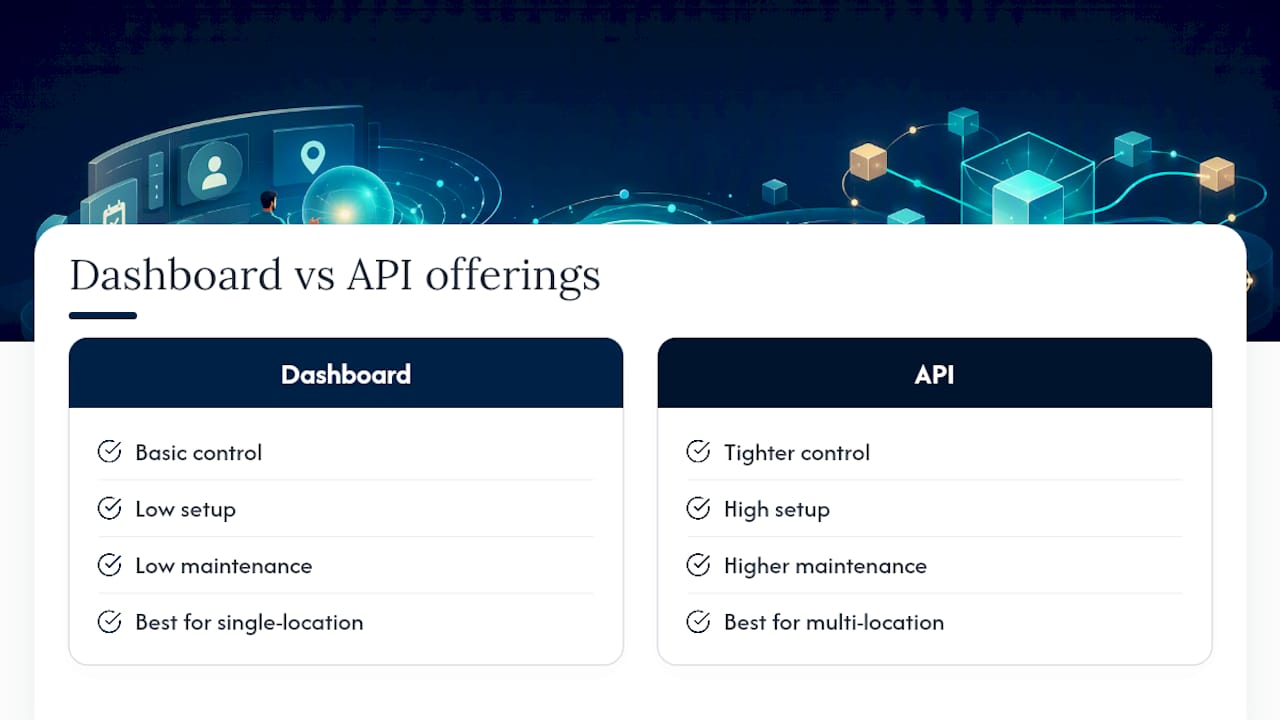
- Consider the Business Profile API if you manage multiple locations or need to push price updates automatically instead of editing each profile by hand.
For a single location with a stable service list, the dashboard is plenty. The API earns its complexity only at scale.
Which Features Actually Turn Profile Views Into Customers?
A complete service list gets you found. These features get you hired.
- Bookings: connect a supported scheduling partner so customers can grab a time slot directly from search results without calling.
- Quote requests: let price-sensitive customers request an estimate right from your profile, and reply fast since they’re likely comparing three profiles at once.
- Posts: short updates about promotions, seasonal services, or completed jobs keep your profile active and give Google fresh content to index.
- Reviews: respond to every review, good or bad, since public replies signal to future customers that someone’s actually running the business.
- Action links: order, reserve, or appointment links put a direct next step on your profile instead of forcing a phone call.
A free Business Profile bundles all of this specifically to move searchers toward becoming paying customers, not just to display your hours.
Pro Tip: Quote requests convert best when you reply promptly. Set a phone notification for new messages, because a quick response often beats a slower competitor.
What Should You Fix First on Your Profile?
Work through this in one sitting. None of it requires a developer.
- Confirm your name, address, and phone number match exactly what’s on your website and other directories.
- Set accurate hours, including holiday hours, since wrong hours are one of the fastest ways to lose a same-day customer.
- Choose the most specific primary category available, then add relevant secondary categories.
- Add every service you actually offer, with a description and a price or price range where the field supports it.
- Upload a good number of current photos: your team, your work, your storefront if you have one.
- Turn on booking or quote request features if your category supports them.
- Post an update at least twice a month.
- Respond to every new review within a few days.
- Check Business Profile Insights monthly for the search terms and actions people take on your listing.
That last step matters more than owners think. Insights reports show impressions, website clicks, direction requests, and bookings, which tells you which service labels are actually pulling search traffic so you can sharpen the wording on the ones that aren’t. Pairing that data with Google Analytics on your website closes the loop between a profile click and an actual form submission or sale.
Resist the urge to list every possible service you could theoretically perform. A profile with four clear, high-demand services outperforms one cluttered with fifteen vague ones, because clarity is what gets a searcher to click through in the first place.
If ranking in the map pack is your bigger goal beyond the profile itself, local map pack signals extend well past what you control inside the dashboard.
What’s New With Gemini and Structured Offering Data?
Eligible profile owners can now connect Gemini to draft review replies, update hours, and surface proactive insights conversationally instead of clicking through menus. Availability depends on single verified ownership and supported regions, so check eligibility before planning your workflow around it. Tools like BabyLoveGrowth’s Gemini ranking tool can help you test how your listing surfaces in AI-driven search.
For businesses juggling detailed price lists or multiple locations, structured offering data through the API gives tighter control, but the setup and maintenance cost rarely pays off for a single-location shop better served by the standard dashboard.
Our Take: What Actually Moves the Needle on a Business Profile
Most owners treat their profile like a digital business card and wonder why the phone doesn’t ring. Audits consistently show the same gap: businesses with complete service listings and active booking or quote features get more direction requests and calls than competitors with a “complete” profile that’s really just a name and address.
… The pattern holds regardless of trade: service specificity plus fast response time beats a prettier profile every time.
— Michael
Get a Profile Audit From a Digital Marketing Agency
If you’d rather hand this off than spend another Saturday clicking through Google’s dashboard, some agencies handle profile claim and verification, full service listing setup with pricing and descriptions, booking and quote integration, review response management, and a local SEO audit that tells you exactly where you’re losing visibility to competitors.

Our quick audit gives you a prioritized list of fixes ranked by expected impact, not a generic checklist you already found on a blog. If your profile hasn’t converted a lead in months, start with our local SEO report and see exactly where the gaps are before you spend another hour guessing.
Official Google Resources Used in This Guide
These are the primary Google pages behind the steps above, worth bookmarking if you manage the profile yourself: the service business overview for choosing service-area versus hybrid, the services management help page for the exact edit flow, the Business Profile API documentation for structured service data, and the Gemini integration guide for AI-assisted management.
Sources
FAQ
How Much Does a Google Business Profile Cost?
Creating and managing a Google Business Profile is free, including adding services, photos, posts, and enabling bookings or quote requests. Any cost comes from optional third-party booking software or from hiring help like Tradewinds United Media to manage and optimize it for you.
How Do I Check My Google Business Account?
Search your business name on Google or Google Maps and look for a “Manage this listing” prompt, or sign in directly at business.google.com to see your current verification status and profile details.
Is There a Monthly Charge for a Google Business Profile?
No, Google doesn’t charge a monthly fee for a standard Business Profile. Charges only apply if you add paid third-party integrations like certain booking platforms or pay an agency for ongoing management.
How Do I Cancel Google Business Services?
You can remove or unverify a profile from the Business Profile dashboard under Business Information, or request its removal through Google Support if you’re closing the business entirely. Canceling a paid third-party add-on, like a booking tool, is handled separately through that provider.