

Local keyword research finds the exact phrases nearby customers type when they need what you sell, then maps those phrases to your website pages and Google Business Profile so Google knows to show you. The process takes five steps: build a seed list from your services, attach geographic modifiers (city, neighborhood, ZIP code, “near me”), validate volume and intent with Google Keyword Planner and GBP Insights, prioritize by conversion tier, and map each keyword to a specific page or GBP field.
Start today with these three moves:
- List your core services as plain nouns (“roof repair,” “tax prep,” “dog grooming”) — these are your seed terms.
- List your target places at three levels: city, neighborhood or district, and ZIP code.
- Run two quick validations: pull volume estimates in Google Keyword Planner (filter to your city) and check the “Queries” tab in Google Search Console to see what’s already driving impressions.
Pro Tip: Open your Google Business Profile dashboard and click “Queries” under Performance before you touch any keyword tool. The phrases already triggering your profile are your highest-priority starting point — they’re real demand you’re partially capturing right now.
Key Takeaways
Local keyword research works when you combine GBP signal parity with mapped, intent-aligned pages targeting Tier 2 and Tier 3 keywords — neither element alone produces consistent Local Pack results.
| Point | Details |
|---|---|
| Three-tier keyword stack | Organize keywords by city (Tier 1), neighborhood/ZIP (Tier 2), and intent modifier (Tier 3) to match effort to conversion potential. |
| GBP signals move faster | Category, attribute, and photo updates can shift Local Pack position within 2–6 weeks; review gaps take months to close. |
| Reviewer language is keyword research | Read your GBP reviews for the exact phrases customers use — those terms belong in your service descriptions and Q&A. |
| Track two environments | Monitor both organic rankings and Local Pack positions separately; a keyword can rank in one but not the other. |
| Tradewindsunitedmedia | Provides local keyword research, GBP optimization, location page design, and monthly rank tracking for small businesses. |
30/90/180-day checklist
Days 1–30 (foundation):
- Build seed list from services and target places (city, neighborhood, ZIP)
- Run Keyword Planner and Search Console validation
- Score and prioritize top 10 keywords using the 0–3 scoring template
- Complete GBP gap analysis against top three Local Pack competitors
- Fix quick wins: secondary categories, attributes, business description, 15 new photos
Days 31–90 (expansion):
- Publish optimized location or service+intent pages for Tier 2 and Tier 3 keywords
- Launch review generation outreach (text or email within 24 hours of service)
- Start citation audit and clean-up (Google, Yelp, Apple Maps, major directories)
- Set up rank tracking for top 10 keywords in both organic and Local Pack
Days 91–180 (scale and measure):
- Run separate keyword research for each additional location
- Publish neighborhood-level content (blog posts, FAQ pages, location pages)
- Review 90-day GBP Insights and Search Console data; adjust keyword priorities
- Full ROI review: compare calls, direction requests, and leads to baseline
Table of Contents
- What is local keyword research and why does it matter for small businesses?
- What types of local keywords should you target?
- How to do local keyword research: a step-by-step workflow
- Which tools should you use for local keyword data?
- How do you evaluate and prioritize local keywords?
- How to analyze the live Local Pack and find competitor gaps
- Where exactly do you apply local keywords in your Google Business Profile?
- How do you scale local keyword research across multiple locations?
- How do you track local keyword performance and measure ROI?
- EEAT: running a GBP signal-level gap analysis today
- What most small businesses get wrong about local keyword research
- Tradewindsunitedmedia can build and run this for you
- Useful tools, guides, and resources
- Sources
What is local keyword research and why does it matter for small businesses?
Local keyword research is the practice of identifying search terms that carry geographic or proximity intent — the kind of intent that tells Google a searcher wants a business nearby, not a national brand or an informational article. It differs from general keyword research in one critical way: the searcher is ready to act, often within hours.
Explicit vs. implicit local keywords
Explicit local keywords include a place name or proximity signal directly in the phrase: “emergency plumber Austin TX,” “dentist near me,” “78701 tax accountant.” The geography is stated.
Implicit local keywords look like generic service terms but consistently trigger Local Pack results because Google infers local intent from the query type. “Roof inspection,” “oil change,” and “family dentist” all pull map results in most markets even without a city name attached. Recognizing these is where most small businesses leave rankings on the table.
Google’s handling of proximity queries relies on the user’s device location rather than the literal presence of “near me” in your content. You don’t need to write “near me” fifty times on your website. What you need is a fully built-out Google Business Profile with accurate categories, consistent NAP (name, address, phone), and enough review signals to establish prominence.
Why local keywords convert better
A searcher typing “plumber” might be researching a career. A searcher typing “burst pipe repair Tampa” is calling someone in the next ten minutes. That intent gap is why local search optimization consistently produces higher conversion rates than broad organic traffic for service-area businesses.
The table below shows how the same service term changes in specificity and conversion potential as you add local modifiers.
| Seed Term | Local Modifier Added | Full Keyword | Likely Intent |
|---|---|---|---|
| plumber | city | plumber Tampa FL | High — service needed soon |
| plumber | neighborhood | plumber Ybor City | Very high — hyper-local urgency |
| plumber | ZIP | plumber 33602 | High — often mobile, near purchase |
| plumber | near me | plumber near me | Very high — immediate need |
| plumber | intent qualifier | emergency plumber Tampa | Highest — crisis purchase |
What types of local keywords should you target?
Understanding the keyword types before you start building a list saves hours of wasted research. Each type serves a different stage of the buyer’s journey and maps to a different page or GBP field.
Explicit-location keywords
These follow the format [service] + [place]: “HVAC repair St. Petersburg,” “wedding photographer Clearwater FL,” “accountant 33701.” They’re the backbone of any local strategy and the first tier to target. City-level terms usually carry the most search volume; neighborhood and ZIP-level terms carry less volume but face far less competition and often convert at higher rates because the searcher is physically close.
Proximity queries and “near me” behavior
“Near me” searches have become a default behavior, especially on mobile. Google serves these results based on the device’s GPS location, not on whether your website contains the phrase. The practical implication: optimize your GBP for proximity by keeping your service area accurate, your categories precise, and your address verified. Your website content should use natural city and neighborhood language, not forced “near me” insertions.
Implicit local intent terms
These are the sleeper keywords. “Pediatric dentist,” “same-day dry cleaning,” “24-hour locksmith” — none of these include a place name, but Google consistently returns Local Pack results for them. Pull up an incognito browser, search your core service term, and check whether a map pack appears. If it does, that term has implicit local intent and belongs on your list.
Intent qualifiers and modifiers
Modifiers shift the keyword from informational to transactional and often reveal the exact customer segment:
- Urgency: “emergency,” “same-day,” “24-hour,” “open now”
- Quality signals: “best,” “top-rated,” “5-star,” “award-winning”
- Price signals: “affordable,” “cheap,” “free estimate,” “no contract”
- Review-driven: “reviews,” “rated,” “recommended”
- Neighborhood-level: “South Tampa plumber,” “Hyde Park electrician,” “Seminole Heights dog groomer”
Neighborhood-level modifiers are particularly valuable for local service providers competing in dense metro areas where city-level terms are dominated by large directories.
How to do local keyword research: a step-by-step workflow
This five-step process follows the seed → validate → prioritize → map → track framework recommended by local SEO practitioners. Run it once to build your initial list, then revisit it quarterly as search behavior shifts.
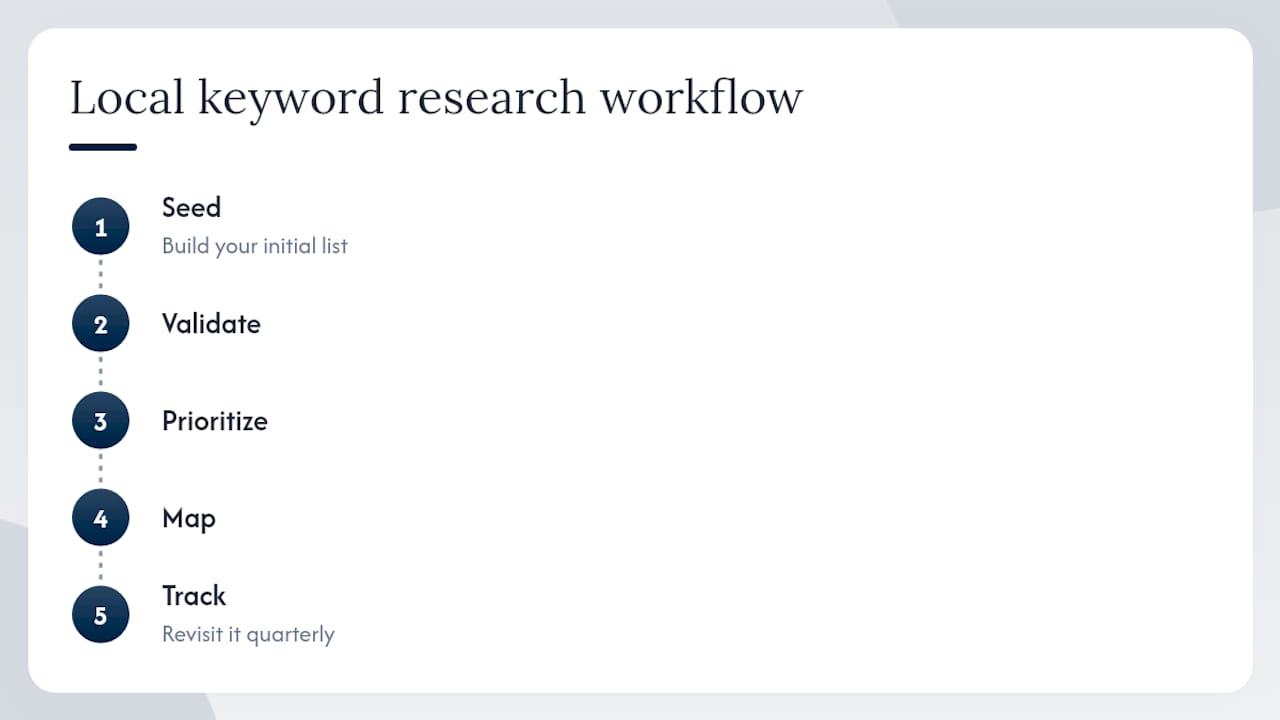
Step 1: Build your seed list
Write down every service you offer as a plain noun or short phrase. Don’t filter yet. A plumbing company might produce: water heater, drain cleaning, pipe repair, leak detection, sewer line, toilet installation, faucet replacement. Then add your specializations and the phrases customers actually use when they call you. Ask your front desk: “What do people say when they describe the problem?” That language is often closer to search queries than the technical terms you’d use internally.
Pair each service with your target places at three levels: city, neighborhood or district, and ZIP code.
Step 2: Expand seeds with local modifiers and long tails
Take each seed term and run it through:
- Google Autocomplete — type “[service] [city]” and note every suggestion that appears.
- Google Related Searches — scroll to the bottom of the results page for additional phrase variations.
- GBP review language — read your existing reviews and competitors’ reviews. Customers describe services in the exact terms future customers search for. “Fixed my AC fast” becomes “fast AC repair Tampa.” This reviewer language technique surfaces long-tail phrases that no keyword tool will generate.
- Google Trends — filter to your state or metro area to spot seasonal spikes (more on seasonality below).
Pro Tip: In Google Trends, compare two neighborhood-level variants of the same keyword (“South Tampa plumber” vs. “Westchase plumber”) to see which area has stronger search momentum before you invest in a location page.
Step 3: Validate with tools
Validation answers two questions: does this keyword have real search volume, and does it trigger local results?
- Open Google Keyword Planner and filter to your city or metro area. Enter your expanded seed list and pull monthly volume estimates. Don’t obsess over exact numbers — Keyword Planner shows ranges, and local volumes are often small. A keyword showing 10–100 monthly searches in your city is still worth targeting if the intent is high.
- Check Google Search Console for any keywords already driving impressions to your site. Filter by your city name to isolate local queries. These are your fastest wins — you’re already ranking partially.
- Run a manual SERP check: search the keyword in an incognito window from your target city (or use a VPN set to that location). Does a Local Pack appear? If yes, GBP optimization is as important as page content for that term.
Step 4: Prioritize by tier and scoring
Organize your validated keywords into three tiers, as outlined in the three-tier local keyword stack:
- Tier 1: Service + city (“roof repair Tampa”) — highest volume, most competition, essential to own.
- Tier 2: Service + neighborhood or ZIP (“roof repair Seminole Heights,” “roof repair 33604”) — lower volume, lower competition, higher conversion rate.
- Tier 3: Service + intent modifier (“emergency roof repair Tampa,” “same-day roof repair near me”) — lowest volume, lowest competition, highest purchase intent.
Score each keyword on a simple 0–3 scale across four factors:
| Factor | 0 | 1 | 2 | 3 |
|---|---|---|---|---|
| Local search volume | No data | Low (10–100/mo) | Medium (100–500/mo) | High (500+/mo) |
| Local Pack present | No | Rarely | Sometimes | Always |
| Competition (SERP) | Directories dominate | Mix | Some local businesses | Mostly local businesses |
| CPC (commercial signal) | $0 | Under $2 | $2–$5 | Over $5 |
Keywords scoring 8 or higher go to the top of your action list. Tier 3 keywords often score 8–10 despite low volume because they hit high on intent and Local Pack presence.
Step 5: Map keywords to pages and GBP fields
Every priority keyword needs a home. Use this mapping template:
| Keyword | Tier | Intent | Target URL | GBP Field to Update |
|---|---|---|---|---|
| roof repair Tampa | 1 | Transactional | /services/roof-repair-tampa | Primary category, description |
| roof repair Seminole Heights | 2 | Transactional | /locations/seminole-heights | Services section, posts |
| emergency roof repair Tampa | 3 | Urgent/transactional | /services/emergency-roof-repair | Q&A, description |
| best roofer Tampa reviews | 3 | Consideration | /reviews or existing page | Review responses |
Pro Tip: If a Tier 2 or Tier 3 keyword doesn’t have a matching page yet, don’t stuff it into an existing page that covers a different topic. Create a focused location or service+intent page. Thin pages built around one specific local phrase consistently outperform bloated pages trying to rank for everything.
Which tools should you use for local keyword data?
The right tool depends on your budget, the number of locations you’re managing, and how granular you need to go. Here’s a practical breakdown of the six tools that matter most for local work.
Google Keyword Planner
Free with a Google Ads account. Filters to city, region, or metro area. The volume data is bucketed (ranges, not exact numbers), but it’s the most reliable free source for local volume estimates. Best for: validating seed terms and checking CPC as a commercial-intent signal.
Google Search Console
Free, and arguably the most valuable tool in this list because it shows real queries already triggering your pages. Filter by country, then manually search for city-name patterns in the query list. Best for: identifying existing partial rankings and quick-win opportunities.
Google Trends
Free. Useful for comparing relative interest between keyword variants and spotting seasonal demand in your metro area. It won’t give you volume numbers, but it will tell you whether “AC repair Tampa” spikes in May or June, which matters for content timing. Best for: seasonality planning and comparing neighborhood-level variants.
Semrush
Paid (free tier available with limits). The Keyword Magic Tool lets you filter by country and state, and the Position Tracking feature supports city-level rank monitoring. The Local SEO toolkit includes a GBP audit feature. Best for: multi-location businesses or agencies managing several clients who need depth and automation.
KWFinder by Mangools
Paid with a limited free trial. KWFinder supports granular location filtering down to city and sometimes neighborhood level, which makes it useful for finding long-tail local phrases that city-level tools miss. The difficulty scores tend to be more realistic for local markets than some enterprise tools. Best for: single-location businesses that want affordable paid-tool depth without enterprise pricing.
Ubersuggest
Freemium. Good for generating keyword ideas quickly and checking basic difficulty scores. The free tier is limited but workable for a first-pass seed expansion. Best for: budget-constrained businesses doing initial research before deciding whether to invest in a paid tool.
When to use which tool
| Scenario | Recommended tools |
|---|---|
| Single location, tight budget | Google Keyword Planner + Search Console + Ubersuggest |
| Single location, ready to invest | KWFinder + Search Console + Google Trends |
| Multi-location business | Semrush + Search Console + Google Keyword Planner |
| Quick neighborhood-level research | KWFinder + Google Autocomplete + Google Trends |
| Tracking Local Pack rankings | Semrush Position Tracking or KWFinder SERP Watcher |
Free tools are enough to build a solid initial keyword list for a single-location business. The jump to a paid tool pays off when you’re managing multiple locations, need automated rank tracking, or want competitive gap data without manual SERP pulls.
How do you evaluate and prioritize local keywords?
Volume alone is a poor guide for local keyword prioritization. A keyword with 50 monthly searches in your city that triggers a Local Pack and has a CPC above $5 is worth more than a 500-search term dominated by national directories where your GBP has no leverage.
Local metrics that actually matter
- Local search volume: Use city-filtered Keyword Planner data. Treat anything above 10 monthly local searches as viable if intent is high.
- Local Pack presence: Search the term manually. If a map pack appears, GBP optimization is a direct ranking lever. If it doesn’t, you’re competing purely on organic content.
- CPC as a commercial signal: High CPC means advertisers are paying to appear for that term, which means buyers are converting. A $6 CPC on “emergency HVAC repair Tampa” tells you the commercial intent is real.
- SERP competition type: Are the top organic results local businesses, national directories (Yelp, Angi, HomeAdvisor), or informational articles? Local businesses in the top three means the barrier is lower than it looks. Directories dominating means you need GBP strength, not just page content.
- GBP strength of current rankers: Check the Local Pack winners’ review counts, photo counts, and category completeness. If the top-ranked competitor has 40 reviews and you have 8, that gap is your most urgent priority.
Quick rules of thumb
- Favor Tier 3 high-intent long tails even when volume is low. A keyword with 20 monthly searches and a Local Pack trigger will drive more calls than a 300-search term buried under directories.
- Prioritize any keyword where your GBP already appears on page two of the Local Pack results. You’re close enough that signal improvements can move you into the visible three-pack.
- Don’t chase keywords where the top three Local Pack results all have 200+ reviews and you have fewer than 20. Work the neighborhood-level variants where the competition is thinner.
Pro Tip: Search your top five priority keywords from a mobile device in your target city. Mobile Local Pack results sometimes differ from desktop, and most of your customers are searching on their phones. If you see a competitor ranking on mobile that doesn’t appear on desktop, their GBP proximity signal is strong — that’s a signal to check their category and attribute setup.
How to analyze the live Local Pack and find competitor gaps
Local competitor analysis starts with the live Local Pack for your target keyword and location, not with the businesses you think of as competitors. Search your Tier 1 keyword right now and note the three businesses that appear. Those are your actual competitors for that term, regardless of who you compete with offline.
Signal-level comparison checklist
For each Local Pack competitor, check these GBP signals:
- Primary category — Does it match your service exactly, or is it a broader category?
- Secondary categories — How many do they have? Are any relevant to your services that you haven’t claimed?
- Attributes — Do they have attributes you’re missing (“women-owned,” “free Wi-Fi,” “wheelchair accessible,” “online appointments”)?
- Review count and recency — Total reviews, average rating, and how recently the last review was posted.
- Review response rate — Are they responding to reviews? Unanswered reviews are a gap you can exploit by being the business that actually engages.
- Photo count and variety — Interior, exterior, team, work samples, products. Google favors profiles with diverse, regularly updated photos.
- Business description — Does it use natural service and location language, or is it generic?
- Services/products listed — Are their service entries detailed with descriptions, or just names?
Converting gaps into quick wins
Once you’ve mapped the gaps, sort them by effort:
- 5–15 minutes: Add missing secondary categories, claim unchecked attributes, update your business description with priority keywords.
- 1–2 hours: Add 10–15 new photos across categories (interior, team, work samples), write detailed service descriptions for your top five services.
- Ongoing (days to weeks): Launch a review generation campaign to close the review count gap. Ask every satisfied customer by text or email within 24 hours of service completion.
- Months: Close a large review volume gap with a competitor who has 150+ reviews. Consistent outreach over 3–6 months is the only reliable path.
Local Pack ranking often responds faster to GBP signal work than to website content changes. Some category and attribute improvements show effects within 2–6 weeks. Review volume gaps take longer, which is exactly why you should start the review generation process before you feel the urgency.
Where exactly do you apply local keywords in your Google Business Profile?
Your GBP has more keyword-bearing fields than most business owners realize. Here’s a field-by-field breakdown with example language.
Field-by-field checklist
- Primary category: Choose the most specific category that accurately describes your main service. “Plumber” is better than “Contractor.” “Emergency Plumber” is not a category — don’t try to force it.
- Secondary categories: Add every relevant secondary category. A plumbing company might add “Drainage Service,” “Water Heater Installer,” and “Septic System Service.”
- Business description (750 characters max): Use your Tier 1 and Tier 2 keywords naturally in the first 250 characters. Example: “Tampa’s trusted plumbing team serving Seminole Heights, Ybor City, and South Tampa. We handle emergency repairs, water heater installation, drain cleaning, and full repiping — same-day service available.”
- Services and products: Create a separate entry for each service with a description of 100–200 words. Include the city or neighborhood name naturally. This is one of the most underused keyword fields on GBP.
- Q&A: Seed your own Q&A with questions customers actually ask. “Do you offer same-day plumbing repair in Tampa?” Answer it with a full sentence that includes your service and location.
- Attributes: Claim every accurate attribute. These affect filter-based searches (“open now,” “women-led,” “free estimates”).
- Posts: Publish weekly or bi-weekly posts about services, promotions, or seasonal tips. Include your city name and a primary keyword naturally.
- Photos: Add photos with descriptive file names and alt text where the platform allows. Update regularly — Google timestamps photo activity.
- Review responses: Respond to every review. In positive responses, naturally echo the service the customer mentioned: “Thank you for trusting us with your water heater replacement in South Tampa — we’re glad the same-day service worked for your schedule.”
For a deeper walkthrough of every GBP field, the Ultimate Google Business Guide covers best practices in full.
Dos and don’ts
| Do | Don’t |
|---|---|
| Use natural service + location language | Keyword-stuff the description with city names |
| Mirror language from your best reviews | Copy competitor descriptions |
| Update services with seasonal offerings | Leave service descriptions blank or one-word |
| Respond to every review within 48 hours | Ignore negative reviews |
| Add photos weekly or bi-weekly | Upload all photos once and never update |
One important distinction: GBP updates affect your Local Pack visibility directly and often faster than website content changes. A new service description or secondary category can shift your pack position within weeks. A new page on your website typically takes longer to index and rank.
How do you scale local keyword research across multiple locations?
Running the same keyword list across every location is one of the most common mistakes multi-location businesses make. Search behavior varies by neighborhood and city. “Affordable dentist” might be a high-volume phrase in one ZIP code and nearly unsearched in another. Run separate research for each location.
Recommended site architecture
- Single location: One service page per core service, optimized for city-level keywords. Add neighborhood-level content as blog posts or FAQ sections.
- 2–5 locations: Dedicated location landing pages under a
/locations/[city-name]/subfolder. Each page gets its own keyword research, unique content, and GBP link. - 6+ locations: Subfolder architecture remains the standard recommendation for most businesses. Subdomains add technical complexity without meaningful ranking benefit for most local businesses. Each location page must have genuinely unique content — hours, team members, local landmarks, neighborhood-specific services — not just a city name swapped into a template.
Quick audit checklist for each new location
- Separate GBP listing verified and fully built out (categories, attributes, photos, description)
- Neighborhood keyword list built independently (don’t copy-paste from another location)
- Location landing page live with unique content and mapped Tier 1 and Tier 2 keywords
- Citation consistency checked (NAP matches across Google, Yelp, Apple Maps, and major directories)
- Review generation process active for that location’s customers
Avoiding duplicate content at scale
Template pages where only the city name changes are a low-value duplicate content problem. The fix is adding genuinely location-specific content: the neighborhoods you serve from that location, the local landmarks near your office, staff bios tied to that branch, and service descriptions that reference local conditions (a roofing company in a coastal Florida market should mention hurricane-rated materials; the same company’s inland location might emphasize hail damage).
How do you track local keyword performance and measure ROI?
Tracking local SEO requires monitoring two separate ranking environments: standard organic search results and the Local Pack (Maps results). A keyword can rank well organically but not appear in the Local Pack, and vice versa.
KPIs to track
| KPI | Source | What it tells you |
|---|---|---|
| Local Pack impressions | GBP Insights | How often your profile appears in map results |
| GBP clicks (calls, directions, website) | GBP Insights | How often searchers take action from your profile |
| Organic impressions for mapped pages | Google Search Console | Whether your pages are gaining visibility |
| Organic clicks for mapped pages | Google Search Console | Whether impressions are converting to traffic |
| Local keyword rank (city/neighborhood) | Semrush or KWFinder | Position in organic results for tracked keywords |
| Local Pack rank | Semrush Local or manual check | Position in the three-pack for tracked keywords |
| Phone calls attributed to local search | Call tracking (CallRail or similar) | Revenue-side attribution |
Reporting timeline
- Week 1–4: Baseline only. Record starting positions for your top 10 priority keywords in both organic and Local Pack. Note GBP Insights numbers (impressions, clicks, calls) for the same period.
- Day 30: Check GBP Insights for movement in impressions and actions. GBP signal changes (new categories, attributes, photos) often show early movement here before organic rankings shift.
- Day 90: Review organic rank changes for mapped pages. Check Search Console for new query impressions on Tier 2 and Tier 3 keywords. Compare call volume to the baseline period.
- Day 180: Full ROI review. Compare leads and calls attributed to local search against the baseline. Identify which keyword tiers drove the most conversions and reallocate effort accordingly.
Google Maps plays a direct role in this attribution picture — direction requests and call clicks from GBP are often the clearest early signal that local visibility is translating into real customer actions.
EEAT: running a GBP signal-level gap analysis today
A signal-level comparison is the most direct path to Local Pack quick wins. Rather than guessing what to fix, you measure your profile against the businesses actually ranking above you right now.
Signal comparison approach
Pull the top three Local Pack results for your primary Tier 1 keyword. For each competitor and for your own profile, score these signals on a 0–2 scale (0 = missing, 1 = partial, 2 = complete):
- GBP completeness: All fields filled, hours accurate, website linked, description at or near 750 characters.
- Secondary categories: Number of relevant secondary categories claimed.
- Attribute coverage: Percentage of available attributes claimed.
- Review count and response rate: Total reviews and percentage of reviews with a response.
- Photos by type: Interior, exterior, team, products/work samples — all four types present and recently updated.
- Business description keyword coverage: Priority service and location terms present in natural language.
Total your score and compare. Any signal where competitors score 2 and you score 0 or 1 is a gap.
Prioritized action list with time estimates
- Add missing secondary categories (5–10 minutes): Immediate impact on which service searches trigger your profile.
- Claim unchecked attributes (10–15 minutes): Affects filter-based searches and signals completeness to Google.
- Rewrite business description (30–45 minutes): Include Tier 1 and Tier 2 keywords naturally in the first 250 characters.
- Add 15–20 new photos across all types (1–2 hours): Photo diversity and recency are measurable signals.
- Write detailed service descriptions (2–3 hours): One per core service, 100–200 words each, with location language.
- Launch review generation (ongoing): Text or email every customer within 24 hours of service. Closing a 50-review gap with a competitor takes 3–6 months of consistent outreach.
As BrightLocal Academy emphasizes, local keyword research works best when it’s treated as a recurring process tied directly to GBP management, not a one-time project. The businesses that maintain Local Pack positions are the ones running this gap analysis every quarter and acting on what they find.
Pro Tip: After updating your GBP categories or attributes, search your Tier 1 keyword from a mobile device in your target city within 48 hours. You’re looking for early movement in your pack position. If you don’t see any change within three weeks, the gap is likely in review count or proximity, not categories.
What most small businesses get wrong about local keyword research
Most small businesses start their local keyword research by targeting the highest-volume city-level terms and then wonder why nothing moves. “Plumber Tampa” has real search volume, but it also has years of entrenched competition from large directories, franchise brands, and established local businesses with hundreds of reviews. Chasing that term first is the slowest possible path to results.
The smarter move is to start where the competition is thinner: Tier 2 neighborhood terms and Tier 3 intent modifiers. A business with 25 reviews can realistically rank in the Local Pack for “emergency plumber Seminole Heights” or “same-day drain cleaning Ybor City” while it builds the review volume needed to compete for “plumber Tampa.” Those neighborhood and intent terms also convert at higher rates because the searcher is more specific about what they need and where they are.
The second mistake is treating GBP as a directory listing rather than a ranking asset. Every field on your GBP is a signal. Businesses that fill out every service description, respond to every review, and add photos weekly are not doing busywork. They’re accumulating the signals that determine whether Google shows them in the three-pack or not.
The third mistake is ignoring reviewer language. Your customers are writing your best keyword research for you in their reviews. When five different customers describe your service as “fast and affordable AC repair,” that phrase belongs in your service description, your Q&A, and your review responses. It’s the language real people use, which means it’s the language future customers search.
What actually moves the needle is the combination: GBP signal parity with your Local Pack competitors, plus mapped pages targeting Tier 2 and Tier 3 keywords with intent-aligned content. Neither alone is enough. GBP without mapped pages leaves organic rankings untouched. Pages without GBP signal strength leave the Local Pack to competitors.

Tradewindsunitedmedia can build and run this for you
Running local keyword research, optimizing your GBP field by field, building location landing pages, and tracking rank movement across organic and Maps results is a full-time job on top of running your business. Tradewindsunitedmedia handles all of it for small businesses and local service providers who want results without spending their evenings in keyword tools.

The specific services that map directly to this guide: local keyword research and prioritization, GBP optimization and monthly management, location landing page design and content, local rank tracking with monthly performance reports, and reputation management to accelerate review growth. Every client gets clear reporting that shows exactly which keywords are driving calls, direction requests, and website visits — not vanity metrics.
The starting point is a Local SEO Report — a prioritized audit of your current GBP signals, keyword gaps, and competitor positioning that tells you exactly where you stand and what to fix first. If you want the full-service approach, the local SEO service covers ongoing keyword research, GBP management, and rank tracking under one retainer. Request your Local SEO Report today and get a clear picture of what’s holding your local rankings back.
Useful tools, guides, and resources
- Google Keyword Planner — Free with a Google Ads account. Use it for city-filtered volume estimates and CPC signals. The most reliable free starting point for local volume validation.
- Google Search Console — Free. Shows the actual queries triggering your pages. Filter by city name to find existing partial rankings and quick-win opportunities.
- Google Trends — Free. Compare keyword variants by metro area and identify seasonal demand spikes before you publish content or run promotions.
- Semrush — Paid. Best for multi-location businesses needing depth, automation, and GBP audit features alongside keyword research.
- KWFinder by Mangools — Paid with a limited free trial. Useful for neighborhood-level long-tail research and realistic local difficulty scores.
- Ubersuggest — Freemium. Good for quick seed expansion when budget is tight; limited for granular local data.
- BrightLocal Academy — Local Keyword Research Course — The most structured free training available for local keyword research tied to GBP management. Recommended for anyone who wants to go deeper on competitor signal analysis.
- Seobility — Local Keyword Research Guide — A practical reference for the seed-to-map workflow, useful for validating your process against an established framework.
- GBP Insights (inside your Google Business Profile dashboard) — Check the Queries tab weekly. The search terms already triggering your profile are your highest-priority keywords — they’re real demand you’re partially capturing and can fully own with the right optimizations.
Sources
- Keyword Research for Local SEO: How to Find Local Keywords
- Local Competitor Analysis Skill | Local SEO Skills
- BrightLocal Academy – How to Master Local Keyword Research
- Google support — web search help
- Google Ads Keyword Planner




