

Map pack ranking is your position in the three local business listings Google shows above organic results for searches with local intent, and it’s driven by three factors: relevance, distance, and prominence. Start with what you can control fastest. Claim and verify your Google Business Profile if you haven’t, correct your primary category, and get some recent reviews over a short period. Everything else builds on that foundation.
TL;DR:
- Claim, verify, and optimize your Google Business Profile by setting precise categories, filling out services, and uploading recent photos to improve relevance.
- Focus on increasing review volume and recency without incentivizing reviews, responding promptly to negative feedback, and tracking review velocity monthly.
- Use geo-grid testing to identify whether your ranking is limited by distance or relevance, and consider expanding or building localized pages if distance is the key issue.
- Ensure your website, citations, and schema are consistent and complete to bolster prominence signals that influence map pack ranking.
- Prioritize GBP optimization and review building first, as these quickly influence visibility, then use ongoing geo-grid testing and reputation management to sustain improved rankings.
Table of Contents
- What Determines Map Pack Ranking: Relevance, Distance, and Prominence
- Google Business Profile Optimization: The Checklist to Fix First
- Why Reviews Move Map Pack Position Faster Than Almost Anything Else
- How to Diagnose a Distance Problem With Geo-Grid Testing
- Website Signals, Schema, and Citations That Support Prominence
- Which Tools Actually Track Map Pack Visibility?
- Tradewinds United Media’s Process for Map Pack Improvement
- Do User Behavior Signals Affect Your Map Pack Rank?
- How Do Google’s Algorithm Updates Affect Map Pack Rankings?
- Do Mobile Searches Change How the Map Pack Ranks?
- What Should You Prioritize First With Limited Time?
- How Tradewinds United Media Can Help Your Business Rank
- Sources
What Determines Map Pack Ranking: Relevance, Distance, and Prominence
Google says local ranking comes down to relevance, distance, and prominence, and each factor works differently than most business owners assume.
Relevance measures how well your profile matches the search. A plumber who lists “Plumbing” as their primary category and fills out service areas for “drain cleaning” and “water heater repair” will outrank a plumber who only wrote “we fix pipes” in their business description.
Distance calculates how far you are from the searcher or the area they typed. This one has a ceiling. No amount of profile polish moves your physical location.
Prominence covers everything else Google knows about your reputation: review volume, star rating, citations, backlinks, and general web presence.
Here’s the practical breakdown:
- Relevance: category accuracy, service descriptions, keyword alignment in your business description
- Distance: your address relative to the searcher, and how tightly Google interprets “near me”
- Prominence: review signals, citation consistency, backlinks, and offline brand recognition that shows up online
A bakery two miles from a searcher with 200 reviews often beats one four blocks away with 12 reviews, because prominence can outweigh a moderate distance disadvantage.
Google Business Profile Optimization: The Checklist to Fix First
Most GBP problems aren’t complicated. They’re just ignored. Here’s the order to work through them.
- Verify ownership through Google’s postcard, phone, or video verification process, and confirm you’re managing the profile, not a stale duplicate someone else claimed.
- Set your primary category with precision. “General Contractor” and “Kitchen Remodeler” send Google very different relevance signals, even for the same business.
- Add secondary categories that reflect real services, but don’t pad the list with categories you don’t actually perform.
- Fill out services with specific line items rather than one paragraph. Google matches individual service entries to individual queries, so “Emergency Drain Cleaning” as its own listed service catches searches a generic description never will.
- Complete every attribute field: hours, payment types, accessibility, wheelchair access, whatever applies. Empty fields are missed relevance opportunities.
- Upload real photos regularly, not stock images. Interior shots, team photos, and completed jobs all feed engagement signals.
- Write a business description in plain language that mentions your services and location naturally, without stuffing keywords.
The biggest anti-pattern to avoid: stuffing your business name field with keywords like “Joe’s Plumbing Emergency 24/7 Water Heater Repair.” Google’s naming policy explicitly bans this, and profiles that violate it risk suspension, not just a ranking penalty. Duplicate listings for the same location cause similar damage, as they split your review count and confuse the algorithm about which profile to trust.
Pro Tip: Set a recurring 90-day calendar reminder to audit your GBP for changed hours, new services, and outdated photos. Profiles that go stale for a year lose relevance signals slowly enough that owners rarely notice until a competitor pulls ahead.
For a deeper field-by-field walkthrough, Tradewinds United Media’s Google Business Profile optimization playbook covers each setting in more detail.
Why Reviews Move Map Pack Position Faster Than Almost Anything Else
Review count, recency, and rating quality feed prominence more directly than most owners realize, and practitioner data backs this up. Industry surveys found that GBP completeness and review signals explain a substantial share of the observable correlation with Map Pack position, making reviews one of the few levers a small business can scale on its own timeline.
Recency matters as much as total count. A profile with 150 reviews from three years ago and nothing since looks stagnant to Google compared to a competitor steadily adding five reviews a month. Consumer trust data shows rising reliance on reviews, and more shoppers now expect a higher average rating before they’ll even consider a local business.
Here’s what actually works without crossing into policy violations:
- Ask in person or via text right after service completion, when satisfaction is freshest
- Send a direct Google review link rather than making customers search for you
- Time requests to match your typical purchase cycle, not just once a year
- Encourage detail without scripting it. Ask customers to mention what service they got and where, which naturally produces location and service keywords in the review text
Never offer discounts or incentives for reviews. That violates Google’s policies and risks your entire profile.
When a negative review lands, respond within 24 to 48 hours, acknowledge the specific complaint, and take the resolution offline. A pattern of thoughtful responses does more for your reputation than a flawless rating ever could. Tradewinds’ guide to responding to bad reviews has templates that keep responses professional under pressure.
Pro Tip: Track review velocity monthly, not review totals. A business adding four reviews a month with a 4.6 rating often outranks a competitor sitting on 300 reviews and adding zero.
How to Diagnose a Distance Problem With Geo-Grid Testing
A single search from your office tells you almost nothing about how you rank across your service area. That’s because Map Pack results shift by location, sometimes dramatically within a few blocks. A geo-grid test solves this by simulating searches from multiple points across a map, then plotting your rank at each point as a heatmap.
- Choose a grid size. A 3×3 grid works for tight service areas; a 5×5 or larger grid suits businesses covering multiple neighborhoods or towns.
- Run the test on your actual target keywords, not just your business name, since branded searches ignore ranking factors entirely.
- Read the heatmap for patterns. If you rank well near your address and fall off sharply at the edges, you’re likely hitting a genuine distance ceiling rather than a relevance or prominence problem.
- Repeat the same grid and query set after every change so you’re comparing apples to apples over time, exactly the kind of controlled, one-variable testing that isolates what actually moved your rank.
When distance is the limiting factor, profile work alone won’t close the gap. Consider building neighborhood-specific service pages, opening an additional physical location if volume justifies it, or supplementing organic Map Pack visibility with paid local ads in underperforming zones.
Website Signals, Schema, and Citations That Support Prominence
Your website feeds prominence just as much as your GBP does. Search engines cross-reference what your site says against what your profile says, and gaps between them create doubt.
- Add LocalBusiness or ProfessionalService schema to your site and run it through a schema validator to confirm Google can parse your name, address, phone number, and service area correctly, per Schema.
- Build individual service pages that mirror your GBP service list rather than cramming everything onto one homepage paragraph.
- Audit citations across directories for NAP consistency (name, address, phone). A mismatched suite number or an old phone number sitting on a directory from years ago quietly erodes trust signals.
- Invest in local link building (mentions from local news, chamber of commerce sites, sponsorships) only after your GBP and citations are clean. Links amplify a solid foundation; they don’t fix a broken one.
Services like StartupSubmit can help distribute consistent citations across dozens of directories at once, which saves the manual cleanup work of fixing NAP errors one listing at a time.
Which Tools Actually Track Map Pack Visibility?
Rank tracking for the Map Pack requires geo-grid capable tools, since a single-point check is close to meaningless. Semrush’s Map Rank Tracker, Local Falcon, and BrightLocal each serve slightly different needs.
- Local Falcon specializes in visual heatmap grids and is often the fastest way to spot a distance ceiling.
- BrightLocal combines rank tracking with citation auditing, useful if you’re managing both at once.
- Semrush’s map tracker fits businesses already using Semrush for broader SEO reporting.
Pick a grid size that matches your actual service radius, and build your query set around the exact phrases customers search, not just your core service name. Track your Visibility Score, a percentage of grid points where you appear in the Map Pack, as your primary trend metric rather than obsessing over rank at any single point. Review it monthly alongside review count, response rate, and citation consistency.
Tradewinds United Media’s Process for Map Pack Improvement
Most Map Pack turnarounds follow a repeatable sequence: audit the current GBP and citation state, clean up profile errors and category mismatches, build review velocity, run geo-grid tests to confirm what moved, then invest in site content and citations where the data shows a real gap.
- Full GBP and citation audit before any changes
- Category and service corrections based on relevance gaps
- A structured review generation plan tied to your actual customer flow
- Geo-grid testing before and after changes to confirm impact
- Targeted site and schema work only where distance and prominence data justify it
Readers wanting a structured starting point can request a Local SEO Report to see where their profile currently stands before committing to a longer campaign.
Do User Behavior Signals Affect Your Map Pack Rank?
Click patterns, call volume, direction requests, and how long a searcher engages with your profile before returning to search results all feed into how Google weighs prominence over time. A profile that gets clicked frequently, generates calls, and holds attention signals real-world relevance that static profile fields can’t fully capture on their own.
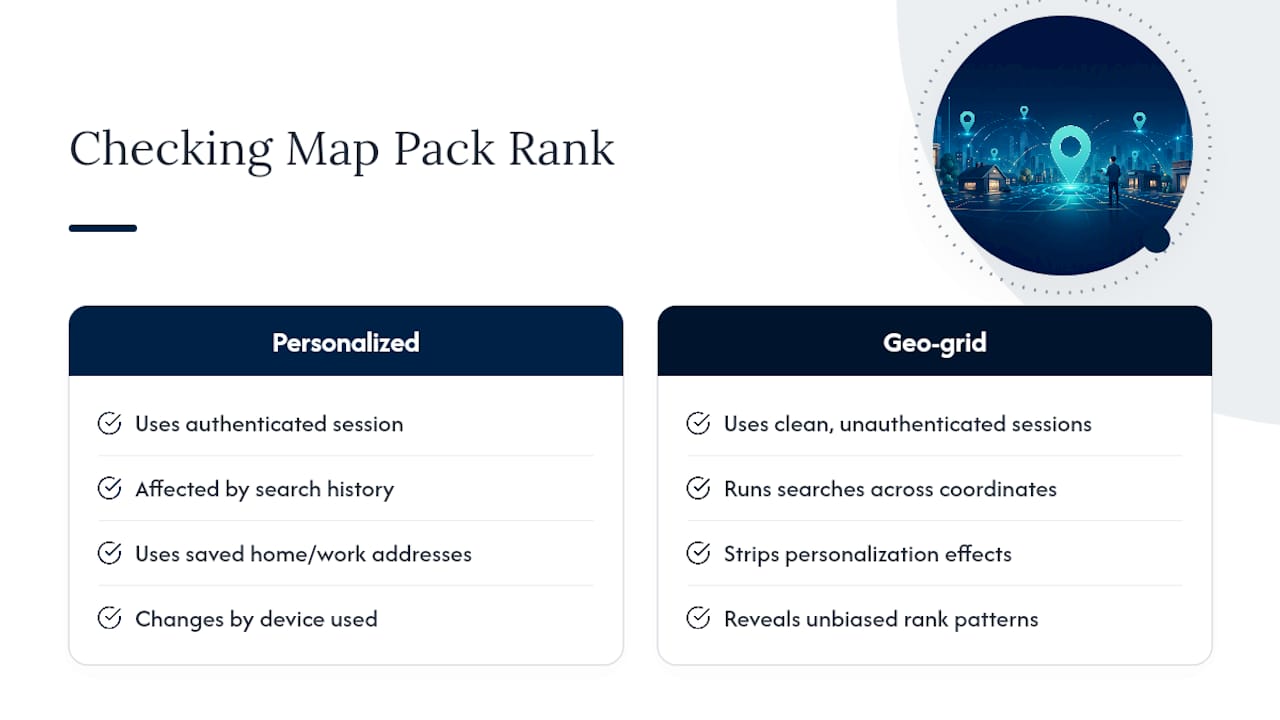
Personalization complicates this further. Google adjusts results based on a searcher’s history, home and work addresses saved in their account, and even the device they’re using. Two people searching the identical phrase from the same neighborhood can see different Map Pack results if one has visited your competitor’s website recently or saved a competing business to their favorites.
This is exactly why single-search checks mislead business owners. If you search your own business name and see yourself ranked first, that result is shaped by your search history, your saved locations, and possibly a cookie from your last visit to your own website. It tells you nothing about what a new customer sees. Geo-grid testing strips personalization out of the equation by running searches from clean, unauthenticated sessions across a spread of coordinates, which is the only way to see an unbiased picture of where you actually rank.
The practical takeaway is that behavior signals reward businesses that earn genuine engagement, not businesses that try to game clicks artificially. Encouraging real customers to call, get directions, or visit your website after finding you in the Map Pack builds the kind of signal Google can’t easily fake, and it compounds over time the same way review velocity does.
How Do Google’s Algorithm Updates Affect Map Pack Rankings?
Google runs automated local algorithm updates continuously, and unlike core search updates that get named and publicly announced, most local ranking adjustments happen quietly and get discovered only after businesses notice rank volatility. This makes local SEO tracking fundamentally different from tracking organic rankings, where major updates are usually confirmed and dated.
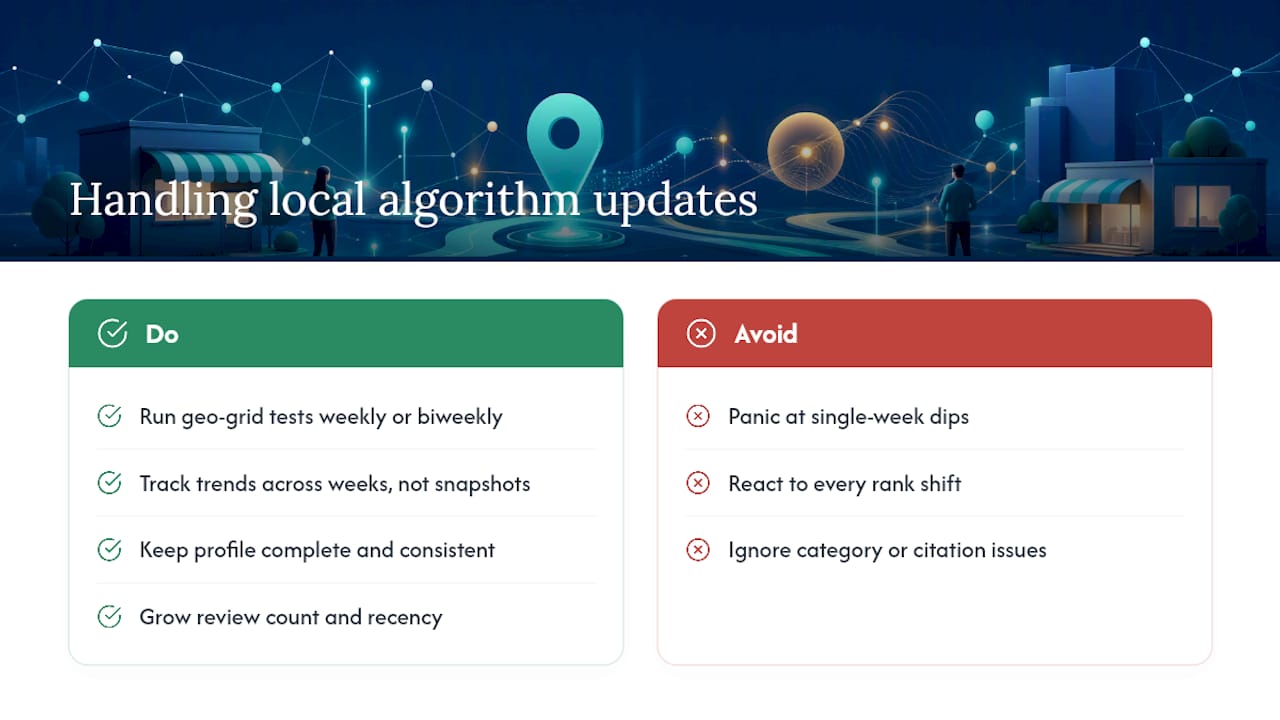
The practical effect: a business can do everything right on paper and still see rank fluctuate week to week as Google’s local algorithm reweights signals like review recency, proximity calculations, or category matching. This is normal, not a sign that something broke. Short-term rank noise is common enough that a single week’s dip rarely indicates a real problem.
What separates businesses that handle this well from those that panic is measurement discipline. Rather than reacting to every rank shift, run your geo-grid test on a consistent schedule (weekly or biweekly, depending on how competitive your market is) and look at trend lines across weeks, not single snapshots. A gradual downward trend across a month signals something worth investigating. A single point of volatility usually resolves on its own.
Because these updates roll out algorithmically and rarely target one business specifically, the best defense is a profile and review foundation strong enough to weather reweighting. Businesses with thin review counts, incomplete categories, or inconsistent citations tend to feel every algorithm shift more sharply than businesses with a fully built-out, consistently maintained presence. Consistency, not reaction speed, is what protects your position through updates you’ll never see announced anywhere.
Do Mobile Searches Change How the Map Pack Ranks?
Mobile search behavior shapes Map Pack results more than desktop does, largely because mobile searches carry stronger implicit location signals. A phone with location services enabled gives Google a precise GPS coordinate rather than an inferred city or zip code, which tightens the distance calculation considerably compared to a desktop search where location is often just an IP-based guess.
This means the Map Pack a customer sees while standing outside their office can look meaningfully different from what the same person sees searching from home on a laptop that evening. For businesses serving a tight local radius, that precision usually works in your favor when you’re genuinely close to where people are searching. For businesses trying to rank across a wider service area, it can expose the distance ceiling discussed earlier more starkly on mobile than on desktop.
“Near me” searches, which skew heavily mobile, also tend to trigger the Map Pack more reliably than desktop searches for the same query, since Google interprets the mobile context as higher local intent by default. If your GBP and website aren’t optimized for a mobile-first experience (fast load times, click-to-call buttons that actually work, tap-friendly direction links) you lose some of the engagement signals that come from a searcher acting on what they see.
Practically, this means testing your geo-grid results with mobile user agents where your tool allows it, since a desktop-only test can miss how your rank actually performs for the “near me” searches that make up a large share of local mobile intent. It also means your website’s mobile experience isn’t separate from your Map Pack strategy. It’s part of the prominence signal Google is watching.
What Should You Prioritize First With Limited Time?
If you’re working with limited hours and a limited budget, fix your Google Business Profile and build review velocity before anything else. Those two moves show up fastest and improve conversion while slower prominence signals build in the background. Measure one change at a time with a repeated geo-grid test. Guessing at what worked wastes the effort you just put in.
— Michael
How Tradewinds United Media Can Help Your Business Rank
If you’ve made it this far, you already know GBP cleanup, review velocity, and geo-grid testing aren’t a weekend project. They’re an ongoing discipline most business owners don’t have hours in the week to maintain alongside running the actual business. Tradewinds United Media handles that discipline as a managed process: GBP optimization, review and reputation management, and recurring performance reporting that shows exactly what moved and why, instead of a vague monthly invoice.

The fastest way to see where you currently stand is to request a Local SEO Report, which gives you a snapshot of your current Map Pack visibility before you commit to anything further. If you’re ready for ongoing management rather than a one-time audit, the Local Map Domination service covers the full sequence: profile work, review generation, and geo-grid tracking over time. Either way, the next step is simple: request your report and see the gap between where you rank now and where your competitors already sit.
Sources
- Tips to improve your local ranking on Google – Google Business Profile Help
- What Is the Google Local Pack? How to Rank in the 3-Pack – Search Engine Land
- Google Map Pack: How Local Rankings Work (2026) | Lumina




