Prioritize verified location pages and accurate Google Business Profiles first. Then systemize citations, reviews, and tracking. That sequence is the backbone of every effective multi-location SEO strategy, and skipping any step in it is the most common reason businesses with five or fifty locations still can’t rank locally.
Here’s the immediate action plan:
- Verify and align your data. Confirm every location has a claimed, verified Google Business Profile with a matching name, address, and phone number on your website.
- Publish unique location pages. Each location needs its own URL with genuinely distinct content, not a template with the city name swapped.
- Systemize reviews and citations. Build a repeatable workflow for requesting reviews and auditing citation accuracy across directories.
Measure success by location: GBP impressions, organic sessions per location page, inbound calls, and form conversions. Those four signals tell you whether a location is gaining traction or stalling.
Key Takeaways
A complete multi-location SEO program requires verified GBPs, unique location pages, consistent NAP, a review workflow, and location-level tracking working together as one system.
| Point | Details |
|---|---|
| GBP verification is the first step | One verified GBP per physical location is the foundation; shared GBPs cannot rank in multiple markets. |
| Unique pages outperform templates | Hyperlocal content on location pages correlated with roughly a 107% ranking lift versus generic content, per a Wiideman study cited by BrightLocal. |
| NAP consistency requires a master repository | A single source of truth for every location’s canonical data prevents citation drift that erodes trust signals. |
| Attribution needs UTMs and call tracking | Tag every GBP link and assign unique CallRail numbers per location to measure ROI accurately in GA4. |
| Tradewindsunitedmedia manages the full system | From GBP optimization and citation audits to location pages and reporting dashboards, Tradewindsunitedmedia handles the operational complexity of multi-location SEO. |
Table of Contents
- What is multi-location SEO and how does it work?
- What does a complete multi-location SEO program cover?
- How do you build high-performing location pages at scale?
- How do you manage Google Business Profiles across many locations?
- How do you build a review program that works by location?
- How do you keep NAP consistent and build local backlinks?
- How should you implement LocalBusiness schema for each location?
- Which URL structure works best for multi-location sites?
- How do you track and attribute results by location?
- How do you scale multi-location SEO without losing control?
- What mistakes most often sabotage multi-location SEO?
- What do the benchmarks say about results and timelines?
- How do you localize content beyond just location pages?
- Which local listings beyond Google should you manage?
- How do you do keyword research for each location?
- How do you analyze competitors in each local market?
- Why does mobile optimization matter for multi-location SEO?
- Service-area pages vs. location pages: which one do you need?
- What most agencies get wrong about multi-location SEO
- Tradewindsunitedmedia handles the complexity so you don’t have to
- Sources
What is multi-location SEO and how does it work?
Multi-location SEO is the practice of optimizing a business’s online presence so each of its physical locations or service areas ranks in local search results for queries relevant to that specific market. It combines local SEO tactics (GBP, citations, reviews) with technical SEO (site architecture, schema, crawlability) and content strategy (unique location pages, localized blogs) into one coordinated program.
The critical distinction is between storefront businesses and service-area businesses (SABs):
- Storefront businesses have a public-facing address customers visit. Each location gets its own GBP with the address displayed, its own location page, and local citations that include the physical address.
- Service-area businesses operate from a base but serve customers at their location (plumbers, HVAC companies, cleaning services). Per Google’s official guidelines, SABs should hide their address in GBP and define a service area instead. Their SEO relies on service-area pages (SAPs) rather than address-based location pages.
The core building blocks for both types are the same: a verified GBP per location or service area, a dedicated landing page, consistent NAP (name, address, phone) across citations, and structured data that tells search engines and AI systems exactly what each location does and where.
What does a complete multi-location SEO program cover?
Backlinko’s operational model frames multi-location SEO as a six-step system: location pages, GBP optimization, reviews, citations, backlinks, and tracking. That’s the right skeleton. Here’s how to prioritize the components.
Must-have components:
- One verified GBP per physical location (never share a single GBP across multiple storefronts)
- Unique, indexable location pages or service-area pages for every market
- A master data repository with canonical NAP, hours, and URLs for every location
- Location-level tracking (UTMs, call tracking, GA4 segments)
- A review acquisition and response program
Nice-to-have components:
- Local PR outreach and community sponsorships for backlinks
- Location-specific social media accounts
- Hyperlocal video content (walkthroughs, staff introductions, neighborhood features)
- Location-specific blog posts and FAQ content
How do you build high-performing location pages at scale?
The page template matters less than the content inside it. Search Engine Land puts it plainly: treat each location page as a digital storefront that answers local customer questions, not a templated content hack. Every page should include:
- H1 with location name and primary service (e.g., “Plumbing Repair in Austin, TX”)
- NAP block with address, phone number, and hours matching the GBP exactly
- Hero section with a real photo of the location, staff, or a local job site
- Services list specific to what that location actually offers
- Staff or team section with names and photos where possible
- Local FAQs answering questions specific to that neighborhood or city
- Directions and parking notes referencing real local landmarks
- Embedded Google Map for the location
- Reviews widget pulling location-specific reviews
- Local photos (not stock images)
- CTA with a phone number or booking link tied to that location
The uniqueness comes from the details no other location shares: the name of the neighborhood, a local case study, a reference to a nearby landmark, or a staff member who grew up in that city. Those specifics are what separate a real location page from a doorway page.
For service-area businesses, swap the address block for a service-area description and replace the physical photos with proof-of-work images from jobs in that area. BrightLocal’s service-area page guidance confirms that local images, directions links, and location-specific social links all correlate with improved local performance.

Pro Tip: Build a modular template in your CMS with locked fields (NAP, schema, CTA) and editable fields (local FAQs, staff bio, neighborhood description). This lets you publish at scale while forcing contributors to add genuinely local content before the page goes live.
From a technical standpoint, every location page needs a crawlable link from your store locator or locations hub. A JavaScript-only locator that search engines can’t crawl is one of the most common reasons location pages never index.
How do you manage Google Business Profiles across many locations?
For businesses with ten or more locations, Google’s bulk verification process is the right starting point. Bulk verification lets you submit a spreadsheet of locations and verify them through a single request rather than verifying each one individually. The process requires a Google account with Business Profile Manager access and a completed location data template.
Once verified, the optimization checklist for each GBP is:
- Primary category: Choose the most specific category that matches the core service. This is the single highest-impact GBP field.
- Services: List every service the location offers, with descriptions.
- Hours: Match exactly what’s on the location page and website.
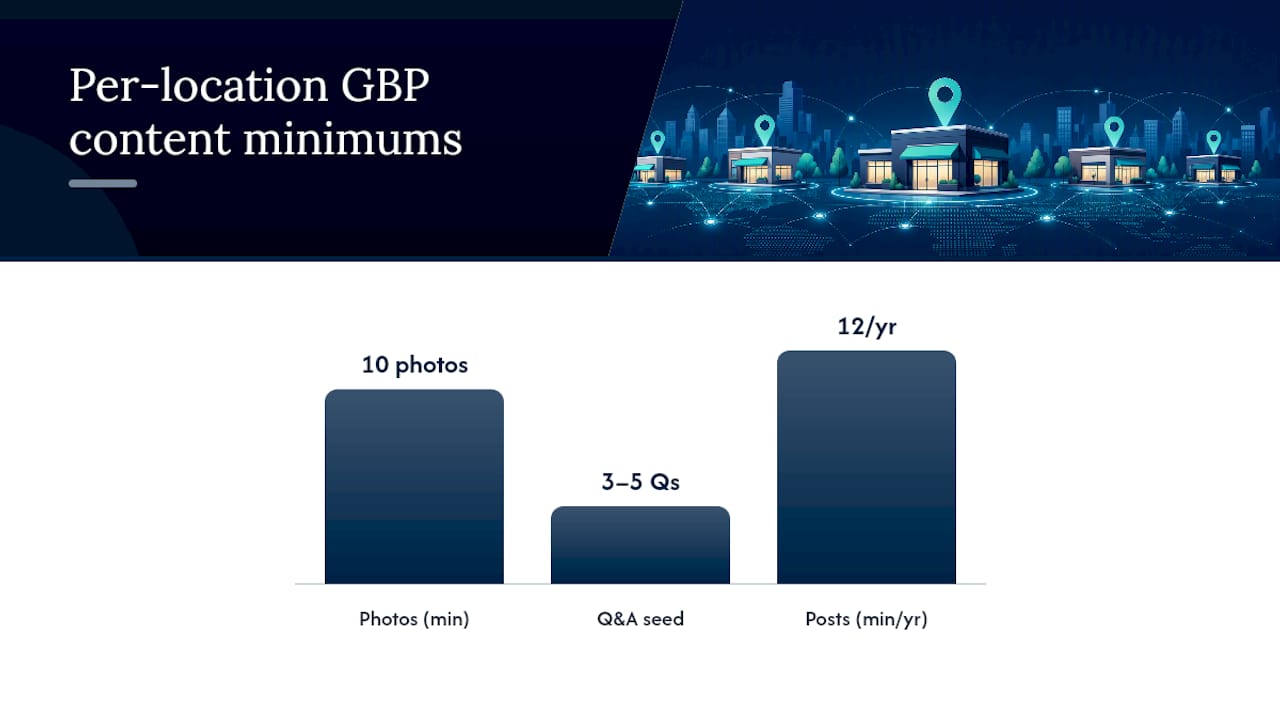
- Photos: Minimum of ten photos per location, including exterior, interior, staff, and products or work samples. Update photos at least quarterly.
- Appointment or booking link: Connect directly to the location-specific booking page, not the homepage.
- Q&A section: Seed it with the three to five questions customers actually ask.
- Posts: Publish at least one GBP post per month per location.
For bulk management, tools like Semrush Local, BrightLocal, and Whitespark each offer dashboards that let you push updates, monitor GBP health, and flag inconsistencies across all locations from one interface.
UTM tagging on GBP links is non-negotiable for attribution. Tag your website URL in GBP with a UTM source of “google,” medium of “organic,” and campaign of “gbp-[location-slug].” Do the same for appointment links. This lets GA4 segment traffic by location and tie GBP visits to actual conversions. For deeper guidance on GBP optimization, the step-by-step process covers category selection, photo specs, and post cadence in detail.
How do you build a review program that works by location?
Reviews are a prominence signal. Search Engine Journal identifies them as one of the three core levers alongside local backlinks and consistent NAP. The challenge at scale is making the workflow repeatable without making it feel robotic.
Review request workflow:
- Trigger the request at the right moment: after a completed service, a positive interaction, or a resolved support ticket.
- Send via SMS or email with a direct link to the location’s GBP review page (not the homepage).
- Personalize the message with the customer’s name and the specific service or location.
- Follow up once, no more than five days later, if no review was left.
Response standards:
- Respond to every review, positive or negative, within 48 hours.
- For positive reviews: thank the customer by name, mention the specific service or location, and add one sentence about what makes that location worth visiting.
- For negative reviews: acknowledge the issue, apologize without admitting fault, and move the conversation offline with a direct contact number. Never argue in the response.
- Escalate reviews that allege safety issues, legal claims, or contain personal information to a manager before responding.
For monitoring, tools like CallRail, GatherUp, and Semrush’s Review Management feature let you centralize review alerts across Google, Yelp, and Facebook into one dashboard. Assign response responsibility by location so no review sits unanswered. For a practical guide on responding to negative reviews, templates that de-escalate and protect your reputation are available.
How do you keep NAP consistent and build local backlinks?
NAP consistency starts with a master data repository: a single source of truth for every location’s canonical name, address, phone number, hours, GBP URL, and location page URL. Keep it in a shared spreadsheet or a tool like Data Axle, and update it before pushing changes anywhere else.
Citation audit steps:
- Run a citation audit through BrightLocal or Whitespark to surface every directory listing for each location.
- Flag mismatches: wrong phone numbers, old addresses, duplicate listings, and name variations.
- Correct mismatches at the source. For aggregator-fed directories, update the data at the aggregator level (Data Axle feeds hundreds of downstream directories).
- Set a quarterly audit cadence to catch drift from address changes, phone number updates, or new locations.
Local backlinks move the needle more than generic directory links. The highest-value sources are:
- Local news coverage (a story about a new location opening, a community event, or a local hire)
- Chamber of commerce membership pages
- Sponsorships of local events, sports teams, or nonprofits
- Industry-specific directories (contractor associations, medical boards, real estate boards)
- Local blogger or influencer partnerships
For outreach, a short email that leads with the local angle (“We just opened our third location in Midtown and wanted to introduce ourselves to the [City] business community”) converts better than a generic link request. Offer something in return: a quote for their article, a sponsorship, or a reciprocal mention.
How should you implement LocalBusiness schema for each location?
Structured data is how you tell search engines and AI systems exactly what each location is, where it is, and what it does. Every location page needs a LocalBusiness JSON-LD block with at minimum these fields:
The sameAs property is where entity corroboration happens. List every authoritative third-party profile for that location: GBP, Yelp, Facebook, Better Business Bureau, and any industry directory. This is how AI recommendation systems verify that the business is real and consistent across the web.
For service-area businesses, replace the
addressblock withareaServedusing aGeoShapeor a list ofCityobjects. Avoid listing an overly broad service area — covering an entire state when you actually serve three counties dilutes proximity signals and can trigger Google’s guidelines on misrepresentation. Per SEO Learning Center’s SAB guidance, hiding the address in GBP and usingareaServedschema together is the technically correct approach for service-area businesses.
Place the JSON-LD block in the <head> of each location page or immediately before the closing </body> tag. Do not use Microdata or RDFa for this; JSON-LD is Google’s preferred format and the easiest to maintain at scale.
Which URL structure works best for multi-location sites?
The subfolder model wins for most businesses. Here’s why the three options compare the way they do:
| Architecture | SEO Strength | Maintenance | Best For |
|---|---|---|---|
Subfolders (site.com/locations/city) | High — consolidates domain authority | Low — one CMS, one team | Most multi-location businesses |
Subdomains (city.site.com) | Medium — treated as separate sites by Google | High — separate analytics, separate crawl | Franchise models with independent operators |
Separate domains (citysite.com) | Low to medium — authority fragmented | Very high — separate everything | Distinct brands under one parent company |
Subfolders keep all link equity on one domain, simplify analytics, and make it easier to maintain consistent schema and internal linking. The landing page vs. microsite decision follows similar logic: a dedicated page within your main domain almost always outperforms a standalone microsite for local authority.
For store locators, the hub page at /locations/ should link directly to every individual location page with crawlable HTML links. If your locator uses JavaScript to render location links, add a static HTML sitemap as a fallback. Canonicalize each location page to itself; never canonicalize location pages to the hub or to each other.
URL naming convention: use /locations/[state]/[city]/ or /locations/[city-state]/ and keep it consistent. Inconsistent URL patterns create entity confusion when GBPs, citations, and schema all point to different URL formats.
How do you track and attribute results by location?
Without location-level attribution, you’re flying blind. A UTM naming convention applied consistently across every channel makes the difference between knowing which locations are growing and guessing.
UTM naming convention:
- GBP website link:
utm_source=google&utm_medium=organic&utm_campaign=gbp-[city-slug] - GBP appointment link:
utm_source=google&utm_medium=organic&utm_campaign=gbp-appt-[city-slug] - Local ads:
utm_source=google&utm_medium=cpc&utm_campaign=local-[city-slug] - Email campaigns:
utm_source=email&utm_medium=newsletter&utm_campaign=local-[city-slug]
Apply UTMs to every outbound link from GBP, local directory listings, and location-specific email campaigns. This lets GA4 segment sessions, conversions, and revenue by location without manual filtering.
Call tracking: Assign a unique tracking number per location through CallRail. Route calls to the real location number and pass call data into GA4 as a conversion event and into your CRM as a lead source. This closes the loop between a GBP impression and an actual phone call.
Dashboard components for Looker Studio:
- GBP impressions, clicks, and direction requests by location (pull via the Business Profile API)
- Organic sessions per location page (GA4 segment by page path)
- Calls by location (CallRail integration)
- Form conversions by location (GA4 goal completions)
- Review count and average rating by location
For a ready-to-use local SEO reporting framework, the dashboard structure covers UTM attribution, GBP metrics, and conversion tracking in one view.
How do you scale multi-location SEO without losing control?
Governance is what separates a program that grows cleanly from one that accumulates errors. Backlinko’s framework treats multi-location SEO as an operational system, and the roles and tools you put in place determine whether that system runs or breaks.
Roles and responsibilities:
- Corporate/agency level: Owns the master data repository, schema templates, URL structure, and reporting. Approves any changes to canonical NAP or GBP primary categories.
- Regional manager: Coordinates location page updates, local PR outreach, and review response escalations for a cluster of locations.
- Local manager: Submits location-specific content (staff bios, local photos, local FAQs), requests review responses, and flags GBP issues.
- Agency (if applicable): Executes technical SEO, citation audits, schema updates, and reporting. Should not have unilateral access to push GBP changes without approval.
Permission rules: Use GBP’s manager/owner permission tiers. Local managers get “Manager” access (can edit content, respond to reviews). Corporate retains “Owner” access (can add/remove managers, verify locations, delete listings).
Recommended tool stack:
- Citation audit and management: BrightLocal or Whitespark
- GBP bulk management: Semrush Local or BrightLocal
- Call tracking: CallRail
- Reporting and dashboards: Looker Studio
- Citation data distribution: Data Axle
- Review monitoring: GatherUp or Semrush Review Management
For teams managing ten or more locations, a local map domination system that centralizes GBP management, citation audits, and review monitoring under one workflow prevents the drift that kills rankings over time.
What mistakes most often sabotage multi-location SEO?
Most multi-location SEO failures trace back to a handful of repeatable mistakes.
- Doorway and duplicate pages. Swapping only the city name across otherwise identical pages triggers Google’s helpful content filters. Fix: add unique staff bios, local FAQs, and neighborhood-specific proof points to each page before publishing.
- Sharing one GBP across multiple locations. A single GBP cannot rank in multiple cities simultaneously. Fix: claim and verify a separate GBP for every physical location.
- Inconsistent NAP. A phone number formatted differently across twenty directories creates entity confusion. Fix: update the master data repository first, then push corrections through Data Axle and manual edits.
- Hiding a service-area business address incorrectly. SABs that display their address when they shouldn’t (or hide it when they shouldn’t) violate GBP guidelines and risk suspension. Fix: follow Google’s SAB rules exactly: hide the address if you don’t serve customers at your location.
- Ignoring location-level reviews. A location with a 3.2-star average drags down the whole brand and ranks below competitors with 4.5+ stars. Fix: assign a review response owner per location and build a review request workflow into the post-service process.
- Untagged GBP links. Without UTMs, GBP traffic shows up as “direct” in GA4 and you can’t measure it. Fix: tag every GBP link before the profile goes live.
What do the benchmarks say about results and timelines?
BrightLocal cites a Wiideman study showing that hyperlocal content on location pages correlated with roughly a 107% lift in rankings compared with generic templated content. Treat that as a directional signal, not a guarantee: the lift reflects the difference between pages built around real local specifics and pages that are essentially duplicates with a city name inserted.
Realistic timeline expectations:
- Weeks 1–4: GBP verifications complete, NAP corrections submitted, UTMs applied. GBP impressions often improve within two to four weeks of a complete profile.
- Months 2–3: Location pages indexed, initial organic visibility for long-tail local queries. Citation corrections propagate through aggregator networks.
- Months 4–6: Review volume builds, organic sessions per location page grow, Map Pack appearances increase for competitive queries.
- Months 6–12: Conversion lifts become measurable by location. Local backlink campaigns start producing domain authority gains.
The AI trust triangle described by Search Engine Journal maps directly to these timelines: business data (GBP, schema) improves fastest, website content (location pages) takes weeks to index and rank, and third-party corroboration (citations, reviews, backlinks) builds over months. All three legs need to be in place for AI-driven recommendation systems to confidently surface a location.
How do you localize content beyond just location pages?
Location pages are the foundation, but they’re not the whole content strategy. Localized blogs, FAQs, and resource content extend your topical authority into the long-tail queries that location pages don’t target.
A blog post titled “Best Time to Replace Your HVAC System in Phoenix” serves a different search intent than a location page for “HVAC Repair in Phoenix.” Both can rank; neither competes with the other. The blog post builds topical authority and earns links; the location page converts the searcher who’s ready to call.
Practical localization tactics beyond the location page:
- City-specific FAQ pages that answer questions unique to local regulations, climate, or customer behavior in that market.
- Local case studies (with the customer’s permission) that name the neighborhood, describe the specific problem, and show the outcome.
- Seasonal content tied to local events or weather patterns (a roofing company writing about storm season in Houston, for example).
- Staff spotlight posts featuring team members at a specific location, which build both local relevance and E-E-A-T signals.
The key discipline is keeping localized content tied to real operational knowledge. A post that reads like it could apply to any city in America adds no local signal. A post that references the specific zip code, a local ordinance, or a named neighborhood reads as genuinely local to both users and search engines.
Which local listings beyond Google should you manage?
Google dominates local search, but Bing Places, Yelp, Apple Maps, and industry-specific directories contribute to the citation footprint that search engines and AI systems use to corroborate a business’s existence and accuracy.
Priority listings to maintain for every location:
- Bing Places for Business: Bing powers a meaningful share of voice search and Cortana results. Claim and verify each location; Bing allows bulk import from Google Business Profile data.
- Yelp: High domain authority and a significant traffic source for service businesses, restaurants, and healthcare. Yelp reviews also feed into Apple Maps and Siri results.
- Apple Maps Connect: Critical for iOS users and Siri local queries. Claim listings through Apple Business Connect and keep hours and photos current.
- Facebook Business Pages: Location-specific Facebook pages feed into Facebook’s local search and contribute
sameAsschema signals. - Better Business Bureau: High-authority citation with trust signals relevant to service businesses.
- Industry directories: Angi, HomeAdvisor, Houzz (home services), Healthgrades, Zocdoc (healthcare), Avvo (legal), and similar vertical directories carry strong relevance signals for their categories.
The conversion-focused approach to local pages applies equally to directory profiles: complete every available field, use real photos, and keep the NAP matching your master data repository exactly.
How do you do keyword research for each location?
Generic keyword research misses the local variation that drives real traffic. “Plumber near me” and “emergency plumber Dallas” are different queries with different intent, different competition, and different conversion rates.
For each location, build a keyword set around three layers:
Layer 1: Core service + city. “Roof replacement Austin TX,” “dental implants Chicago,” “HVAC repair Phoenix.” These are the primary targets for location pages.
Layer 2: Neighborhood and zip code modifiers. “Plumber in Midtown Atlanta,” “electrician 78701.” These are lower competition and often higher intent because the searcher is being specific about where they are.
Layer 3: Question and intent queries. “How much does a roof replacement cost in Denver?” “Best pediatric dentist near Buckhead.” These feed blog posts, FAQ sections, and GBP Q&A content.
Use Semrush Local or a tool like Whitespark’s Local Citation Finder to pull location-specific keyword data. Google Search Console filtered by location page URL shows you what queries are already driving impressions, which is often the fastest way to find ranking opportunities that need a small push.
How do you analyze competitors in each local market?
Each location competes in its own micro-market. The competitor ranking for “plumber in Austin” is not the same set of businesses ranking for “plumber in Houston,” even if you operate in both cities.
For each target market, identify the top three to five organic and Map Pack competitors. Then audit:
- Their GBP completeness: How many reviews do they have? What categories do they use? How often do they post?
- Their location page structure: What content do they include that you don’t? Are they using schema? Do they have more local photos?
- Their citation footprint: Where are they listed that you aren’t? BrightLocal’s competitor analysis tool surfaces citation gaps by location.
- Their backlink profile: What local sites link to them? A local news mention or a chamber of commerce link that your competitor has and you don’t is a specific, actionable gap.
The goal isn’t to copy what competitors do. It’s to identify the specific signals they have that you’re missing, then close those gaps with better content and more authoritative sources.
Why does mobile optimization matter for multi-location SEO?
Most local searches happen on mobile, and most of them happen when someone is actively looking for a nearby business. A location page that loads slowly or renders poorly on a phone loses the conversion before it starts.
The technical requirements are straightforward but often neglected at scale:
- Core Web Vitals per location page. Run PageSpeed Insights on each location page individually; a slow page in one city is invisible in that market’s Map Pack.
- Click-to-call phone numbers. Every location page needs a
tel:link on the phone number so mobile users can call with one tap. - Tap-friendly CTAs. Buttons need to be large enough to tap without zooming. A booking button that’s 12px tall on mobile is effectively invisible.
- Embedded maps that load fast. Lazy-load the Google Maps embed so it doesn’t block page rendering.
- Local schema visible to mobile crawlers. Google’s mobile-first indexing means the schema in your mobile HTML is what gets read. Confirm your JSON-LD block renders in the mobile version of each page.
A location page that passes Core Web Vitals thresholds, loads in under three seconds on a 4G connection, and has a visible click-to-call button will outperform a technically superior desktop page that frustrates mobile users.
Service-area pages vs. location pages: which one do you need?
The decision comes down to one question: do customers come to you, or do you go to them?
Use a location page when:
- You have a physical address customers visit.
- You want to display your address in GBP.
- The location is a distinct storefront with its own staff, hours, and services.
Use a service-area page when:
- You serve customers at their location (home services, mobile businesses, delivery).
- You hide your address in GBP per Google’s SAB rules.
- You want to rank in a city or region where you don’t have a physical presence.
Service-area pages need the same content depth as location pages to rank: unique content about the area, proof-of-work photos from jobs in that market, local FAQs, and areaServed schema. What they don’t include is a physical address or an embedded map pointing to a business location. The service-area SEO technical requirements confirm that hiding the address in GBP and using areaServed with GeoShape schema is the correct technical approach.
A common mistake is creating SAPs for every city within a 200-mile radius with no real operational presence in those markets. Google’s guidelines and its helpful content signals both penalize this. Build SAPs only for markets where you actually serve customers, and populate them with real evidence of that service.
What most agencies get wrong about multi-location SEO
The biggest mistake isn’t technical. It’s treating multi-location SEO as a content volume problem rather than an entity trust problem.
Most programs fail because they publish fifty location pages in a week, check the “done” box, and wait for rankings that never come. The pages are thin, the GBPs are half-complete, the citations are inconsistent, and there’s no review program. Each location looks like a placeholder, not a real business. Google’s systems and AI recommendation engines both flag this pattern.
The AI trust triangle from Search Engine Journal is the right mental model: business data, website content, and third-party corroboration all need to align before a location earns consistent visibility. You can’t shortcut two of the three legs and expect the third to carry the program.
The quick wins that actually move the needle fast: verify your top five GBPs completely (photos, services, hours, Q&A), fix NAP mismatches on the top ten citation sources, and add UTM parameters to every GBP link. Those three steps take a day of focused work and produce measurable improvements within weeks. Everything else in this guide builds on that foundation.
Tradewindsunitedmedia handles the complexity so you don’t have to
Running a complete multi-location SEO program across five, ten, or twenty locations is a full-time operational job. Tradewindsunitedmedia builds and manages the entire system: location page design and publishing, GBP claiming and optimization, citation audits through Data Axle and BrightLocal, review acquisition workflows, and Looker Studio dashboards that show you exactly which locations are growing and which need attention.

The difference from a typical agency engagement is transparency. Every client gets a clear performance report showing GBP impressions, organic sessions, calls, and conversions by location, so the investment connects directly to business results. No guessing about what’s working.
If your locations are underperforming in local search or you’re starting a new multi-location program, a local SEO audit is the right first step. It surfaces the exact gaps in your GBP completeness, citation accuracy, and location page quality, and gives you a prioritized fix list. Request yours at Tradewindsunitedmedia.
Sources
Guides and research:
- Multi-location SEO: How to structure geographic pages at scale — Search Engine Land
- Multi-Location SEO: How to Scale Without the Chaos — Backlinko
- Local SEO for multiple locations — Search Engine Journal
- Support
Tools for scaling: