Responsive search ads (RSAs) are Google Ads text ads that let you enter up to 15 headlines and 4 descriptions, which Google’s machine learning tests in combination and serves as up to three headlines and two descriptions per impression. The single most important action is simple: build multiple diverse RSAs per ad group, write assets that don’t repeat the same idea twice, and aim for a Good or Excellent Ad Strength rating before you launch.
TL;DR:
- Using multiple RSAs per ad group with diverse assets increases the potential to match a wider range of search queries and improve ad performance.
- Building at least 8 to 10 headlines and filling all description slots enhances the variety of combinations, boosting Ad Strength and results.
- Monitoring combination and asset reports helps identify underperforming assets and optimize or replace them to maintain or improve effectiveness.
- Pairing RSAs with Smart Bidding and layered extensions can further expand visibility and conversion opportunities, especially on mobile devices.
- Excessive pinning limits testing flexibility and can reduce ad performance, so pin only essential elements and use multiple pinned variants when necessary.
Table of Contents
- What Are Responsive Search Ads and How Do They Serve?
- Asset Limits and Character Counts You Need to Hit
- Do Responsive Search Ads Actually Improve Performance?
- How to Create and Optimize Responsive Search Ads
- Measuring RSA Performance the Right Way
- Advanced Pairing Tactics for Experienced Advertisers
- Tradewinds United Media’s Take on RSAs for Small-Business Campaigns
- Let Tradewinds United Media Build and Manage Your Google Ads Account
- Sources
- FAQ
What Are Responsive Search Ads and How Do They Serve?
An RSA isn’t one ad. It’s a pool of headline and description assets that Google’s system mixes and matches in real time, testing which combination is most likely to earn a click for a given search query, device, and user context. Instead of writing one fixed headline and description and hoping it resonates with every searcher, you feed the system raw material and let it assemble the version most relevant to each auction.
At serve time, Google typically displays up to three headlines and two descriptions out of the assets you’ve provided, and the Google Ads API documentation confirms this same three headline, two description structure at the ad level. That means if you’ve loaded 15 headlines, only a fraction show at once, and different searchers may see entirely different combinations depending on what the algorithm predicts will perform best for their query.
Display behavior adds another layer of nuance. Google can bold portions of your headlines to match the search query, and on some placements it moves headlines into the description position or truncates text when screen space is tight. Mobile devices, in particular, often show shorter combinations than desktop, so a headline that reads perfectly on a laptop screen can wrap awkwardly on a phone. The display URL path fields (path1 and path2) sit below your domain and give you room to reinforce a landing page theme, like “/shoes/running” instead of a bare root domain.
This is exactly why asset variety matters so much. If every headline says roughly the same thing in different words, the system has nothing meaningfully different to test, and you lose most of the benefit of the format. Genuine variety, spanning benefits, features, offers, and calls to action, gives the algorithm real options to match against real search intent.
Asset Limits and Character Counts You Need to Hit
Google Ads caps RSAs at 15 headlines with a 30-character limit each, and 4 descriptions with a 90-character limit each. Path fields typically allow up to 15 characters each. These aren’t soft guidelines. Go over, and the field simply won’t save.
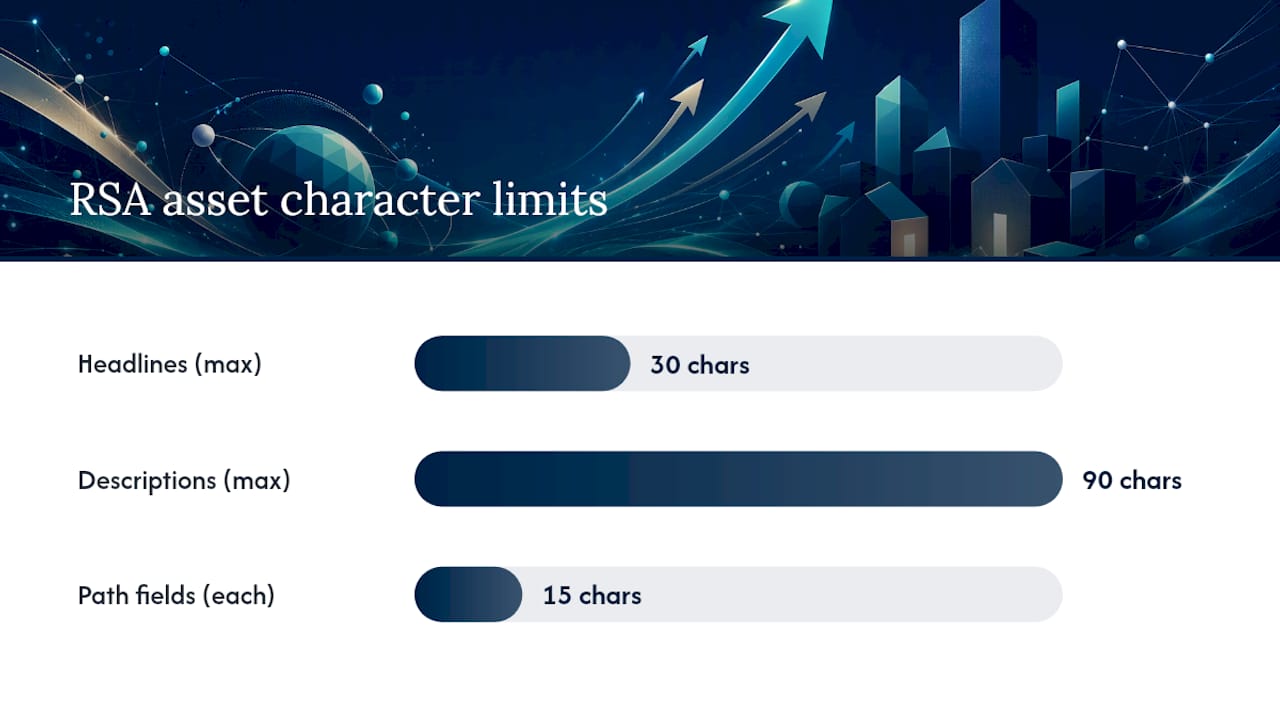
The 30-character headline limit is tighter than it looks once you account for spaces and punctuation. “Free Shipping on All Orders” already eats 28 characters. Descriptions give you more room to work with at 90 characters, enough for a full sentence with a call to action attached.
Before you publish, run through this quick check:
- Have you written at least 8 to 10 headlines, not the bare minimum of 3?
- Do your first three headlines make sense as a standalone sentence if Google pairs them together?
- Have you avoided writing three headlines that all say essentially “Best Prices” in different phrasing?
- Does at least one description contain a specific call to action (“Get a Free Quote,” “Book Today”)?
- Have you filled both path fields to reinforce relevance to the landing page?
Google technically allows you to launch an RSA with as few as 3 headlines and 2 descriptions, but that defeats the purpose of the format. With only the minimum, there’s barely any combination pool for the system to test, and your Ad Strength score will almost certainly land on “Poor.” The gap between the minimum and the 15/4 ceiling is where the real performance upside lives.
Do Responsive Search Ads Actually Improve Performance?
They do, and Google has published numbers to back it up. Improving Ad Strength from Poor to Excellent correlates with an average 15% increase in clicks and conversions for the same ad group. That’s not a hypothetical. It’s the difference between an ad the system can barely test and one it can optimize aggressively.
Google’s reported data: Going from Poor to Excellent Ad Strength drives roughly a 15% lift in clicks and conversions. Adding a second RSA to an ad group adds an average 6.6% more conversions, and a third RSA adds another 3.7% on top of that, according to Google’s RSA guide.
The mechanism behind this is straightforward: more assets and more RSAs mean more combinations eligible to enter more auctions, which widens your reach into search queries a single static ad might never match. That said, these are averages across a large advertiser base. A local plumbing campaign with tight geographic targeting won’t see identical uplift to a national ecommerce account with thousands of daily searches. Treat the percentages as directional evidence that diversity pays off, not a guaranteed outcome for your account.
How to Create and Optimize Responsive Search Ads
Setting one up is fast. Getting it right takes more discipline. Here’s the sequence that actually moves the needle:
- Start the ad. In your ad group, click to create a new responsive search ad and enter your final URL first, since Google will flag mismatches between your URL and ad copy as you go.
- Write your headlines. Aim for 10 to 15, mixing keyword-rich phrases (matching what people actually search) with benefit-led lines (why they should click) and a little urgency or offer-driven variants.
- Write your descriptions. Fill all 4 slots, and place your longest, most specific keyword phrases here rather than cramming them into a 30-character headline where they’ll get cut off.
- Preview the combinations. Use Google’s ad preview tool to see how different headline and description pairings actually read together before you save.
- Check Ad Strength and act on the feedback. If it flags “add more headlines” or “improve keyword relevance,” address that specific gap rather than adding random filler text.
- Save and pair with a second RSA. Never run a single RSA alone in an ad group; use it as one of at least two, per Google’s own recommendation of two or more RSAs with Good or Excellent Ad Strength per ad group, each with its own unique final URL if you’re testing landing pages.
Pinning deserves its own conversation because it’s the single most common way advertisers accidentally sabotage their own RSAs. Pinning locks a specific headline or description into a specific position, which sounds useful for legal disclaimers or brand names, but it also shrinks the combination pool the algorithm has to test. Google explicitly warns that excessive pinning can lower both Ad Strength and performance. The fix isn’t to avoid pinning entirely. It’s to pin only what’s truly required, such as a legal disclosure in description position one, and to load 2 to 3 different pinned variants for that slot instead of a single locked line, so the system retains some room to test.
Pro Tip: Write your first three headlines as if Google will always show them together as a single sentence. Even though the system mixes and matches, your top three tend to get served most often, and disjointed pairings quietly kill click-through rate.
For text customizers or dynamic elements, unique, non-templated assets consistently outperform copies with minor wording tweaks. Ad Strength, as Google’s best practices guide notes, is a forward-looking diagnostic meant to catch these gaps at the authoring stage. It’s not a performance metric. Use it to fix asset diversity before launch, then switch your attention to the numbers that actually matter once the ad is live.

Measuring RSA Performance the Right Way
Ad Strength tells you what the system thinks might work. The combination report and asset-level reporting tell you what actually did. Both live inside the ad group’s “View asset details” panel in Google Ads, and both are essential once your RSAs have collected enough data to draw conclusions.
The combination report shows which specific headline and description pairings served most often and how each performed, which is the closest thing you’ll get to seeing inside the algorithm’s decision-making. Asset-level reporting breaks it down further, labeling individual headlines and descriptions as “Best,” “Good,” “Low,” or “Learning” based on their contribution to overall performance.
Track these signals in order of importance:
- Incremental impressions and reach, since more combinations should mean access to more search queries.
- Click-through rate at the ad and asset level, to spot which specific lines are pulling their weight.
- Conversion rate and cost per conversion, the numbers that actually decide budget allocation.
- Contribution relative to other RSAs in the same ad group, so you know which ad is carrying the campaign.
The decision rules are straightforward once you have this data. If an asset is consistently labeled “Low” after a few weeks of meaningful volume, replace it rather than waiting indefinitely for it to improve. If one RSA in an ad group is dramatically outperforming a second, don’t pause the second outright. Refresh its weaker assets first. Add a brand-new RSA only when you’re testing a genuinely different angle, like a seasonal offer, not just a rewording of what’s already running.
Advanced Pairing Tactics for Experienced Advertisers
RSAs perform best when they’re not working alone. Pairing RSAs with Smart Bidding and broad match keywords lets Google’s automated bidding chase conversions across a wider set of queries, since the combination testing inside the ad and the query matching outside it are both optimizing toward the same signal.
Image assets and other extensions layered onto RSAs can lift visibility further, particularly on mobile placements where visual elements stand out in a crowded results page. If you’re building these out, a structured asset checklist helps keep image, sitelink, and callout assets consistent across campaigns instead of scattered and mismatched.
On pinning, the advanced move is running 2 to 3 pinned variants per required position rather than one static line, which keeps some testing flexibility alive even when compliance forces your hand. For testing cadence, most ad groups do well with 2 to 3 RSAs running simultaneously; more than that starts splitting traffic too thin to reach statistical confidence within a reasonable time frame.
Tradewinds United Media’s Take on RSAs for Small-Business Campaigns
Many small-business accounts often use only one RSA per ad group, five headlines, and no second ad to compare against. Diverse assets and Good/Excellent Ad Strength are the baseline, not the finish line. Our approach starts with 2 RSAs per ad group, 8 to 12 distinct headlines each, and a review cadence tied to actual conversion volume rather than a fixed calendar. A budget guide matters here too, since a local service business testing RSAs on a small daily spend needs realistic timelines before pruning assets, not a two-day judgment call.
— Michael
Let Tradewinds United Media Build and Manage Your Google Ads Account
Writing 15 headlines that don’t repeat themselves, pinning only what’s necessary, and checking combination reports every week is a real job, not a side task. Some agencies offer services that handle the entire cycle for small and local businesses: building the asset library, pushing Ad Strength toward Good or Excellent, setting up Smart Bidding correctly, and sending clear reports that show which ads and assets are driving conversions.

For business owners who’d rather see results than manage character counts, a service team can build the RSA structure, monitor the combination data, and adjust assets as the numbers come in. Local visibility campaigns benefit especially, since a well-built asset library shows up across more of the searches your actual customers are running. Check out what Google Ads management costs and get a plan built around your account’s current performance.
FAQ
Can you provide some examples of responsive search ads?
A strong RSA pairs keyword-driven headlines like “Same-Day AC Repair” and “Licensed Local Plumbers” with benefit-led lines like “Free Estimates, No Obligation,” then backs them with descriptions that add specifics like pricing, service area, or guarantees.
How many responsive search ads can I have per ad group?
There’s no hard cap on the number of RSAs per ad group, but Google recommends running at least 2 RSAs with Good or Excellent Ad Strength, and most accounts see the best balance of testing and clarity with 2 to 3 active at once.
How do I make a responsive search ad?
Enter your final URL, add up to 15 headlines and 4 descriptions, fill in your path fields, preview the combinations, check your Ad Strength score, and save; then repeat the process to add a second RSA to the same ad group.
What is a benefit of responsive search ads?
RSAs widen the number of search queries your ad can match by testing multiple headline and description combinations automatically, and Google reports that raising Ad Strength from Poor to Excellent correlates with an average 15% increase in clicks and conversions.
Should I pin headlines in my responsive search ads?
Pin only when required, such as a legal disclaimer or fixed brand name, since excessive pinning shrinks the combination pool the algorithm can test and can lower both Ad Strength and performance.