The most effective site structure for SEO is a shallow, topic-clustered architecture: important pages sit within a few clicks of the homepage, related content is grouped into hubs, and internal links connect them with intent. Prioritize flattening your critical pages, building hubs around your core topics, and linking them deliberately. Done right, this improves crawlability, spreads link equity, and signals topical authority to search engines.
TL;DR:
- Most sites should keep important pages within three clicks of the homepage to enhance crawlability and ensure effective link equity distribution.
- Building topic hubs with deliberate internal links improves authority concentration and guides user navigation, leading to higher engagement and conversions.
- Flattening site hierarchy reduces load times, improves mobile usability, and speeds up indexing on large sites with many categories or products.
- Structurally sound sites with proper internal linking, URL hierarchy, and sitemap management improve search rankings and prevent crawl budget waste.
- Incremental fixes to internal linking and navigation are often sufficient for existing sites, but severe structural issues may require a complete redesign.
Table of Contents
- What Site Structure Means for SEO and How It Maps to Goals
- Why Site Structure Matters: Measurable Benefits After Fixes
- Common Structure Models: Which Pattern Fits Your Site
- Actionable Best Practices and a Prioritized Checklist
- Building Hub-and-Spoke Topic Clusters in Practice
- URL Architecture and Technical Hygiene Rules
- Internal Linking Strategy and Crawlable Links
- How Structure Affects Crawling and Indexing
- Planning and Auditing: Inventory, Mapping, and Rollout
- How Tradewinds United Media Approaches Site Structure Work
- Impact of Site Structure on Page Load Speed and Mobile Responsiveness
- Handling Dynamic Content and Pagination Within Site Structure
- Effects of Site Structure on User Engagement Metrics and Bounce Rates
- What I’ve Learned About Structure Tradeoffs and When to Get Help
- Getting Professional Help With Site Structure and SEO
- Sources
- FAQ
What Site Structure Means for SEO and How It Maps to Goals
Site structure, or website architecture, is how pages on your site relate to each other through navigation, URLs, internal links, and taxonomy. It is the skeleton search engines and visitors use to figure out what your site covers and which pages matter most.
Crawlers follow links to discover pages, so a page buried five or six clicks deep may get crawled rarely, if at all. Structure also directs link equity: a well-linked hub page passes authority to the supporting pages beneath it, while an isolated page with no inbound links receives almost none. According to Search Engine Land’s guide to site architecture, a strong structure improves crawlability, user experience, link equity flow, and topical authority together, not in isolation.
The components that make up structure work as a system:
- Navigation: the menus and links that guide both users and crawlers through your content.
- URLs: paths that should reflect where a page sits in your hierarchy.
- Internal links: the connections that pass authority and context between pages.
- Taxonomy: the categories and tags that group related content logically.
A service business with a flat menu and clear category pages typically gets new pages indexed faster than one where pages exist only through a search box or a buried footer link.
Why Site Structure Matters: Measurable Benefits After Fixes
Fixing structure produces changes you can actually measure: more pages indexed, faster crawling of new content, and better distribution of ranking power across your site. These are not abstract wins. They show up in Search Console and in your analytics within weeks of a rollout.
A common planning rule is to keep important pages within three clicks of the homepage, which improves crawl efficiency and how much link equity reaches those pages. When a page sits deep in a hierarchy, fewer internal links point to it and crawlers visit it less often, which slows indexation and can hold back rankings even when the content itself is strong.
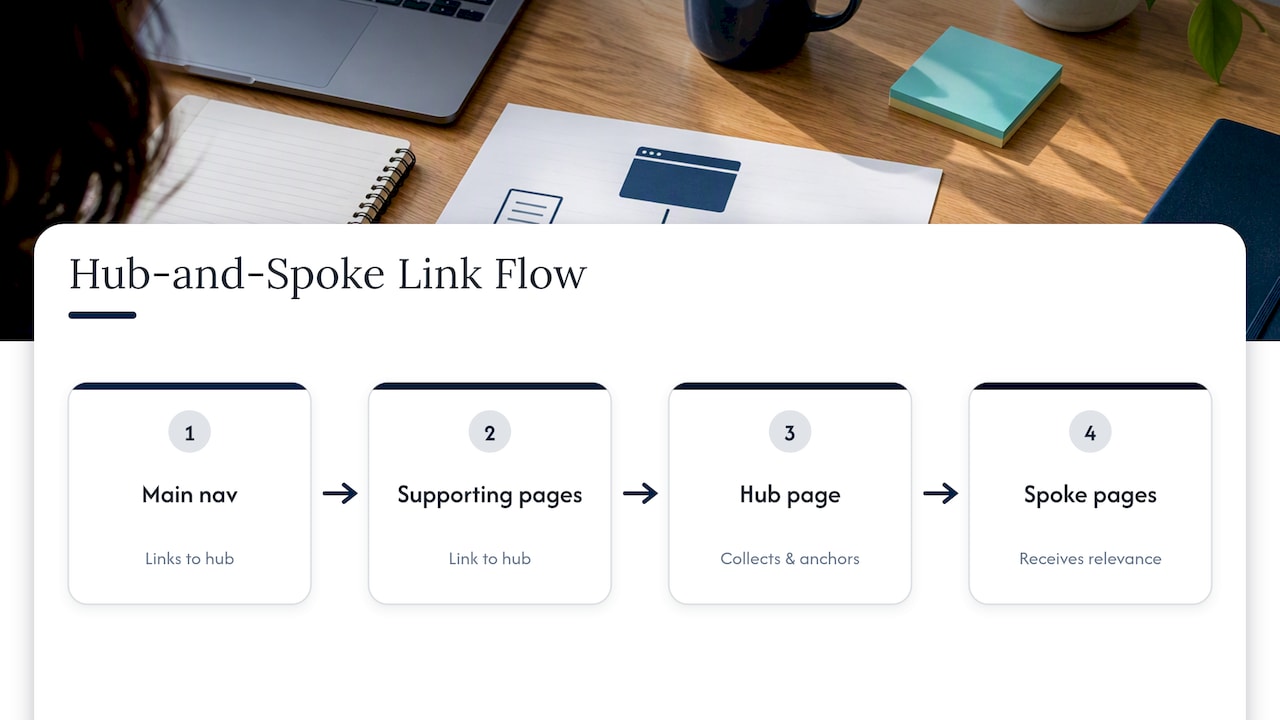
Reorganizing around hubs changes how link equity flows. Instead of every page linking outward with no clear hierarchy, a hub page collects links from its supporting spokes and from the main navigation, then redistributes relevance back to them. Search Engine Land notes that topic clusters anchored by a strong hub page often separate sites that rank well in competitive searches from those that do not, because the hub concentrates authority instead of scattering it.
User behavior tends to shift too. When related content sits a click or two away instead of requiring a search, visitors explore more pages per session and are less likely to bounce immediately. A shopper who lands on a product page and finds a clear path to related categories, buying guides, or comparison content is more likely to convert than one who hits a dead end. None of this requires new content: it requires connecting what you already have in a way that makes sense to both people and crawlers.
Common Structure Models: Which Pattern Fits Your Site
Most sites fit one of five structural patterns, and picking the wrong one is a common reason structure fixes stall out.
- Flat architecture: every important page sits close to the homepage with minimal nesting, which Backlinko notes is more crawl-friendly for most business sites and works well for small to medium sites with a few hundred pages or fewer.
- Deep hierarchical trees: multiple nested category levels, useful when a site genuinely needs strict organization, such as a large documentation library or a multi-department corporate site with distinct audiences.
- Hub-and-spoke (topic clusters): a central hub page on a broad topic links out to and receives links from narrower supporting pages, building topical authority around a subject rather than a single keyword.
- Silo structure: content is grouped into strict, largely self-contained sections with minimal cross-linking between silos, often used by sites that want to keep topically distinct services from diluting each other’s relevance.
- Matrix or database-driven structure: pages are generated dynamically from attributes like size, color, or location, common on large ecommerce or directory sites where thousands of pages share a template.
A local service business with 40 pages rarely needs anything beyond a flat structure with two or three topic hubs. A large ecommerce catalog with tens of thousands of SKUs usually needs a matrix approach layered with faceted navigation rules, because a strict hierarchy alone cannot scale to that volume without creating either massive click depth or an unmanageable menu.
The deciding factors are content volume, how distinct your business lines are, and whether your audience searches by broad topic or specific attribute. Match the pattern to those factors before you touch navigation code.
Actionable Best Practices and a Prioritized Checklist
Fixing structure works best in a defined order, because navigation decisions made early affect every URL and internal link you build afterward.
Start with navigation and taxonomy. Map your homepage to a small set of hub pages, then map each hub to its supporting spoke pages. This single exercise, done on a spreadsheet or a whiteboard before any code changes, prevents the most common failure: rebuilding menus without a plan for where new content will live. Professional website design services built around clear taxonomy solve this navigation problem at the design stage rather than patching it later.
Once the map exists, work through this checklist in order:
- Identify every page that should rank and confirm it sits within three clicks of the homepage.
- Find and fix orphan pages, meaning pages with no internal links pointing to them.
- Rewrite internal link anchors to be descriptive rather than generic (“click here”) or repetitive exact-match phrases.
- Add hub-to-spoke links in both directions so authority flows into and back out of each cluster.
- Remove or shorten link chains where a user has to click through three or four intermediate pages to reach a spoke.
- Add breadcrumbs that mirror the taxonomy, and confirm they match your canonical URL structure.
- Update or resubmit your XML sitemap once the new structure is live.
- Set up 301 redirects for any URLs that moved, and check for redirect chains.
Pro Tip: Audit your top twenty pages by traffic first. Fixing their internal links has more impact than reorganizing your entire site at once.
Avoid two mistakes that undo this work quickly: link chains that force crawlers and users through several hops to reach a page, and orphan pages left over from old campaigns or seasonal content that never got connected to the new taxonomy. Both quietly waste crawl budget and link equity that could be reaching pages you actually want to rank.
Building Hub-and-Spoke Topic Clusters in Practice
Picking a hub topic starts with keyword mapping: group your keyword research into themes broad enough to support five to fifteen supporting pages, then check that the theme matches a real audience need rather than just a keyword volume number.
The hub page itself should cover the topic broadly and link out to every spoke, functioning as an overview and a navigation point rather than a deep dive on one narrow angle. Spoke pages go deep on a single subtopic, question, or use case, and each one links back to the hub and, where relevant, sideways to other spokes that share context.
Practical rules that keep clusters clean:
- Give the hub a clear, broad title and let spokes own the specific, long-tail phrasing.
- Link every spoke to its hub using descriptive anchor text, not the same phrase repeated across every page.
- Check for cannibalization before publishing a new spoke; two pages targeting the same phrase split ranking signals instead of combining them.
- Review existing content for gaps a competitor’s cluster covers that yours does not, and prioritize filling the gap that overlaps with your highest-traffic hub first.
This is the same internal-linking logic that connects marketing and content pages more broadly. Building a brand through consistent content depends on this kind of deliberate linking between related pages rather than isolated posts.
URL Architecture and Technical Hygiene Rules
URLs should mirror your content hierarchy so a visitor or a crawler can guess a page’s place in your site just by reading the path. A URL like /services/plumbing/water-heater-repair/ tells you exactly where that page sits; a URL full of numeric IDs or session parameters tells you nothing.
Keep these rules in place across your CMS templates:
- Mirror the taxonomy in the path: category, subcategory, page, in that order.
- Keep URLs short and descriptive, using words that match the page’s actual topic.
- Avoid query parameters for content that should have its own indexable path; reserve them for filters and tracking.
- Use canonical tags whenever similar content exists at more than one URL, so search engines know which version to index.
- Align breadcrumbs with the URL path exactly. A mismatch between what breadcrumbs show and what the URL says confuses both users and crawlers.
- For multi-language sites, add hreflang tags so each regional or language version is served to the right audience without competing against itself in search results.
A good example: /blog/site-structure-seo/. A poor example: /index.php?id=4521&cat=9&ref=nav. The first is guessable and stable; the second breaks the moment your CMS changes its internal ID scheme.
Internal Linking Strategy and Crawlable Links
Internal linking is the mechanism that turns a structural plan into something crawlers and visitors actually follow. Google Search Central’s link guidance is direct on the technical requirement: links need standard HTML anchor elements with href attributes to be reliably crawled, since links built purely through JavaScript click events often are not parsed the same way.
That single requirement should be checked across every template on your site, including product cards, related-content modules, and footer links that might be built as buttons rather than anchors.
Beyond the technical requirement, the guidance is equally clear that descriptive anchor text helps both users and search engines understand the destination page, and that repetitive exact-match anchors are less effective than natural, varied phrasing.
Practical placement rules:
- Put your most important contextual links inside the body content, where they carry the most relevance signal.
- Use related-content modules to link spokes to each other within a cluster.
- Keep primary navigation focused on hubs, not every individual spoke.
- Add descriptive alt text to any image that also functions as a link.
- Reserve
nofolloworsponsoredattributes for paid or untrusted links, andugcfor user-generated content links, so trusted internal links pass full signal.
How Structure Affects Crawling and Indexing
An XML sitemap is a safety net, not your primary discovery mechanism. Google’s SEO Starter Guide notes that sitemaps help crawlers see pages, especially lower-visibility ones, but they complement internal linking rather than replace it. A page with no internal links pointing to it will still struggle even if it sits in the sitemap.
Keep these controls in view during any structural rollout:
- Submit an updated XML sitemap through Search Console any time you add or reorganize a significant number of pages.
- Check robots.txt for accidental blocks on sections you actually want crawled.
- Confirm noindex tags are only on pages you intend to exclude, since a leftover noindex from a staging build can quietly deindex a live page.
- Use a shallow, well-linked structure to help crawlers spend their limited crawl budget on pages that matter rather than deep, thinly linked ones.
- Monitor the index coverage report in Search Console weekly during a rollout to catch new crawl errors or excluded pages early.
Planning and Auditing: Inventory, Mapping, and Rollout
Before changing anything, build a full content inventory: every URL, its traffic, its conversions, and where it currently sits in navigation. This becomes the basis of a new site map showing hubs, spokes, and how they should link together.
Prioritize changes using three filters: traffic-driving pages first, conversion pages second, and strategic hub pages third, since those three categories carry the most risk if something breaks.
- Build the inventory and map current structure against the proposed hub-and-spoke plan.
- Stage the changes in a test environment before touching the live site.
- Set up 301 redirects for every URL that changes, and test each one individually.
- Roll out in phases rather than all at once, watching Search Console and rankings after each phase.
- Track index coverage, click depth, and organic traffic to the affected pages for at least four weeks post-launch.
Pro Tip: Keep a rollback plan ready. If rankings drop sharply after a phase, revert that phase’s redirects while you investigate rather than pushing forward.
How Tradewinds United Media Approaches Site Structure Work
Tradewinds United Media’s process for structure work follows the same order outlined above: taxonomy design first, hub creation second, internal-link strategy third, then measurement against the client’s own traffic and conversion data. This mirrors the reporting transparency clients see throughout an engagement, with regular updates on what changed and what it produced. The agency’s approach centers on clear, data-driven performance reports rather than vague progress updates, giving business owners a concrete view of how structural changes translate into rankings, traffic, and leads over time.
Impact of Site Structure on Page Load Speed and Mobile Responsiveness
Structure and speed are connected more directly than most site owners realize. A deep, tangled hierarchy often means heavier navigation menus, more scripts loading on every page, and more database queries to render breadcrumbs, related-content modules, and category listings. Flattening a structure typically reduces the number of nested template calls a page needs, which can shave meaningful time off render.
Mobile responsiveness compounds this. A navigation menu built for a deep hierarchy with several nested dropdown levels often becomes unusable on a small screen, forcing users into multiple taps just to find a page a flat structure would have surfaced in one. Simplifying the hierarchy usually simplifies the mobile menu at the same time, since there are fewer levels to represent.
Image-heavy category and hub pages deserve particular attention, since they tend to accumulate unoptimized images over time as content gets added without cleanup. A hub page that links to fifteen spokes with full-size thumbnails for each one can become one of the heaviest pages on the site, even though it is also one of the most important for both users and crawlers.
The practical takeaway: any structural rollout is a good moment to also audit page weight, image sizes, and mobile menu behavior, since the two projects touch the same templates and fixing one without the other leaves value on the table.
Handling Dynamic Content and Pagination Within Site Structure
Dynamic content, such as product listings, blog archives, or search results pages, creates a specific structural challenge: the pages exist, but their URLs and content can shift based on filters, sort order, or time.
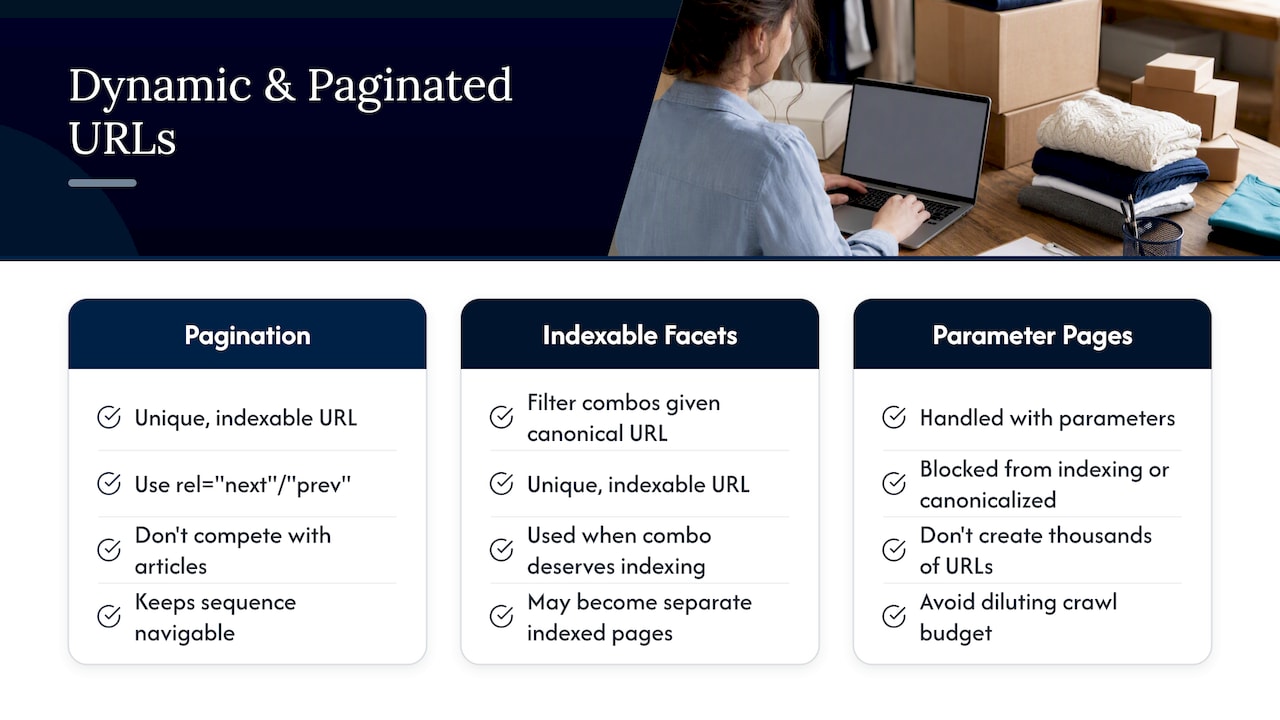
Pagination is the most common version of this. A blog archive with twenty pages of listings needs each paginated page to remain crawlable and linked, but none of those paginated pages should compete with the individual articles they link to for the same keywords. Using rel="next" and rel="prev" conventions where your CMS supports them, or simply ensuring each paginated page has a unique, indexable URL, keeps the sequence navigable without duplicating content signals.
Faceted navigation on ecommerce sites, where a shopper filters by size, color, or price range, multiplies URLs quickly. Left unmanaged, this can generate thousands of near-duplicate pages that dilute crawl budget. The fix is deciding in advance which filter combinations deserve their own indexable, canonical URL and which should be handled with parameters that are either blocked from indexing or canonicalized back to the main category page.
Dynamic content should still fit inside the hub-and-spoke logic that governs the rest of the site: a category page acts as a hub, individual product or article pages act as spokes, and pagination or filters are the mechanism for browsing within that hub, not a separate structural layer competing for the same rankings.
Effects of Site Structure on User Engagement Metrics and Bounce Rates
Structure shapes what a visitor does after the first click, and that behavior feeds back into how search engines assess a page’s usefulness. A visitor who lands on an article and immediately sees two or three clearly relevant next steps, rather than a generic “related posts” widget stuffed with unrelated content, tends to click through and stay on the site longer.
Bounce rate often improves when hub pages give visitors an obvious next step. A hub that clearly summarizes its cluster and links to the specific spoke that answers a visitor’s exact question reduces the chance they leave and search elsewhere for the same answer. The opposite happens when a visitor lands on a spoke page with no link back to related content: they get their answer and leave, with no path deeper into the site.
Time on site and pages per session both tend to track structural clarity more than content length. A shorter, well-linked article that points to the right next page often outperforms a longer piece that dead-ends, because engagement metrics reward the path forward, not just the initial page.
None of this replaces good content. But even strong content underperforms when the structure around it gives visitors nowhere obvious to go next, which is why structure and content strategy should be planned together rather than one after the other.
What I’ve Learned About Structure Tradeoffs and When to Get Help
A full rebuild makes sense when your hierarchy is genuinely broken: orphaned sections, no consistent taxonomy, or navigation that was patched together over years. Incremental fixes work fine when the bones are sound and you mainly need better internal linking and fewer clicks to key pages.
The most common mistakes are overly deep hierarchies built out of habit, orphaned content from abandoned campaigns, and internal links so generic they carry no context. If your team cannot map your own site’s hub-and-spoke structure on a single page, that is a reasonable signal to bring in outside help.
— Michael
Getting Professional Help With Site Structure and SEO
Fixing structure touches navigation code, content strategy, and technical SEO at once, which is a common combination needed for small businesses trying to compete against sites with far bigger budgets.

An engagement typically starts with an audit of your current structure and indexation, followed by a prioritized roadmap tied to your traffic and conversion data rather than a generic checklist. Services that map directly to this work include:
- Website design to rebuild navigation and taxonomy around clear hubs.
- SEO to plan internal linking, topic clusters, and technical crawl fixes.
- Local visibility support through Google Business Profile and reputation management to connect structural fixes to real local search results.
Clients get clear, ongoing reports showing what changed and what it produced, so a structure project never feels like a black box. If your site’s navigation or rankings have been stuck, get in touch about an SEO review to see where the gaps are.
Sources
For deeper technical detail, review Google’s link crawlability guidance directly, along with practitioner breakdowns from Search Engine Land and Backlinko. Use AI-assisted internal linking tools when auditing link patterns at scale, and confirm every change against Search Console’s own index coverage data.
- SEO Link Best Practices for Google | Google Search Central
- Site architecture: Creating a website structure that ranks — Search Engine Land
- Website Architecture: How to Setup an SEO-Friendly Structure — Backlinko
FAQ
What is the ideal click depth for important pages?
A common planning guideline keeps important pages within three clicks of the homepage to support crawl efficiency and link equity flow. Pages beyond that depth tend to get crawled and indexed less reliably, especially on larger sites.
What is the difference between silo structure and hub-and-spoke?
A silo groups content into strict, largely self-contained sections with minimal cross-linking, while hub-and-spoke actively links a central hub page to and from its supporting spokes. Hub-and-spoke tends to build topical authority more effectively because the linking is deliberate rather than isolating.
Does site structure really affect rankings, or just crawlability?
Structure affects both. Clear hierarchy and internal linking help search engines crawl and index pages, and they also distribute link equity so hub and spoke pages reinforce each other’s relevance for related search terms.
How often should I audit my site’s structure?
Most sites benefit from a structural review whenever they add a significant new content category or notice a drop in index coverage. A quarterly check of orphan pages and click depth catches problems before they compound.
Can Tradewinds United Media fix an existing site’s structure without a full redesign?
Yes, Tradewinds United Media’s SEO and website design services can address navigation, internal linking, and taxonomy issues incrementally when the underlying site does not need a full rebuild. An initial audit determines whether incremental fixes or a fuller redesign fits the site’s condition.