A good negative keywords strategy comes down to one habit: read the real searches that triggered your ads, block the ones that could never become customers, and protect the ones that could. Done weekly at first and monthly after that, it keeps a small Google Ads budget pointed at people who want what you sell. This guide shows how to find negatives, which match type to use, where to put them, and how to avoid the most expensive mistake: blocking searches that were already working.
TL;DR
- Negative keywords tell Google which searches should not trigger your ads. They are your main filter against paying for clicks that will never convert.
- Start from the Search terms report, not from a brainstormed list. Real queries beat guesses.
- Negative match types behave differently from positive ones: they do not expand to close variants, so you add plurals and synonyms yourself.
- Organize negatives by scope: ad group, campaign, or a shared list, so one broad block never silences a campaign that needs the term.
- Review on a schedule, and check conversions before you exclude anything.
Table of Contents
- What negative keywords do, with an example
- Start with the Search terms report
- Choose the right match type
- Where to put negatives: ad group, campaign or list
- How to add negative keywords in Google Ads
- Negative keywords and Performance Max
- Keep it working: review without blocking good searches
- How negatives connect to the rest of your account
- A worked example: a local HVAC company
- Where we come in
- Our perspective
- FAQ
- Sources
What negative keywords do, with an example
A negative keyword is a word or phrase that keeps your ad from showing when a search contains it. Google’s own help page says negatives work by excluding queries, and that for Search campaigns you can use broad, phrase or exact match negatives.
Here is what that looks like for a local business. Say you run a plumbing company and bid on “water heater repair.” Without negatives, your ad can appear for searches such as “water heater repair jobs,” “how to repair a water heater yourself,” or “water heater repair course.” The people typing those want a job, a tutorial or training. They will click, and you will pay, and nobody will call.
Add “jobs,” “salary,” “diy,” “course” and “free” as negatives and those clicks stop. The money moves to searches like “water heater repair near me” and “emergency water heater leak.”
The benefit is simple to state and easy to measure:
- Less wasted spend. You stop paying for clicks with no buying intent.
- Better conversion rate. The clicks you keep are more relevant, so a larger share turn into calls and form fills.
- Cleaner data. Your reports show how real prospects behave, not a mix of prospects and browsers.
- More room to bid. When fewer dollars leak, the same budget can support higher bids on the terms that earn.
If you wonder whether your ad spend is leaking at all, our look at whether Google Ads is a money pit or a lead-generation machine walks through the usual causes, and irrelevant queries are near the top.
Start with the Search terms report
Most lists of “top negative keywords” are generic. Yours should come from your own account. The Search terms report shows the actual queries that triggered your ads, with clicks, cost and conversions next to each.
Search Engine Land’s practitioner guidance says to use search term reports to spot queries that get clicks without converting or that do not match what the campaign is meant to capture. Here is a workable routine.
- Open the Search terms report for the last 30 days. If your account is small, use 60 or 90 days so you have enough data.
- Sort by cost, highest first. Your biggest spenders matter most.
- Read each query and ask one question: could this person ever buy from me?
- Sort the queries into three buckets: clearly irrelevant, relevant but unproven, and relevant and converting.
- Add the first bucket as negatives. Leave the second alone until you have more data. Protect the third.
Common irrelevant intent types
When you scan queries, the irrelevant ones usually fall into a few families. Knowing them speeds up the work.
| Intent type | Example words | Why it rarely converts |
|---|---|---|
| Job seekers | jobs, careers, hiring, salary, internship | They want employment, not your service |
| Do-it-yourself | diy, how to, tutorial, instructions | They plan to do the work themselves |
| Free seekers | free, coupon, sample | They will not pay |
| Education | course, training, certification, school | They want to learn the trade |
| Wrong product or service | a service you do not offer | They need something else |
| Wrong place | cities or states outside your service area | You cannot serve them |
| Research only | definition, meaning, history, wiki | They want information |
Treat this as a starting checklist, not a rule. A retailer who sells a how-to book wants “how to” searches. A trade school wants “course.” The same word can be a negative for one business and a goldmine for another.
When a negative is the wrong fix
Not every weak query deserves a negative. The same Search Engine Land piece cautions that when a query has weak secondary metrics, adjusting the match type may serve you better than adding a negative. If “emergency plumber” converts on exact match but wastes money on broad match, the answer is tighter targeting of the positive keyword, not a block on the words “emergency plumber.”
Choose the right match type
This is where most small accounts go wrong. Google’s guidance is clear that negative match types work differently from their positive counterparts. Negatives do not match close variants, so excluding “flowers” will not necessarily block “flower.” The same page notes that negatives automatically account for casing and misspellings, but synonyms and singular or plural forms are your job.
Negative broad match
This is the default. Your ad is blocked when the search contains all of the negative’s words, in any order. If your negative is “used cars,” a search for “cars used” is blocked, but a search that only says “used” may still show your ad. Broad negatives are forgiving in word order but narrow in what they catch, which surprises many advertisers.
Negative phrase match
Your ad is blocked when the search contains your words in the same order. Use it when the sequence carries the meaning, such as “free trial” or “how to.”
Negative exact match
Your ad is blocked only when the search is exactly your term, with nothing added. This is the safest choice when a short term is harmless inside longer queries. If “repair” alone is useless but “roof repair” is your bread and butter, an exact negative lets you block the first without touching the second.
A quick way to choose
- Single word that is never wanted, like “jobs”: broad match is fine, since it blocks any query containing it.
- Multi-word term where order matters, like “how to”: phrase match.
- Term that is harmful alone but valuable in context: exact match.
Remember to add plural forms and common synonyms by hand. “Job” and “jobs” are two entries.
Where to put negatives: ad group, campaign or list
A negative’s scope decides how much traffic it removes. The wider the scope, the greater the risk of silencing something good. Think of three levels.
| Level | What it blocks | Best for |
|---|---|---|
| Ad group | Queries from that ad group only | Keeping similar ad groups from competing, such as “kitchen remodel” and “bathroom remodel” |
| Campaign | All queries in that campaign | Intent mismatches specific to one service or location |
| Shared list | Whatever campaigns you apply it to | Universal junk like jobs, free and DIY |
A tidy small-business setup looks like this:
- One universal list for words that never produce customers for you anywhere: jobs, careers, salary, free, diy.
- One list per service line if your services differ, for instance a list for residential work and one for commercial.
- Ad group negatives to steer queries to the right ad. If you have separate ad groups for two services, add each service’s name as a negative in the other so the right ad and landing page show.
Name your lists plainly. “Universal junk,” “Residential only” and “Outside service area” tell a colleague, or your future self, exactly what is inside.
How to add negative keywords in Google Ads
The steps change slightly as the interface updates, so treat these as the general path and check Google’s help pages if a menu has moved.
Adding from the Search terms report
- Open Insights and reports, then Search terms.
- Tick the queries you want to exclude.
- Choose to add them as negative keywords.
- Pick the level (ad group or campaign) and the match type.
- Save.
This is the fastest route and the one to use for weekly cleanups.
Adding manually or as a list
- Go to Keywords in the left menu, then the Negative keywords tab.
- Press the plus button.
- Choose whether the negatives apply to a campaign or an ad group, or create a list to reuse.
- Type or paste your terms, one per line. Use quotation marks for phrase match and square brackets for exact match.
- Save and apply the list to the campaigns that need it.
Negative keywords and Performance Max
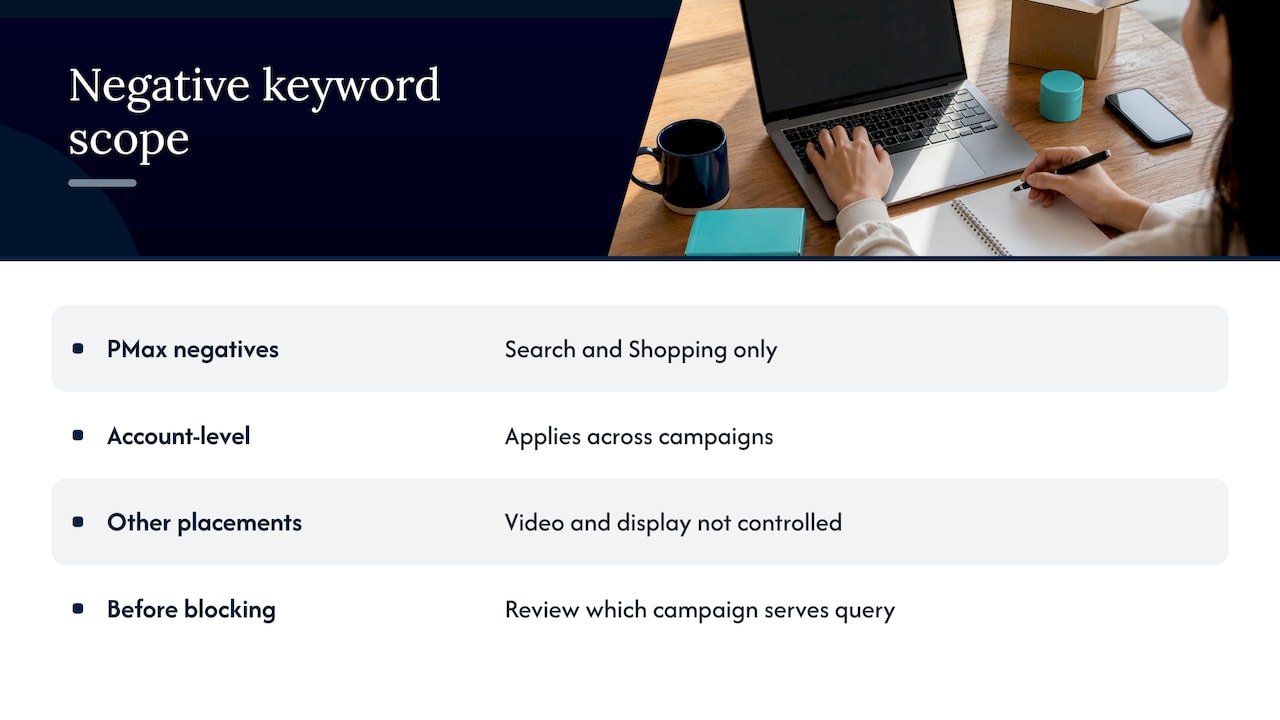
A common question is whether you can add negatives to Performance Max. You can. Google’s help page explains that adding negative keywords to Performance Max campaigns or your account lets you avoid showing for queries containing those terms on Search and Shopping inventory. The same page notes that these negatives apply to Search and Shopping inventory only, so they will not control placements elsewhere, such as video or display.
The page also describes account-level negative keywords, which apply across campaigns. That is useful for a small business with a few campaigns, because your universal junk list can sit in one place. Because the reach is so wide, use only terms that you would never want anywhere in the account.
A practical point for businesses running Search and Performance Max side by side: if Search captures your exact-intent queries, review which campaign is serving each query before you block anything, so you do not accidentally cut off the campaign that converts at a better cost.
Keep it working: review without blocking good searches
A negative list is not a one-time project. New queries appear every week, and your own offers change. Build a light review rhythm.
- Weeks 1 to 4: check the Search terms report weekly. This is when most of the obvious waste shows up.
- After that: review monthly, or after any change to keywords, budgets or landing pages.
- Each quarter: reread the full list. Remove anything that no longer fits your business.
Guardrails that prevent expensive mistakes
- Check conversions before blocking. A query with a few clicks and no conversions may simply be early. A query with spend and no conversions over a meaningful stretch is a stronger candidate. Without working conversion tracking, you are guessing about which queries earn.
- Do not block your own brand. Make sure none of your business name words land in a broad negative.
- Avoid single common words as broad negatives. A word like “cheap” might be wrong for a premium brand but right for a discount retailer.
- Keep a change log. A simple spreadsheet with the date, term, match type and reason lets you undo a mistake fast.
- Watch impressions after big additions. If impressions on your best keywords drop suddenly after you add a list, something in it is too broad.
How negatives connect to the rest of your account
Negative keywords do not work alone. Three connections are worth knowing.
Quality Score. Showing for fewer irrelevant searches tends to improve click-through rate and relevance signals, which feed into Quality Score and cost per click. The effect is not guaranteed, but cleaner traffic is a sound foundation.
Audience and intent. Negatives filter by words. Audience settings filter by who is searching. Using both is stronger, and our guide to audience targeting for Google Search ads covers the second half.
Competitor and keyword research. Auction data shows who you are up against and which terms deserve budget. It also shows which terms to leave alone. See our guides on competitor keyword research and Google Ads competitor analysis.
If you are still deciding how much of your marketing budget belongs in paid search at all, this comparison of SEO, Google Ads and social media spending helps frame it.
A worked example: a local HVAC company
Imagine an HVAC contractor in Tampa with a modest monthly budget. Their campaign targets “AC repair,” “air conditioning installation” and “furnace repair.” After a month, the Search terms report shows these queries (invented for illustration):
- “ac repair technician salary”
- “how to fix ac unit not cooling”
- “ac repair classes”
- “car ac repair”
- “ac repair near me”
- “ac repair tampa emergency”
The first three are job, DIY and education intent. The fourth is the wrong product entirely. The last two are the customers. The cleanup:
- Add “salary,” “classes” and “jobs” to the universal list as broad negatives.
- Add “how to” as a phrase negative.
- Add “car” and “auto” as broad negatives, since this company never touches vehicles.
- Add cities outside the service area to a location list.
- Leave “repair” and “ac” alone. They are the core of the business.
No single change here is dramatic, and that is the point. A strategy is many small, well-judged exclusions, each backed by a real query.
Where we come in
Most owners know negatives matter but do not have an hour each week to read search terms. We manage Google Ads for small and local businesses, and negative keyword work is part of the routine: reviewing search terms, tightening lists, and showing you in plain reports what changed and what it did for your leads. If you want a second set of eyes on your account, see our Google Ads management service, or visit our home page to see everything else we do for local visibility.
Our perspective
The biggest negative keyword failures we see are not caused by too few exclusions. They come from owners who got burned by wasted clicks and swung to the other extreme, adding broad blocks without checking whether those terms ever converted.
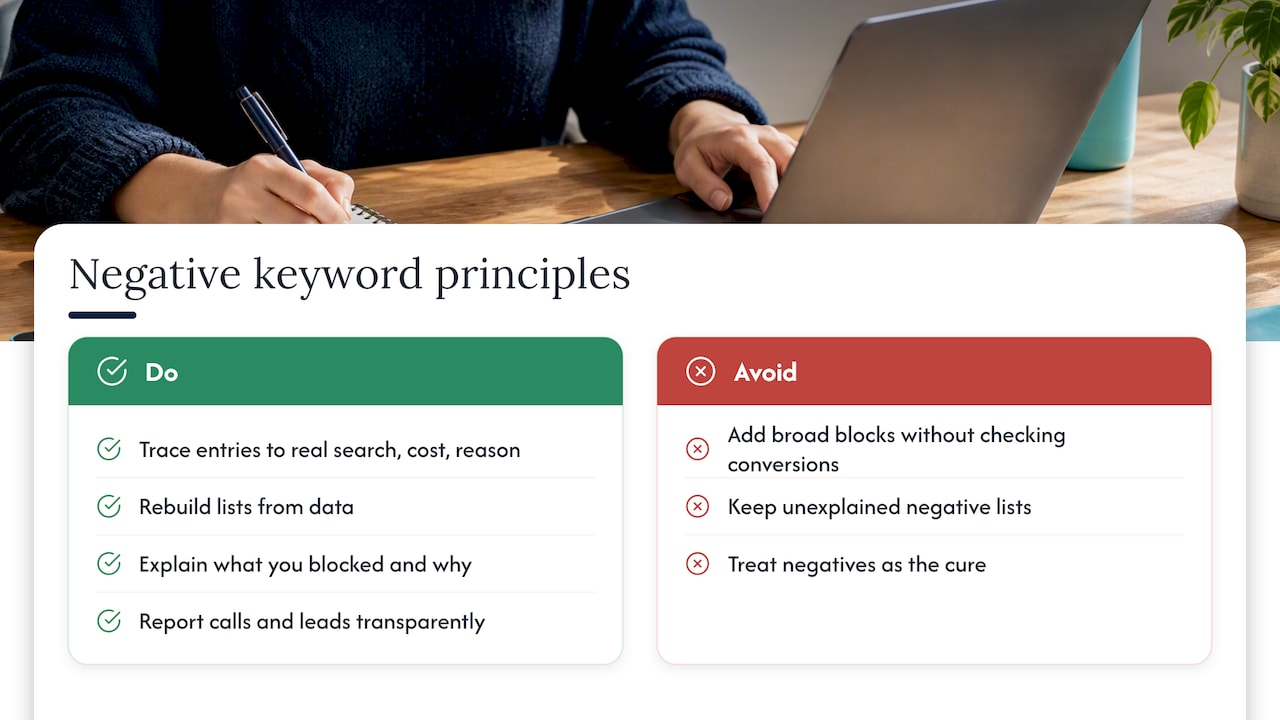
Our view is that a negative list should read like a record of decisions. Every entry should trace back to a real search, a real cost and a real reason. When a client has been frustrated by a previous agency, we usually find a list nobody can explain. We rebuild it from the data, tell the owner what we blocked and why, and keep the reporting transparent so they can see the effect on calls and leads rather than on vanity metrics.
We also treat negatives as a conversation with the account. If the same irrelevant query keeps appearing, the real fix may be a tighter keyword, a better ad or a clearer landing page. The negative is the quick patch; the structure is the cure.
— Michael
FAQ
What is a negative keyword example?
For a plumber, “jobs” is a typical negative. Someone searching “plumber jobs” wants employment, so blocking that word stops you paying for a click from a job seeker. A luxury retailer might block “cheap” for the same reason: the searcher and the brand do not match.
Can you add negative keywords to Performance Max?
Yes. Google lets you add negative keywords to Performance Max campaigns and at the account level. They apply to Search and Shopping inventory only, so they will not restrict other placements. You can read the details on Google’s Performance Max negative keywords page.
How often should I update my negative keyword list?
Check the Search terms report weekly for the first month of a campaign, then monthly once it settles. Review the entire list each quarter so outdated terms do not keep blocking good traffic. Any big change to your keywords or services is also a reason to review.
Should I use broad, phrase or exact match for negatives?
Use broad for single words that are never wanted, phrase when word order matters, and exact when a term is harmless inside longer searches. Negatives do not match close variants, so add plurals and synonyms yourself, as Google explains.
Can negative keywords hurt my campaign?
They can if they are too broad or based on too little data. Blocking a word that appears in your best-converting queries cuts off leads. Check conversion data before adding, keep a change log, and watch impressions after large additions.
Sources
- About negative keywords, Google Ads Help
- Negative keywords in Performance Max campaigns, Google Ads Help
- Negative keywords in paid search: 6 strategies, Search Engine Land