

Assets are the individual pieces of ad content, headlines, descriptions, sitelinks, images, call buttons, and more, that Google mixes and matches to build a single ad in real time. The more relevant assets you give an ad group, the more combinations Google’s system can test, which typically raises Ad Strength and click quality. The single most important move you can make today is adding a genuine variety of assets rather than relying on one headline and one description.
TL;DR:
- Using a diverse range of assets, including multiple headlines, sitelinks, and images, significantly improves ad performance and relevance across different search queries.
- At least four to six sitelinks with descriptions and matching key pages should be provided for high-volume ad groups to boost engagement and quality scores.
- Image assets require a mature account of at least 60 days with a positive spend history and should include square and landscape formats to maximize eligibility and click-through rates.
- Asset showing depends on ad rank, position, and predicted impact, with restrictions like schedule, approval, and correct association affecting their visibility.
- Building and managing a well-organized asset library at the account or campaign level, with regular testing and refreshing, is essential to optimize Google Ads performance.
Table of Contents
- What Are Google Ads Assets and How Does Google Use Them?
- Which Asset Types Should You Use, and When?
- How Are Google Ads Assets Charged, and When Do They Show?
- What Are the Requirements for Image Assets in Google Ads?
- Where Do You Manage Assets, and How Do Scheduling and Levels Work?
- What’s the Best Practice Checklist for Google Ads Assets?
- How Tradewinds United Media Approaches Google Ads Assets for Clients
- Want Your Google Ads Assets Managed Instead of DIY’d?
- Sources
What Are Google Ads Assets and How Does Google Use Them?
Every Google ad you see is rarely one fixed block of text. It’s a live assembly of parts: headlines, descriptions, sitelinks, callouts, images, sometimes a phone number or a lead form. Google calls these components assets, and its ad system evaluates them per query, picking the combination it predicts will perform best for that specific searcher at that specific moment.
This matters because two people searching the same term can see slightly different versions of your ad. One might get a sitelink pointing to your pricing page; another sees a call button instead, depending on device and intent signals Google picks up.
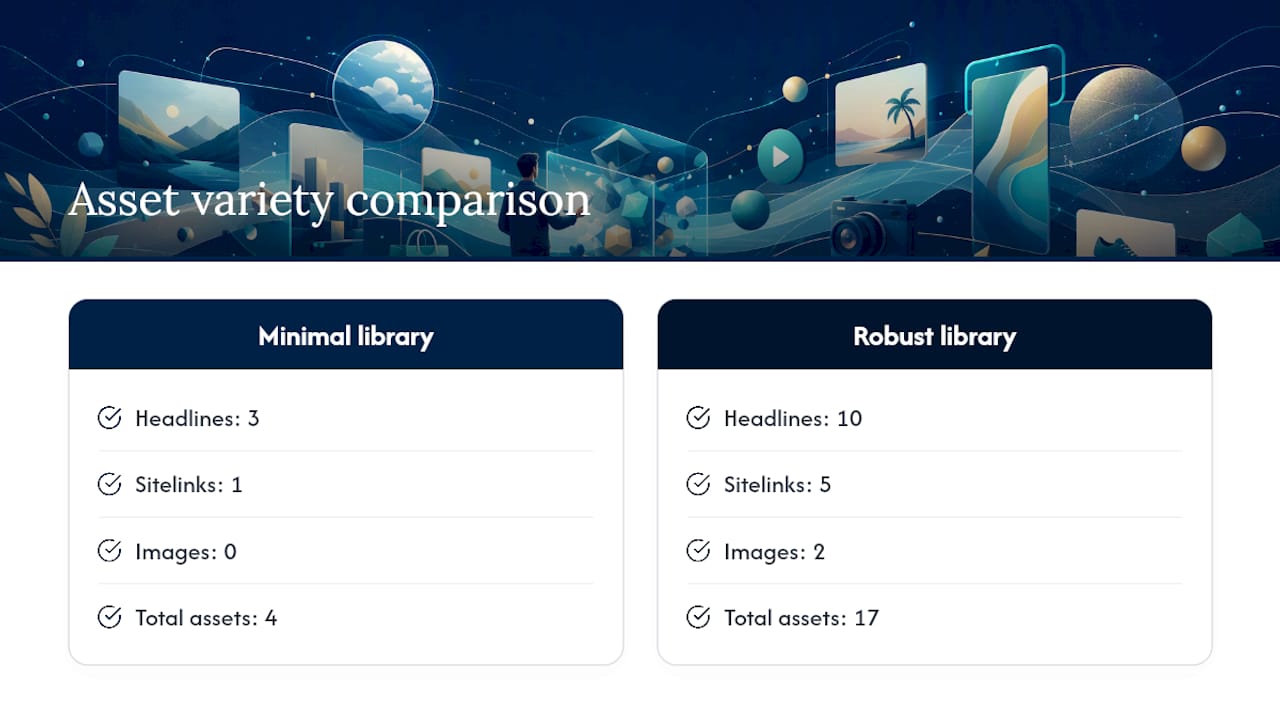
The practical upshot: variety is leverage. An ad group with three headlines and one sitelink gives Google almost nothing to work with. An ad group with ten headlines, five sitelinks, and two images gives the auction real options, which directly affects Ad Strength scoring and eligibility. Google also weighs predicted impact and current ad position when deciding which assets to show and in what combination, so a well-built asset library doesn’t just sit there. It actively competes for space in every auction your ad enters.
Treating assets as optional add-ons is the most common mistake advertisers make. They function closer to a second layer of ad copy, one that qualifies clicks before a user even lands on your site.
Which Asset Types Should You Use, and When?
Not every asset fits every goal. Matching the right type to the right campaign objective is where most of the performance gains actually happen.
- Sitelinks point searchers to specific pages beyond your homepage, like a services page or a contact form. You can set them at the account, campaign, or ad group level, and providing at least four to six sitelinks with descriptions meaningfully improves performance for high-volume ad groups.
- Callouts and structured snippets surface quick facts, “free estimates” or “licensed and insured,” or service categories like brands, styles, or types of service offered. They’re cheap to build and easy to overlook.
- Price and promotion assets work best for time-bound offers or clearly tiered services. Schedule them around the actual promotion window so they don’t linger and mislead.
- Image assets add visual weight directly in the search results, useful for businesses where the product or space itself sells (restaurants, contractors, retail).
- Location and call assets drive foot traffic and phone leads. If your business depends on local visits, these two carry more weight than most advertisers realize.
- Lead form and app assets capture interest without requiring a landing page visit at all, ideal for lead-gen businesses or app install campaigns.
A rough mapping: a local service business should prioritize call assets, location assets, and sitelinks to a booking page. An e-commerce brand should lean on image assets, price assets, and promotion assets. A lead-gen operation benefits most from lead form assets paired with strong callouts that pre-qualify the click.
Pro Tip: Build sitelinks around the pages your best customers actually visit before converting, not just the pages you’d like them to see. Check your analytics funnel first.
How Are Google Ads Assets Charged, and When Do They Show?
You don’t pay a separate fee to add assets. Charges apply only when someone interacts with your ad, whether that’s the main headline or a sitelink extension underneath it. Seller rating assets are a notable exception; they display automatically based on third-party review data and don’t carry an extra charge.
One rule trips up a lot of advertisers: Google caps billing at a maximum of two clicks per ad impression across the ad and its associated assets. Click the headline and a sitelink in the same impression, and you’re billed for both, but never for more than two.
Whether an asset shows at all depends on three factors working together: your Ad Rank, your ad’s position on the results page, and Google’s predicted impact for that specific asset combination in that specific auction. A perfectly built sitelink won’t show if your ad is sitting in a lower position where Google predicts it won’t add value.
If assets aren’t showing, check in this order: confirm asset approval status, confirm the ad group has enough Ad Rank to earn a competitive position, verify the asset isn’t restricted by scheduling, and check that it’s actually associated with the right campaign or ad group level.

What Are the Requirements for Image Assets in Google Ads?
Image assets carry more eligibility friction than text-based assets, and skipping the prep work is the top reason advertisers get blocked. Google requires accounts to be at least 60 days old, maintain a clean policy history, and show recent Search spend before image assets become available. A brand-new account can’t just upload photos and expect them to serve.
On format: square images (1:1) are required, landscape (1.91:1) is optional but recommended for wider serving. Google recommends higher-resolution uploads for sharper rendering, accepts JPG and PNG files, and caps file size at roughly 5 MB.
Adding image assets to a Search campaign has been associated with a measurable click-through-rate uplift when images actually serve, according to industry reports, which is a big part of why Google gates access behind account history rather than opening it to everyone immediately, according to Search Engine Land’s coverage of image asset performance.
- Upload at least one square and one landscape version per campaign.
- Avoid heavy text overlays. Google’s policy review tends to flag them.
- Use real product or location photos over generic stock where possible.
- Enable dynamic image assets cautiously. Google extracts images directly from your landing pages, and you should audit what it pulls and opt out of anything low quality or off brand.
If disapprovals keep hitting, the usual culprits are text-heavy images, low resolution, or landing page mismatches. New accounts should build history and compliance first, rather than promising image-based features to a client before the account can even use them.
Where Do You Manage Assets, and How Do Scheduling and Levels Work?
Google Ads centralizes asset creation and organization inside the asset library, often referred to as Asset Studio, where you upload, edit, and assign assets before they ever reach a live campaign.
- Open the asset library from your account dashboard and create or upload the asset (headline, image, sitelink, etc.).
- Choose the level to associate it with: account-wide for evergreen links like “Contact Us,” campaign-level for theme-specific content, or ad group and asset group level for tightly targeted landing pages.
- Set a start and end date if the asset is time-sensitive, like a seasonal promotion.
- Review the associations tab periodically to confirm an asset hasn’t accidentally attached to the wrong campaign.
- Pause or remove assets at the specific level causing the issue rather than deleting them account-wide, which preserves reusable assets for other campaigns.
Account-level assets inherit down into every campaign unless you override them, so a poorly worded account-level callout can quietly show up everywhere. Build broad, evergreen content at the account level and save narrow, landing-page-specific assets for the ad group or asset group tier.
What’s the Best Practice Checklist for Google Ads Assets?
Most underperforming accounts share the same problem: too few assets, too little variety, and no testing rhythm.
- Add a minimum of four to six unique assets per type where the format allows it. Industry practice consistently points to this range as enough to give Google real options without diluting relevance.
- Mix manually written assets with automated ones Google generates from your landing pages, but review automated assets regularly and opt out at the account level if quality slips.
- Check the Assets report and Ad Strength indicator weekly, not just at campaign launch.
- Refresh underperforming text after two to three weeks of data. Assets with low predicted impact rarely recover without a rewrite.
- Track CTR, conversion rate, and total conversions at the asset level, not just the campaign level, to see which specific pieces are pulling weight.
Pro Tip: Don’t judge a new sitelink or callout on day one. Give it a real sample size, roughly a few hundred impressions, before deciding it’s underperforming.
How Tradewinds United Media Approaches Google Ads Assets for Clients
Tradewinds United Media builds asset sets directly into campaign structure from day one, matching sitelinks, callouts, and images to each client’s local visibility goals rather than bolting them on afterward. Every build feeds into the data-driven reporting clients see, so asset performance ties back to measurable leads, not just impressions.
— Michael
Want Your Google Ads Assets Managed Instead of DIY’d?
Building a full asset library, sitelinks, callouts, images, lead forms, and keeping them all compliant with Google’s eligibility rules takes ongoing attention most business owners don’t have time for. Tradewinds United Media runs that process for you: asset creation, Asset Studio organization, image specs handled correctly the first time, and reporting that shows exactly how each asset contributes to leads.

Instead of guessing which sitelinks to build or waiting out the 60-day image asset eligibility window on your own, you get a managed setup from the start. That includes ongoing testing and refreshes, the same routine outlined above, run by people who do this daily across dozens of accounts. If you’re weighing the cost of handling this yourself against hiring it out, Google Ads management services lays out exactly what’s included. The next step is simple: request a look at your current account and see where your asset setup is leaving performance on the table.




