You can’t delete a customer’s Facebook review from your business Page. You can do three things: report the review if it breaks Meta’s rules, reply so the next reader sees how you handle complaints, or switch reviews off for the whole Page. Which one fits depends on why the review hurts. A fake or abusive review is a reporting job. An honest but harsh one is a reply-and-outweigh job.
This guide shows the steps for each route, what Meta will and won’t take down, and how to protect your Page’s reputation while a report is pending. If a stream of bad reviews is costing you calls, our reputation management work is built for that situation.
TL;DR
- A business can’t edit, hide or delete a customer’s Facebook review or star rating. It can reply to it or report it.
- Meta removes reviews that break its rules (spam, fake accounts, harassment, hate, graphic content, incentivized or irrelevant reviews), not reviews that are simply negative or unfair.
- A star-only rating with no written text can’t be reported at all.
- Turning reviews off hides every review, good ones included, and stops new ones.
- A calm public reply, a private follow-up and a steady flow of new positive reviews do more for most small businesses than a removal fight.
Table of Contents
- What you can and can’t do with a Facebook review
- How to report a Facebook review that breaks the rules
- What Meta is unlikely to remove
- How to respond so the review stops costing you customers
- Turning reviews off: what it does
- A removal plan for different kinds of owners
- Our perspective
- How Tradewinds United Media can help
- FAQ
- Sources
What you can and can’t do with a Facebook review
Facebook now calls most reviews “recommendations.” A customer says whether they recommend your business, adds optional text, and you see it on your Page. Meta’s tools give the business a limited set of actions: respond, edit or delete your own response, and report the review. There is no button that removes someone else’s opinion.
That design is deliberate. When Meta tightened its Community Feedback rules in the U.S. in June 2022, TechCrunch reported that businesses must prohibit review manipulation, incentivization, irrelevance, graphic content and spam, and that Meta said it treats positive and negative feedback equally and does not scrutinize negative feedback more heavily. So the test is never “is it negative?” The test is “does it break a rule?”
| Situation | Can it come down? | Your best move |
|---|---|---|
| Fake account, spam burst, competitor attack | Possible, if it breaks the rules | Report it, document the pattern |
| Threats, hate speech, harassment, private details | Possible | Report it with a dated screenshot |
| Review about a different business or a different issue entirely | Possible if irrelevant | Report it |
| Star rating with no text | No, it can’t be reported | Outweigh it with new reviews |
| Honest complaint you think is unfair | Unlikely | Reply publicly, follow up privately |
| Review from a real customer who is now satisfied | Only the reviewer can delete it | Resolve the issue, then ask them |
How to report a Facebook review that breaks the rules
Reporting is the only route that can lead to a removal by Meta. Meta’s help page says you can report a Recommendation that doesn’t follow its Community Standards. The Community Standards are Meta’s public rulebook for what may be posted.
Step by step
- Open your business Page and go to the Reviews section.
- Find the review and open the options menu next to it.
- Choose the report option and pick the reason that matches the problem: spam, fake account, harassment, hate, violence, privacy or another listed reason.
- Submit it and keep a screenshot of the review, the reviewer’s profile and the date.
A few details decide whether the report goes anywhere:
- Pick the honest reason. “I disagree with this” is not a reason Meta can act on. “This person has never been a customer and posted the same text on three competitors’ Pages” is.
- Expect a wait with the review still live. After a successful submission, the review’s status typically shows as pending while Meta assesses it, and it stays publicly visible during that time, according to a Facebook reviews guide. Reply in the meantime, so the public record shows your side.
- Star-only ratings are out of reach. Without written text there is nothing for Meta to judge against its rules, so there is no report option.
What to gather before you report
A fake review is easier to prove when you can show a pattern. Check whether you can match the reviewer to a real transaction in your records: a customer list, booking system or invoice. If there’s no match, note it. Look at the reviewer’s profile for signs of a throwaway account, and note whether several similar reviews arrived within a short window. If the same thing is happening on your Google listing, our guide to spotting, reporting and outlasting Google Maps spam uses the same evidence habits.
If Meta leaves the review up
Meta’s process has a last stage, the Oversight Board, an independent body that reviews some content decisions. It is not a guaranteed second chance. Meta’s Transparency Center explains that the Board selects only some eligible appeals and may decline to hear a case you submit. Plan as if the review will stay, and put your energy where you have control.
What Meta is unlikely to remove
Owners often ask whether a review can come down because it is inaccurate, one-sided or written by someone who never gave you a chance to fix the problem. Frustrating as that is, an opinion you disagree with generally stays. The Better Business Bureau, a nonprofit that tracks business complaints and publishes guidance for companies, notes that the Consumer Review Fairness Act protects customers’ right to leave honest reviews, but not reviews that are genuinely harmful, such as those revealing sensitive information or using racial epithets, in its advice on handling negative reviews.
That gives you a practical sorting rule. If the review attacks you personally with slurs or threats, or exposes private data, report it. If it says your service was slow, your quote was high or your tech was late, treat it as customer feedback and answer it.
One caution on the Meta side: rules and automated systems change. In early 2026, for example, a Northwest wine trade publication reported that Meta confirmed a technical error affecting recommendation suspensions for some alcohol-related Pages and began rolling out a fix. That was a specific incident, not a change to how review reports work, but it is a reminder to check the Page’s status if your recommendations suddenly disappear.
How to respond so the review stops costing you customers
For most small businesses, the reply is where the damage is contained. Future customers read the complaint, then read how you answered. The BBB’s guidance is to respond promptly, stay respectful without denials or excuses, acknowledge the concern, apologize where it’s due and offer a resolution or a way to reach you.
A workable pattern:
- Reply within a day or two. Silence reads as indifference.
- Acknowledge the specific problem. Name what went wrong in a sentence, so it’s clear you read it.
- Take it offline. Give a direct phone number or email and an offer to fix it. Keep the public thread short, and don’t argue point by point.
- Follow through, then close the loop. If the customer is satisfied, they can update or delete their own review. Only the reviewer can do that, so never pressure them or offer anything in exchange.
A sample reply for a late-arrival complaint: “Thank you for telling us, Dana. Arriving two hours after the window we promised isn’t how we want a customer’s day to go. Please call Mike at the office so we can make it right.” It is short, specific, and contains no excuses.
We’ve written more templates for different complaint types in our guide on how to respond to bad reviews.
Time works for you
The BBB points to research showing that more than 80 percent of people thought reviews over three months old were irrelevant, and about 60 percent of 18- to 34-year-olds considered only reviews written in the past two weeks. Its conclusion is that bad reviews become less important over time. That is the case for a steady supply of fresh, genuine reviews: each new one pushes the old complaint further down the page and out of the window most shoppers look at. Our walkthrough on how to get more Google reviews with one follow-up shows a simple request routine that carries over to Facebook, as long as you ask every customer and never reward positive answers only.
Turning reviews off: what it does
If reviews are doing more harm than good on Facebook, you can switch them off. On the newer Pages experience, the steps run through Settings & Privacy, then Settings, then Privacy, then Page and Tagging, where you toggle off the option that lets others view and leave reviews on your Page. On the classic experience, go to Settings, then Templates and Tabs, and switch off Reviews.
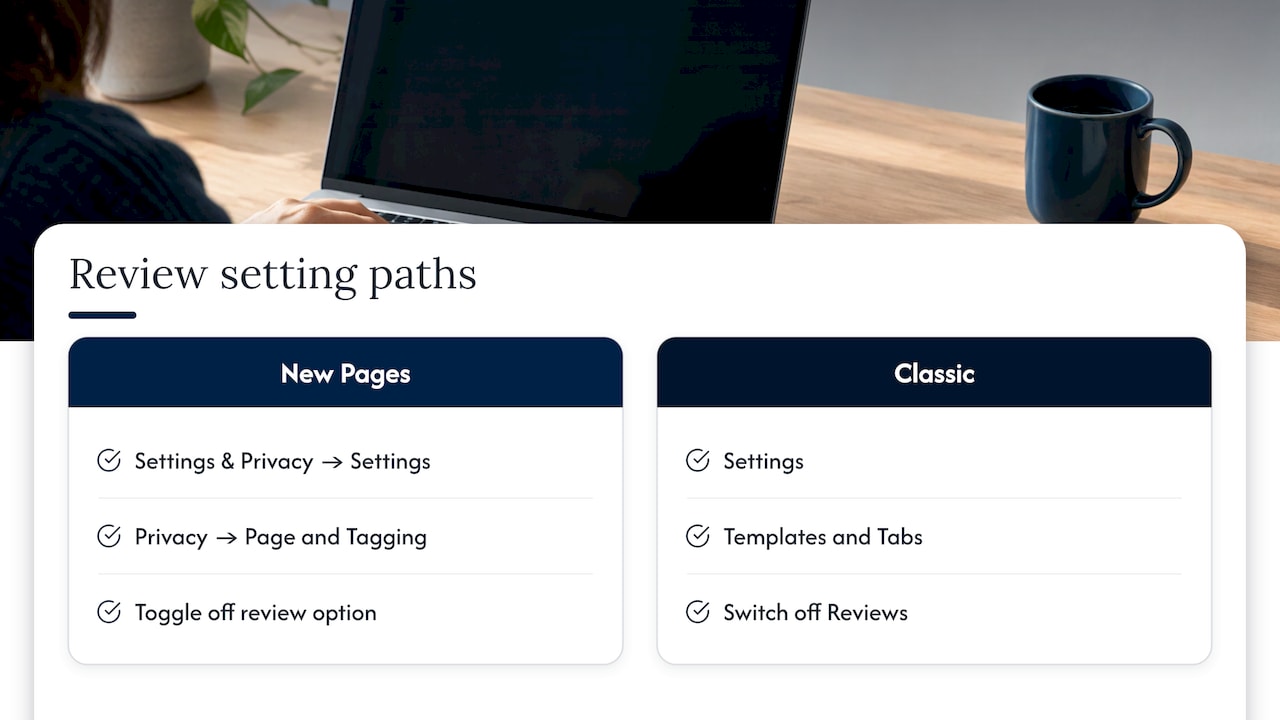
The result: reviews no longer appear on your Page and visitors can’t leave new ones. That also hides the positive reviews you’ve earned, and it takes away a trust signal for anyone checking you out on Facebook. For a business that has built up a body of good feedback, reporting the rule-breaking review and replying to the rest is usually the stronger play. Turn reviews off when a Page is under a sustained attack and you need breathing room while you prepare your reports.
A removal plan for different kinds of owners
You have one fake or abusive review. Report it with the right reason, save screenshots, and reply publicly in a calm, factual way. Move on to getting new reviews while Meta decides.
You have a burst of reviews from accounts that look coordinated. Report each one, document the timing and the profiles, and consider pausing reviews while the reports are processed. Check your other listings, since the same attack often hits Google and Yelp. Our guide on building the evidence that gets Yelp reviews removed lays out how to organize that proof.
You have an honest bad review from a real customer. Don’t report it as spam; it won’t qualify and you’ll waste the effort. Reply, fix the issue and let new reviews dilute it.
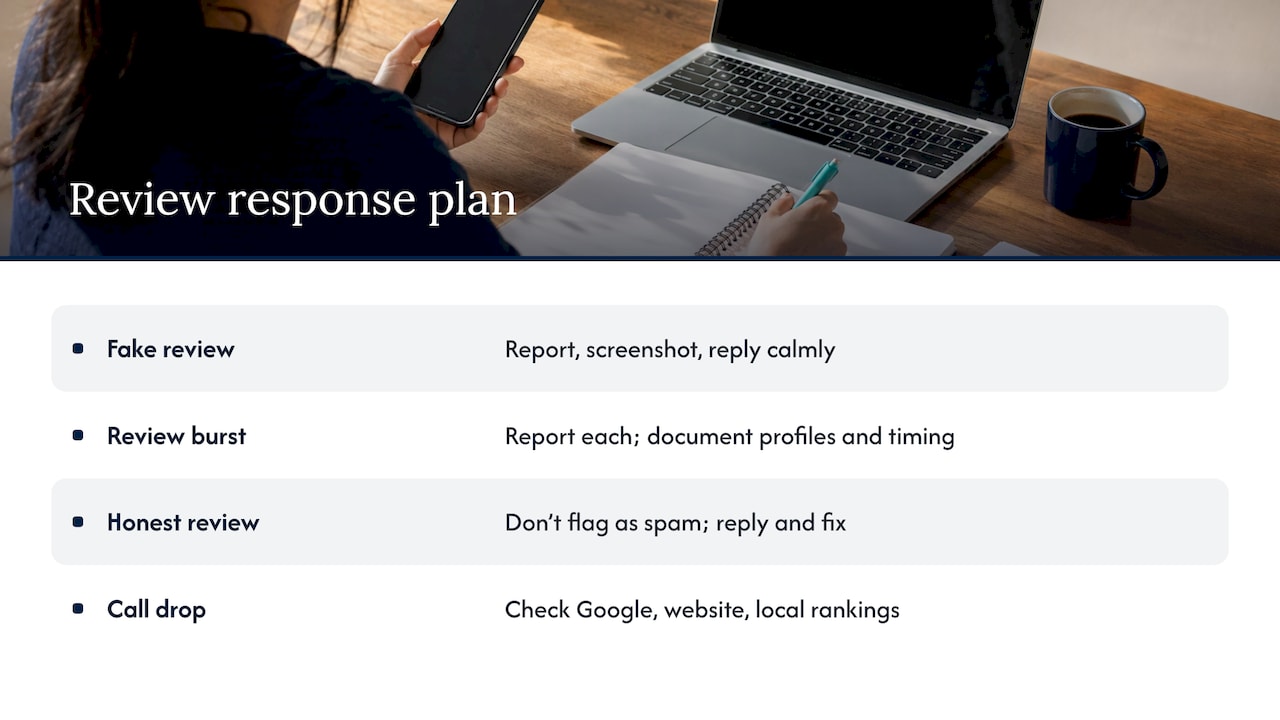
You’re not sure what’s behind the drop in calls. Reviews are one input among several. A list of reviews on Facebook rarely explains a quiet phone by itself. Look at your Google Business Profile, your website and your local rankings together; we explain how those connect in our piece on reputation management and local SEO.
Our perspective
Most owners who search for how to remove a Facebook review are really asking how to stop a single bad moment from defining the business. The honest answer is that you won’t control the platform, but you can control everything around it.
When a client comes to us with a review that stings, we start with the same question: does it break a rule, or does it just hurt? If it breaks a rule, we help build the report so the evidence is clear. If it just hurts, we put the effort into the reply and into the steady flow of recent, real reviews that carry more weight with a new customer than any one complaint.
Our approach is data-driven, and we show clients clear performance reports so they can see how their reputation work connects to calls, visits and customers. That means you aren’t guessing whether the work is paying off. We think a Page with a strong reply record and fresh reviews reads as a business that cares, and that’s the reputation that wins customers.
If you’ve been through an agency that promised fixes and went quiet, you’ll find our updates regular and our strategy transparent.
Michael
How Tradewinds United Media can help
Tradewinds United Media offers reputation management alongside Google Business Profile services, SEO and website design for small and local businesses. That means a review problem can be handled in the same place as the visibility problem behind it, with performance reports that show how the work converts into business results.
If you’d rather hand the monitoring, replying and review-building to a team, start with our reputation management service, or see what to expect on reputation management costs for a U.S. small business.

For a longer plan, our 90-day reputation management strategy breaks the work into weekly actions.
FAQ
Can a Facebook review be deleted off a business Page?
Not by the business. Meta’s tools let you reply to a review, edit or delete your reply, and report the review if it breaks the Community Standards. Only the person who wrote a review can delete it, or Meta can remove it after a report.
How do I remove a negative Facebook review?
If it breaks Meta’s rules (spam, fake account, harassment, hate, privacy violations), report it from the review’s options menu and keep screenshots. If it’s an honest complaint, reply publicly, offer to resolve it privately, and gather new reviews so it carries less weight over time.
How do I disable reviews on Facebook?
On the newer Pages experience, open Settings & Privacy, then Settings, then Privacy, then Page and Tagging, and turn off the option to let others view and leave reviews. On the classic layout, go to Settings, then Templates and Tabs, and switch off Reviews. All existing reviews disappear from the Page and new ones can’t be left.
Why can’t I report a review that is only a star rating?
A rating with no written text gives Meta nothing to evaluate against its rules, so no report option appears. The practical answer is to earn more recent reviews so a single rating has less influence on your average.
Is there a way to remove a review I left on Facebook Marketplace?
Open Facebook, go to Marketplace, find the review in your activity or the seller’s profile, open its options and choose Delete if Facebook offers it. If the option is missing, the review may not be removable from your side. Contact Meta through its help center.
Sources
- Report a Recommendation or review about a business Page on Facebook, Meta
- How to appeal to the Oversight Board, Meta Transparency Center
- Meta is cracking down on fake and irrelevant reviews, TechCrunch
- BBB Business Tip: How to handle negative reviews
- Helpful Tools to Manage and Moderate Facebook Conversations, Social Media Examiner
- Where the Facebook page recommendation suspension issue stands, Northwest Wine Report
- How to Respond to Negative Facebook Reviews, eesel AI